




Introduction
We'll go over the fundamentals of routing with Sinatra in this tutorial. A simple Ruby framework called Sinatra is used to create server-side web applications. It is not as well-known or influential as Rails. However, because we'll personally design each of our routes in a file called app.rb, Sinatra is a terrific tool for learning about routing. Since Rails will mostly take care of routing for us, it is less helpful in comprehending this crucial idea.
Routes in Sinatra
The root directory should be expanded to include a Gemfile, an app.rb file, and a Sinatra routing example subfolder.
The Gemfile should be as follows:
sinatra_routing_example/Gemfilesource('https://rubygems.org')
gem('sinatra')
gem('pry')
After creating the Gemfile, make sure to bundle.
Add the following code to app.rb now:
sinatra_routing_example/app.rbrequire('sinatra')
get('/') do
"We'll use this as our home page. The root route in a Sinatra application is always '/'."
end
get('/albums') do
"All albums will be listed on this path."
end
get('/albums/new') do
"By doing so, a page with a form for adding a new album will be brought up."
end
get('/albums/:id') do
"Based on its ID, this route will display a certain album. Here, ID has the value #params[:id].."
end
post('/albums') do
"We'll add an album to our list of albums if we choose this approach. We are unable to access this by entering the URL. We'll utilize a form with a POST action specified in a later lesson to access this route."
end
get('/albums/:id/edit') do
"By clicking this, we will be sent to a page with a form for changing an album with the ID #params[:id]."
end
patch('/albums/:id') do
"This route will update an album. It is not accessible via a URL. We'll utilize a form specifying a PATCH action to go to this route later in the tutorial."
end
delete('/albums/:id') do
"This route will delete an album. It is not accessible via a URL. We'll use a delete button in a later lesson that declares a DELETE action to get to this route."
end
get('/custom_route') do
"We can create custom routes, but we should only do this when needed."
end
To use Sinatra's features, we first need to install it. Sinatra offers methods like getting, posting, patching, and deleting.
Keep in mind that every route has a unique do...end block. Each block offers a set of instructions that our program will carry out when the course is reached. Instead of writing code, we'll merely have each block render a string for the time being.
Let's investigate. Enter ruby app.rb in the terminal after doing a cd to the project's root directory. The following output will be returned by the terminal (Output might somewhat vary):
== With support from Puma, Sinatra (v2.0.5) has taken the stage on 4567 for development.
Puma is starting in single mode...
* Version 3.12.0 (Ruby 2.4.1-p111), often known as "Llamas in Pajamas" * Environment: development * Min threads: 0, max threads: 16 * tcp:/localhost:4567 listening
Press Ctrl-C to halt.
The terminal provides us with the following helpful data:
-
To see our application, navigate to localhost:4567. The machine the program operates on is referred to as the local host. The number that appears after the colon is the port number. Access to this program is not available to users of other computers. To interact with our program, we'll constantly go to localhost:4567 (unless we set another port number).
-
We are in a setting for development. We will deal with frameworks and libraries that use development environments throughout the remainder of the course. In contrast, a production environment is used for deployment, and a test environment is utilized for testing.
- Ctrl-C is the shortcut for closing an application.
Launch a browser now and go to localhost:4567. When Sinatra is running, here is where our application resides.
-
The following will occur: "/" is usually the root route in a Sinatra application. This will be our home page." A root path should always be present in our Sinatra apps. Otherwise, they won't see a home page—only an error page. For instance, if bestundergroundrecords.com were used to access our record shop, users would arrive at an error page and need to go to bestundergroundrecords.com/albums instead. Sadly, people would probably conclude that the website doesn't function.
-
Try entering localhost:4567/albums and localhost:4567/albums/new into your browser. We'll be directed to the relevant code blocks.
- Next, try entering localhost:4567/albums/72 into your browser's address bar. The string that our application will return is as follows: "This route will display a certain album based on its ID.
A parameter hash is accessible to each block. A URL, link, or form's dynamic values will be passed on to the params hash. We'll eventually use a search method for the route mentioned above to get the album, and we'll need an ID to achieve that. Later, more on this.
-
Remember that we cannot just write a URL to access routes that use POST, PATCH, or DELETE. After all, we wouldn't want visitors to navigate to a website and edit or delete albums. A GET request is made each time we enter a URL or click on a specific link. We'll go through using forms and buttons to access POST, PATCH, and DELETE routes in later lectures.
-
Visit localhost:4567/custom route and see whether it works. Remember that our naming conventions are in place to make life easier for both developers and users—Sinatra doesn't care what we call our routes. Every CRUD-related function should follow RESTful naming rules.
- Now try entering a URL that doesn't correspond to any of the routes mentioned above. We may enter localhost:4567/nothing here, for example. Sinatra will return an error message.
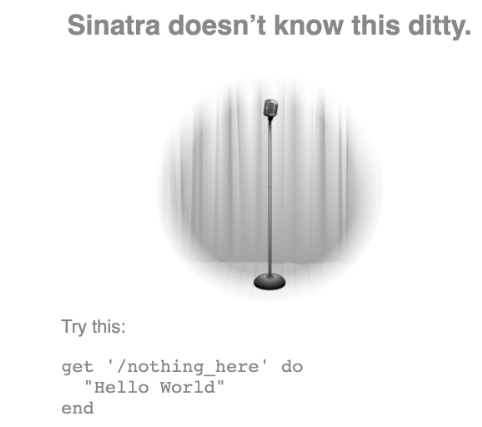
This mistake happens frequently. If a route is missing, Sinatra will return the error message "Sinatra doesn't know this song." The course must be present in-app.rb for this error to occur. Typically, there are two ways to fix this mistake:
- The URL contains a mistake. Repeat the process after making sure the URL is spelled correctly.
- In app.rb, the route is missing and needs to be added.
The CRUD feature of our application has routes that we have successfully established. Our program, however, renders strings. We'll expand our application throughout the following courses to incorporate views and back-end logic. But all of that will be written in standard Ruby code. App.rb contains all of the Sinatra-related code we'll cover over the next few weeks.



 7+ registered

