Do you think IIT Guwahati certified course can help you in your career?
Introduction
Cookstyle is a code linting tool that aids in the improvement of your Chef Infra cookbooks. It improves by identifying and automatically fixing any errors in style, grammar, and logic. Cookstyle is tailored for Chef Cookbook code and is more reliable than Rubocop. As a result, linting Cookbooks using Cookstyle will be more reliable and less likely to result in failed CI tests. In this article, we will be learning about AptRepositoryDistributionDefault, AptRepositoryNotifiesAptUpdate. We will also discuss Attribute metadata and ConflictsMetadata.
CookStyle
Cookstyle uses the RuboCop linting engine as its power source. In order to enforce a standard code style and catch frequent Ruby coding errors, RuboCop comes with over 300 rules or cops. With a portion of those cops specifically designed for cookbook development. We've tailored Cookstyle. Additionally, we ship Chef-specific cops that identify typical cookbook coding errors, tidy up unused code. It also find deprecations that prohibit cookbooks from working with the most recent versions of Chef Infra Client.
DefaultMetadataMaintainer
The department is: DefaultMetadataMaintainer
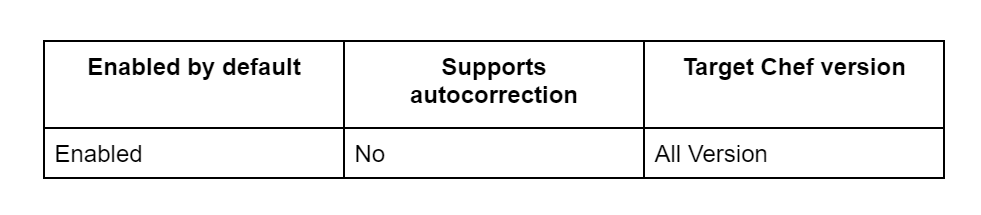
Chef/Sharing/DefaultMetadataMaintainer is the full name of the cop.
Chef/Sharing/EmptyMetadataField is the full name of the cop.
Fields containing an empty string shouldn't be included in metadata.rb. Either omit the field or include a value.
Examples
Incorrect
license ''
Correct
license 'Apache-2.0'
Configurable attributes
IncludePropertyDescriptions
The department is: IncludePropertyDescriptions
Chef/Sharing/IncludePropertyDescriptions is the full name of the cop.
Description fields should be included in resource attributes to enable automated documentation. Chef Infra Client 13.9 or newer is necessary.
Examples
Incorrect
property :foo, String
Correct
property :foo, String, description: "Set the important thing to..."
Configurable attributes
IncludeResourceDescriptions
The department is: IncludeResourceDescriptions
Chef/Sharing/IncludeResourceDescriptions is the full name of the cop.
Resources should have description fields so that documentation can be automated. Chef Infra Client 13.9 or newer is necessary.
Examples
#### correct

```ruby
resource_name :foo
description "The foo resource is used to do..."
Configurable attributes
IncludeResourceExamples
The department is: IncludeResourceExamples
Chef/Sharing/IncludeResourceExamples is the full name of the cop.
Examples fields should be included in resources to enable automatic documentation. Chef Infra Client 13.9 or newer is necessary.
Examples
#### correct

```ruby
examples <<~DOC
  **Specify a global domain value**

  ```ruby
  macos_userdefaults 'full keyboard access to all controls' do
    key 'AppleKeyboardUIMode'
    value '2'
  end
The major components of the chef are the chef server, chef node, and chef workstation.
What exactly is a Chef Node, and why is it significant?
The node, a component of the Chef design, can be viewed as a physical server or a virtual machine. With Chef, any resource may be used.
What distinguishes a recipe in Chef from a cookbook?
A Recipe is created when resources are combined, and this is helpful for carrying out settings and policy. Combining Recipes creates a Cookbook, which is much easier to maintain than a single Recipe.
Why are SSL certificates used in Chef?
The Chef's initial configuration, as well as the creation of the certificate and private keys in Nginx, require the SSL certificate. This makes sure that between the Chef Client and Chef Server, the appropriate data can be obtained.
Conclusion
In this article, we have extensively discussed CookStyle Cops - Chef/Sharing Section.









 1+ registered

