




Introduction
Hi there!
Would you like to learn how to build your very own Katalon Studio plugin? You're in the right place. This blog will focus on building a Katalon Studio Plugin and testing it. So, let's get right into it.
Katalon Studio Plugin
A Katalon Studio plugin is a Maven-based Java project that contains pom.xml, plugin.xml files and all the packaged codes of the plugin. The pom.xml file describes the plugin's functionality. The plugin.xml file stores data on the extensions of the plugin.
We shall create a plugin that listens to the plugin activation event and prints a message after successful installation on Katalon Studio.
Creating this plugin would require Java SDK 1.8, Maven 3.3+ and Katalon Studio.
Create a Maven-based Java project
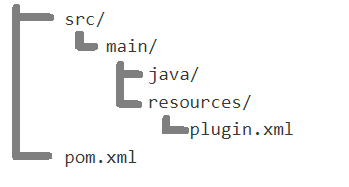
Construct a Maven Java project with the following structure.
Update pom.xml
Use the following template for your pom.xml file.
<?xml version="1.0" encoding="UTF-8"?>
<project xmlns="http://maven.apache.org/POM/4.0.0" xmlns:xsi="http://www.w3.org/2001/XMLSchema-instance"
    xsi:schemaLocation="http://maven.apache.org/POM/4.0.0 http://maven.apache.org/xsd/maven-4.0.0.xsd">

    <modelVersion>4.0.0</modelVersion>

    <parent>
        <groupId>com.katalon</groupId>
        <artifactId>com.katalon.platform.parent</artifactId>
        <version>1.0.17</version>
    </parent>

    <!-- Replace your plugin description here -->
    <groupId>(enter your groupID)</groupId>
    <artifactId>(enter your artifactID)</artifactId>
    <version>1.0.0</version>

    <packaging>bundle</packaging>

    <dependencies>
        <!-- Katalon Platform dependencies-->
        <dependency>
            <groupId>com.katalon</groupId>
            <artifactId>com.katalon.platform</artifactId>
            <version>1.0.17</version>
        </dependency>
    </dependencies>

    <build>
        <plugins>
            <plugin>
                <groupId>org.apache.maven.plugins</groupId>
                <artifactId>maven-dependency-plugin</artifactId>
                <version>2.4</version>
                <executions>
                    <execution>
                        <id>unpack-dependencies</id>
                        <phase>prepare-package</phase>
                        <goals>
                            <goal>unpack-dependencies</goal>
                        </goals>
                        <configuration>
                            <excludes>com/katalon/platform/**,org/eclipse/**,org/osgi/**</excludes>
                            <includes>**/*.class</includes>
                            <outputDirectory>${project.build.outputDirectory}</outputDirectory>
                        </configuration>
                    </execution>
                </executions>
            </plugin>
            <plugin>
                <groupId>org.apache.felix</groupId>
                <artifactId>maven-bundle-plugin</artifactId>
                <extensions>true</extensions>
                <configuration>
                    <instructions>
                        <Bundle-SymbolicName>${project.groupId}.${project.artifactId};singleton:=true</Bundle-SymbolicName>
                        <Bundle-Version>${project.version}</Bundle-Version>
                        <Import-Package></Import-Package>
                        <DynamicImport-Package>*</DynamicImport-Package>
                        <_noee>true</_noee>
                        <_nouse>true</_nouse>

                        <!-- Change your public export package here -->
                        <Export-Package>(enter your default package)*</Export-Package>
                    </instructions>
                </configuration>
            </plugin>
        </plugins>
    </build>
</project>
Features
Katalon Studio's core features for plugins are mentioned here. The plugin.xml file contains many extension tags, each of which describes how client plugins can hook into Katalon Studio. These are extension points. The extension points are available as listeners. Consider this extension to Subscribe to a plugin activation event.
<extension
        point="com.katalon.platform.extensions_point">
      <point
            id="com.katalon.platform.api.extension.pluginActivationListener"
            interfaceClass="com.katalon.platform.api.extension.PluginActivationListener"
            serviceClass="com.katalon.platform.internal.lifecycle.PluginActivationListenerService">
      </point>
</extension>-
id: It represents the ID of the extension point.
-
interfaceClass denotes the interface class client plugins that should provide the implementation to extend this extension.
-
serviceClass is an internal service class.
We can extend this extension point in the plugin.xml file as follows.
<plugin>
    <extension
            point="com.katalon.platform.extensions">
        <point
              id="<enter groupID>.FirstExtensionId"
              extensionPointId="com.katalon.platform.api.extension.pluginActivationListener"
              implementationClass="<enter default package>.FirstPluginActivationListener">
        </point>
    </extension>
</plugin>-
extensionPointId is the id of the extension point.
-
implementationClass implements the interfaceClass and extends the interface to perform custom actions.
Create your implementationClass
Create a file called FirstPluginActivationListener in the src/java/main folder and add the code.
package <enter your default package name>;

import com.katalon.platform.api.Plugin;
import com.katalon.platform.api.extension.PluginActivationListener;

public class FirstPluginActivationListener implements PluginActivationListener
{
    // Message to be displayed in the console after plugin is activated.
    @Override
    public void PostActivation(Plugin plugin)
    {
        System.out.println("Hi, the Activated plugin is: " + plugin.getPluginId());
    }
}
Build your plugin
In the command line window, enter mvn clean package and wait for a successful build message. After the build is completed, a .jar file with the name you specified as the artifactID will be present in the target folder.
Test your plugin
All messages from the plugin are displayed in the Event log tab present next to Log Viewer. Click on Plugin/Install Plugin and choose the .jar file created in the previous step. This will launch the plugin, and a notification message will be displayed stating Plugin installed successfully. The Event log will display the following result.
Hi, the Activated plugin is: <groupID>.<artifactID>Test execution event
Execute the Test suite and observe the Event log for successful completion status.
Must Read Apache Server



 7+ registered

