




Introduction
Mocha is a feature-rich JavaScript test framework that runs in the browser and on Node.js, making asynchronous testing simple and enjoyable. Mocha tests are run in sequential order, allowing for flexible and precise reporting while mapping uncaught exceptions to the appropriate test cases.
In this article, we'll look at the mocha commands that can be found on the command line.
Command line options
--help
You can get a list of all the instructions available to you by typing mocha --help on the command line.

--allow-uncaught
Mocha attempts to catch uncaught exceptions thrown by running tests by default and reports them as test failures. To disable this behaviour and allow uncaught exceptions to propagate, use the --allow-uncaught option. The process will usually crash as a result of this.
When debugging particularly difficult-to-trace exceptions, this flag comes in handy.
--async-only, -A
This will enforce the rule that tests must be written in "async" style, which means that each test must return a Promise or provide a done callback. Failures are assigned to non-compliant tests.
#--bail, -b
When Mocha encounters the first test failure, it will stop running the tests. For possible cleanup, the corresponding "after each" and "after all" hooks will be executed.
It's worth noting that --bail is not the same as --exit.
#--check-leaks
This option should be used to have Mocha check for leaked global variables while running tests. The --global option allows you to specify which globals are acceptable (for instance: --check-leaks --global jQuery --global MyLib).
#--compilers
Since v6.0.0, --compilers has been deprecated. More information and workarounds can be found here.
#--exit
This was changed in version 4.0.0.
If your tests hang after upgrading to Mocha v4.0.0 or newer, you can use --exit to solve the problem quickly (though this is not always recommended).
Mocha would, by default, force its own process to exit once it had completed all tests prior to version v4.0.0. This behaviour indicates tests (or fixtures, harnesses, code under test, etc.) that don't clean up after themselves properly, which can lead to a slew of issues. In the end, "dirty" tests can (but do not always) produce false positive or negative results.
When a server is still listening on a port, a socket is still open, and so on, this is known as "hanging." It could also be something as simple as a rogue setInterval() or an unfulfilled Promise.
Where it was previously -exit, --no-exit is now the default behaviour in v4.0.0 (and newer).
Simply passing --exit to the Mocha process is the simplest way to "fix" the problem. It may take some time to debug because the source of the problem is not always obvious, but it is recommended that you do so.
Here are some ideas to get you started on making sure your tests don't make a mess:
- The new async hooks API should be used.
- You should make use of.
- only until you figure out what's causing Mocha to freeze
#--forbid-only
This will enforce the rule that tests cannot be exclusive (using describe.only() or it.only(), for example, will be prohibited).
When an exclusive ("only'd") test or suite is encountered, --forbid-only causes Mocha to fail and aborts further test execution.
#--forbid-pending
This will enforce the rule that tests may not be skipped (e.g., use of describe.skip(), it.skip(), or this.skip() anywhere)
When a skipped ("pending") test or suite is encountered, --forbid-pending will cause Mocha to fail and abort further test execution.
#--global <variable-name>
In v6.0.0, the option was changed to --global, and --globals is now an alias.
This will be the name of a global variable. For example, if your app exposes a global named app and YUI on purpose, you might want to add --global app --global YUI.
Wildcards are accepted with --global. You could use --global '*bar' to match foobar, barbar, and so on. You can also specify '*' to ignore all globals.
A comma-delimited list can be passed to --global; note that --global app,YUI is the same as --global app --global YUI.
You can specify a whitelist of known global variables that you expect to leak into the global scope when you use this option in combination with --check-leaks.
#--retries <n>
This will n times retry failed tests.
Mocha does not retry test failures by default.
#--slow <ms>, -s <ms>
This will set the milliseconds for the "slow" test threshold. This will be used by Mocha to identify test cases that are taking too long. Failures will not be assigned to "slow" tests.
With the default spec reporter, a test that runs for half of the "slow" time is highlighted in yellow; a test that runs for the entire "slow" time is highlighted in red.
#--timeout <ms>, -t <ms>
This controls the test case timeout, which is set to two (2) seconds by default (2000 milliseconds). Failure is assigned to tests that take longer than this amount of time.
If you want to override, you can specify a millisecond timeout or a value with the s suffix, for example, --timeout 2s and --timeout 2000.
You should use --no-timeout if you want to disable timeouts.
Asynchronous (blocking) tests will be bound by the timeout as well, but they will not finish until the code stops blocking. The infinite loops will continue to exist!
#--ui <name>, -u <name>
The --ui option allows you to specify the interface to use; bdd is the default.
#--color, -c, --colors
The --colors option is now an alias for --color in version 6.0.0.
This will "Force" colour output to be enabled, or you can use --no-color to force it to be disabled. By default, Mocha decides using the supports-color module.
Certain reporters that output in a machine-readable format explicitly suppress colour output in some cases.
#--diff
When an assertion failure occurs, you should show the difference between actual and actual expected values whenever possible.
Because this flag defaults to true, you should use --no-diff to disable Mocha's own diff output.
Because some assertion libraries provide their own diffs, Mocha's is not used, regardless of the default value.
Mocha's diff output is designed to be human-readable and does not conform to any known standards.
#--full-trace
This will allow you to see "full" stack traces. Mocha will try to distil stack traces into less noisy (but still useful) output by default.
When debugging a suspected issue within Mocha or Node.js, this flag will come in handy.
#--growl, -G
Growl will be enabled as a result (or OS-level notifications where available).
This will necessitate the installation of additional software.
#--inline-diffs
This enables "inline" diffs, a different way of diffing strings.
It comes in handy when working with long strings.
If an assertion library provides its own diff output, nothing happens.
#--reporter <name>, -R <name>
This specifies the reporter that will be used, with spec as the default.
It allows third-party reporters to be used. After installing mocha-lcov-reporter, for example, you can use it with --reporter mocha-lcov-reporter.
#--reporter-option <option>, -O <option>, --reporter-options <option>
This was changed in version 6.0.0. It is possible to specify it multiple times. --reporter-options has been renamed to --reporter-options.
In a <key>=<value> format, it will provide options specific to a reporter, such as --reporter tap --reporter-option tapVersion=13.
It's worth noting that not all reporters are open to suggestions. It's possible to specify it as a comma-separated list.
#--config <path>
This is a new feature in version 6.0.0.
It specifies a configuration file's explicit path.
If --config is not specified, Mocha looks for a config file by default; use --no-config to disable this behaviour.
#--opts <path>
This was updated in v6.0.0, with the addition of --no-opts.
It specifies a path to mocha. opts.
Mocha will look for a mocha.opts in test/mocha.opts by default; you can disable this behaviour with --no-opts.
#--package <path>
This is a new feature in version 6.0.0.
This specifies a package's explicit path.
file in json (ostensibly containing configuration in a mocha property).
Mocha will look for a package by default.
If you use --no-package, it will look for package.json in the current working directory or in the nearest ancestor, and it will use the first file found (regardless of whether it has a mocha property).
#--ignore <glob|file|directory>
This will explicitly ignore (exclude) one or more test files, directories, or globs that would otherwise be loaded (e.g., some/**/files*).
This option has no effect on files specified with the --file option.
They can be specified more than once.
#--extension <ext>, --watch-extensions <ext>
This extension denotes that the file is a test file. js will be used by default.
This option has an impact on the behaviour of --watch.
You should use --extension js to re-add.js as a test file extension if you specify --extension. If you want to load.mjs and.js test files, for example, you must specify --extension mjs --extension js.
#--file <file|directory|glob>
This will include a test file that will be loaded before any other test files. You can use?file multiple times, and they will be loaded in the order you specify.
It's useful if you want to declare hooks that run before every test across all test files, for example.
The options --sort and --recursive will have no effect on files specified this way.
One or more suites, tests, or hooks must be present in files specified in this manner. If this isn't the case, consider using --require instead.
#--recursive
You should recurse into subdirectories when looking for test files.
To define which files are considered test files, look at the?extension section.
#--require <module>, -r <module>
Before loading the user interface or test files, you'll need to load a module. It's helpful for:
- Harnesses for testing
- Assertion libraries with built-in augments or a global scope (such as should.js)
- Instant ECMAScript modules can be created with esm
- Compilers like Babel (via @babel/register) or TypeScript (via --require ts-node/register).
The modules that are required in this way should work in a synchronous manner; Mocha will not wait for async tasks in a required module to complete.
Note that --require cannot be used to set a global beforeEach() hook, for example. Instead, use --file, which allows you to specify the order in which test files are loaded.
#--sort, -S
Array.prototype.sort will be used to sort the test files (by absolute path).
#--watch, -w
This will run tests on JavaScript changes in the current working directory (and once initially).
By default, only files with the extension.js are monitored. To change this behaviour, use the --extension option.
#--fgrep <string>, -f <string>
This option is now mutually exclusive with --grep in version 6.0.0.
It tells Mocha to only run tests with titles that contain the specified string.
It and --grep are mutually exclusive.
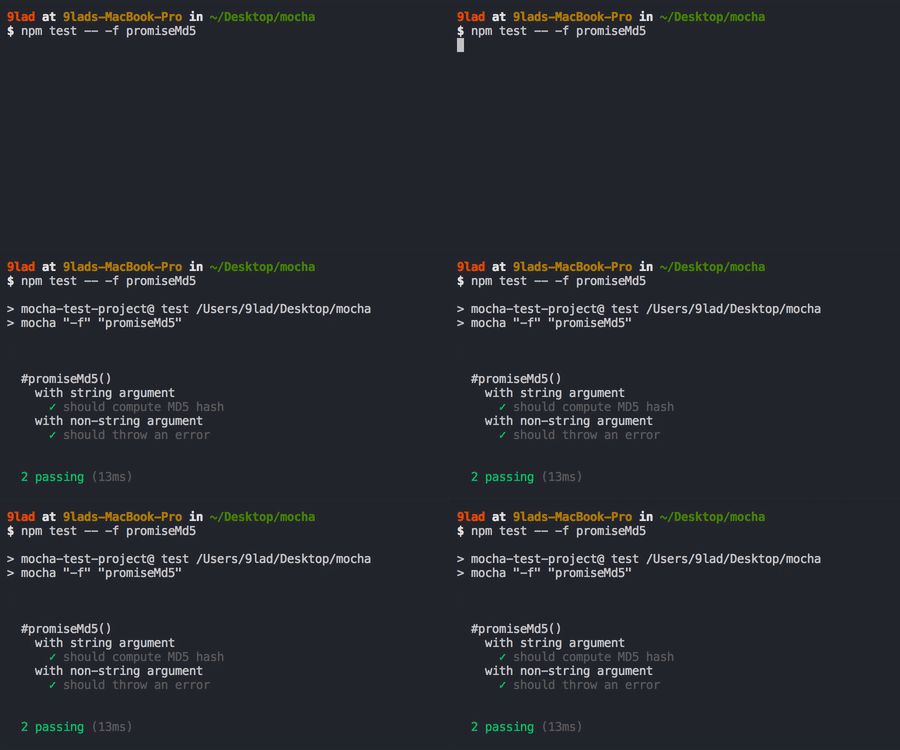
#--grep <regexp>, -g <regexp>
This option is now mutually exclusive with --fgrep in version 6.0.0.
Mocha will only run tests that match the given regexp, which will be internally compiled into a RegExp.
#--invert
The inverse of the match specified by --grep or fgrep should be used.
This can be done with either --grep or --fgrep (but not both).
#--debug, --inspect, --debug-brk, --inspect-brk, debug, inspect
This enables the debugger or inspector in Node.js.
To use the V8 inspector with Chrome Dev Tools, use the commands --inspect / --inspect-brk / --debug / --debug-brk.
The internal debugger of Node.js can be launched with inspect / debug.
These choices are all mutually exclusive.
It's equivalent to --no-timeout.
About option types
In v6.0.0, these were updated.
Each type [boolean] flag annotated in Mocha's --help output can be negated by appending --no- to the flag name. --no-color, for example, disables Mocha's colour output, which is enabled by default.
Unless otherwise specified, all boolean flags are set to false by default.
#About node flags
All flags supported by the node executable will be supported by the mocha executable.
These flags will differ depending on the version of Node.js you're using.
Mocha's configuration allows you to set the node flags.
#About v8 flags
To use it, add --v8- to any flag listed in the output of node --v8-options (other than the --v8-options itself).
The V8 flags can be set up in Mocha's settings.


 1+ registered

