

Table of contents
1.
Introduction
2.
Root Hooks
3.
Multiple Root Hook
4.
Multiple Root Hook Plugins
5.
FAQs
6.
Key Takeaways
Last Updated: Mar 27, 2024
Easy

Root Hooks

Career growth poll
Do you think IIT Guwahati certified course can help you in your career?

Introduction

Mocha is one of the most important frameworks of Javascript for Node development. It is generally used for asynchronous testing and is compatible with all of the major libraries of Node, including

  • should.js
  • express.js
  • better-assert

We can install the mocha framework using the npm install command,

npm install -g mocha
You can also try this code with Online Javascript Compiler
Run Code

Let us look at an example,

arrow.js

var assert = require('assert');
describe('arr', function () {
  describe('#indexOf()', function () {
    it('should return -1 when the value is not present in the array', function () {
      assert.equal([1, 2, 3].indexOf(4), -1);
    });
  });
});
You can also try this code with Online Javascript Compiler
Run Code

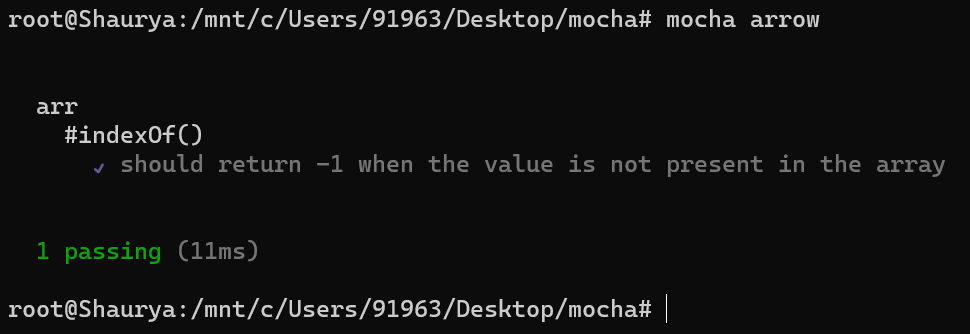
In the above code, we run a test case using Mocha. If the value is not present in the array, we return -1.

Root Hooks

We are often required to execute hooks before or after every test in every file. These are generally called Root Hooks. We can easily define a Root Hook using the following syntax,

arrow.js

exports.mochaHooks = {
  beforeEach(done) {
    console.log("This is the Before Each hook");
    done();
  }
};
You can also try this code with Online Javascript Compiler
Run Code

We can choose from a variety of Hooks, namely.

  • beforeAll()
  • beforeEach()
  • afterAll()
  • afterEach()

Multiple Root Hook

We can have multiple root hooks for the same plugin in Mocha. Let us look at an example code,

exports.mochaHooks = {
  beforeEach: [
    function (done) {
      console.log("Do something before each test");
    },
    async function () {
      console.log("Async functions are allowed in Root Hooks");
    },
  ],
};
You can also try this code with Online Javascript Compiler
Run Code

In the above code snippet, we exported the mochaHooks package and created a beforeEach hook. We also demonstrated that async functions are allowed in Root Hooks.

Multiple Root Hook Plugins

We can register multiple root hook plugins by calling --require numerous times. For instance, for registering root hooks in firstHook.js and secondHooks.js, we will use --require firstHook.js and --require secondHook.js. These calls will get recorded in the order of the declaration.

FAQs

  1. What is Mocha?
    Mocha is one of the most important frameworks of Javascript for Node development. It is generally used for asynchronous testing and is compatible with all of the major libraries of Node
    .
  2. What are Hook functions used for?
    Hooks are most commonly used to set preconditions and postconditions for a test. They are also used to clean up after the tests are executed.
     
  3. How many types of Root Hooks are there?
    There are four types of hooks in Mocha, namely: beforeAll(), afterAll(), beforeEach(), afterEach().
     
  4. Are hooks synchronous or Asynchronous?
    All the hooks in Mocha can be both synchronous and asynchronous. They behave a lot like regular test cases in any programming language.
     
  5. What are Root Hooks?
    We are often required to execute hooks before or after every test in every file. These are generally called Root Hooks.

Key Takeaways

This Blog covered all the necessary points about the Root Hook functions in Mocha. We further discussed the basics of Mocha. Finally, we mentioned the ways of implementation for the Root Hook function.

Don’t stop here; check out Coding Ninjas for more unique courses and guided paths. Also, try Coding Ninjas Studio for more exciting articles, interview experiences, and fantastic Data Structures and Algorithms problems.

Live masterclass


