Do you think IIT Guwahati certified course can help you in your career?
Introduction
Django is a prevalent choice if one has completed their front-end journey with HTML, CSS, and Javascript or wants to dive straight into backend development. Django is popular because it is a highly efficient, high-level, python-based backend web framework. Django follows a Model, View, and Template (MVT) based architecture. Some of the heaviest and most popular websites today are based on Django. Django was designed to ease the process of development for developers. Hence, Django has a wide range of features that prevent code redundancy. One such feature is formsets.
In Django, we can handle a group of forms together. This can be achieved using the power of formsets. Django Formsets, simply put, are a collection of forms.
Understanding the Need of Formsets
Before learning the implementation of Django formsets, let us understand why we need them. Django Formsets are an advanced way of reducing code redundancy. Imagine we had two forms on a single page. Typically, this would be implemented using two forms with different names, declared individually. Such an approach creates the issue that the functionality and code become challenging to implement and understand. Formsets, if implemented carefully and correctly, help overcome this issue by enabling developers to make a collection of all such forms. To define them formally, formsets are nothing but a layer of abstraction added on top of a page to handle multiple forms collectively.
Implementing Django Formsets
Project Setup
Before learning about formsets, let us set up our Django example project. Simply run the following commands on the terminal to make a test project.
django-admin startproject testProject
cd testProject
django-admin startapp testApp
Doing this, we would have a new Django project called “testProject” containing an app called “testApp.” We should have the following directory structure:
If there is an issue while setting up the project, head over to this link to set up the project.
Creating our Formset
First, let us make a formset consisting of just one form. To do so, create a forms.py file in the testApp directory and add the following code.
from django import forms

# Creating a form
class blogForm(forms.Form):
    blog = forms.CharField()
    author = forms.CharField()
You can also try this code with Online Python Compiler
The above code creates a simple form that has two fields. The left side of the statement names the field, while the right side of the statement showcases the input type. In this form, there are two fields called blog and author.
Now, we need to create a formset out of this form. To do so, add the following code to the views.py file in the testApp directory.
from django.shortcuts import render
from .forms import testForm


# Importing the required formset class from the django.forms class
from django.forms import formset_factory


def formset_view(request):
    context ={}
    blogFormSet = formset_factory(blogForm) // Creates a formset
    formset = blogFormSet()
    context['formset']= formset
    return render(request, "testApp/home.html", context)
You can also try this code with Online Python Compiler
With the view complete, let us complete our architecture for this form by creating the template for this formset. In the testApp subdirectory of the templates directory, create a file called home.html and add the following code.
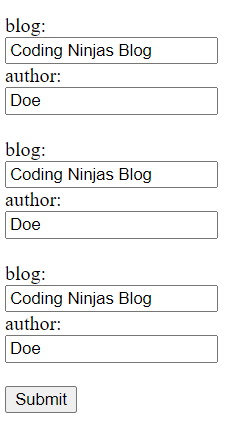
As discussed earlier, the most extensive functionality of formsets is their ability to create and handle multiple forms at once. This is done using the extra attribute of formsets. For example, if we need to make three instances of the form, we can modify the code in our views.py file as follows.
from django.shortcuts import render
from .forms import testForm


# Importing the required formset class from the django.forms class
from django.forms import formset_factory


def formset_view(request):

    context ={}

    blogFormSet = formset_factory(blogForm, extra=3) // Creates a formset of 3 forms.
    formset = blogFormSet()


    context['formset']= formset
    return render(request, "testApp/home.html", context)
You can also try this code with Online Python Compiler
Now we have three forms in our formset. We need to understand that it is easy to create multiple forms; the main challenge arises in handling their data correctly in the backend. This challenging task is made easy using Django formsets. Let us see how we can handle data efficiently. For this example, we would print the data on our server terminal to see how the data is being processed.
Add the data management function to manage formset data in the template code.
<form method="POST" enctype="multipart/form-data">

    <!-- Management data of formset -->
    {{ formset.management_data }}
    <!-- Using the formset -->
    {{ formset.as_p }}

    <input type="submit" value="Submit">
</form>
You can also try this code with Online Python Compiler
To get the data printed on the terminal, make the following amendment to the views.py file.
from django.shortcuts import render
from .forms import testForm


# Importing the required formset class from the django.forms class
from django.forms import formset_factory


def formset_view(request):


    context ={}


    blogFormSet = formset_factory(blogForm, extra=3) // Creates a formset of 3 forms.
    formset = testFormSet()

            if formset.is_valid():
        for form in formset:
            print(form.cleaned_data)


    context['formset']= formset
    return render(request, "testApp/home.html", context)
You can also try this code with Online Python Compiler
What are Django formsets? A Django formset is a layer of abstraction to work with multiple forms on the same page. It can be best compared to a data grid.
What is the max number of forms a formset can have? Although there is no such limit, we can limit the max number of forms in a formset by using the max_num parameter to formset_factory().
Key Takeaways
This blog looked into the critical aspects of the Django formsets. We created a sample app and project and demonstrated the working of three forms which constituted a formset by printing their output on our terminal. Formsets are an advanced concept and should be used with critical inspection of correct syntax; otherwise, many problems can arise. Continue learning Django and backend web development using this link!







 1+ registered

