The Problem Solved by ORM
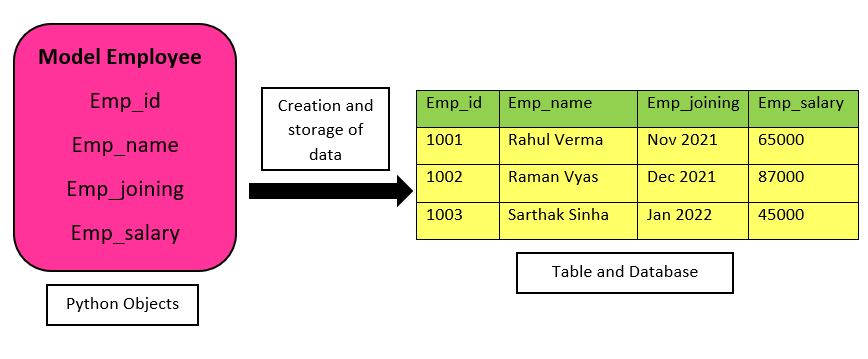
As already discussed in traditional methods, a programmer has to make the table on his own, and making a table is not enough. One must know not only SQL but its implementation as well. This becomes a time-consuming and difficult task. So to resolve this concept, ORM is introduced, as it makes the programmer’s work quite easy.
In ORM, we just have to define the class and its objects, which act as a column in the database tables. When the user enters his information, ORM automatically takes that information and fills it accordingly in the table. So a programmer doesn’t have to care about managing tables in the database, and it also reduces time.
Before learning ORM, you should have a basic idea of Models in Django, As this is just another step of learning Django after models.
# here, we have initialized the class with the name Album and its objects.
class Album(models.Model):
    title = models.CharField(max_length = 30)
    artist = models.CharField(max_length = 30)
    genre = models.CharField(max_length = 30)

    def __str__(self):
        return self.title
# here, we initialize the class with the name song and the objects inside it.
class Song(models.Model):
    name = models.CharField(max_length = 100)
    album = models.ForeignKey(Album, on_delete = models.CASCADE)

    def __str__(self):
        return self.name
By running the following command under the project directory, we can access the Django ORM.
python manage.py shell
Now we are at python console, So when we need to import models, we can do so by running the following command.
from books.models import Song, Album
Operations In ORM
Now, we will see the various operations we can perform using ORM in the database.
Sometimes there is a need to add something, replace something, or delete something, and then it becomes easier to work.
We will use the word QuerySet a lot so first, let's understand what it means.
It lists model objects and performs multiple operations on the database.
Adding Objects
Here, we have to create two objects, one with the name model album and a model Song.
First, we will write the command for the object of the model album and save it in the database.
>>> a = Album(title = "Divide", artist = "Ed Sheeran", genre = "Pop")
>>> a.save()
Now we will write the command for the object of model Song and save it in the database.
>>> s = Song(name = "Castle on the Hill", album = a)
>>> s.save()
Retrieving object
For better sake of understanding let us add 2 more Albums.
>>> a = Album(title = "Abbey Road", artist = "The Beatles", genre = "Rock")
>>> a.save()
>>> a = Album(title = "Revolver", artist = "The Beatles", genre = "Rock")
>>> a.save()
We will write the following command for retrieving all the objects of the model :
>>> Album.objects.all()
<QuerySet [<Album: Divide>, <Album: Abbey Road>, <Album: Revolver>]>
The output is a set of objects that matches the query or QuerySet.
There are many options for retrieving e.g. get(), filter(), exclude().We will discuss them one by one.
Using filter() Method
Sometimes, we have to select some object from all the objects, so in these cases, the filter() method is helpful, As it saves our time and gives us precise results.
>>> Album.objects.filter(artist = "The Beatles")
<QuerySet [<Album: Abbey Road>, <Album: Revolver>]>
Using exclude() Method
It returns the object which does not match the parameter that we set. It is beneficial in the case where we want specific results.
>>> Album.objects.exclude(genre = "Rock")
<QuerySet [<Album: Divide>]>
Using get() Method
It returns the single object matching with the given condition otherwise it will give an error.
>>> Album.objects.get(pk = 3)
<QuerySet [<Album: Revolver>]>
Modifying Existing Object
Whenever we need to modify the object according to user demand, we can do that also with the help of the following command.
>>> a = Album.objects.get(pk = 3)
>>> a.genre = "Pop"
>>> a.save()
Deleting Objects
We can also delete the object according to our user. While deleting, we get some freedom to choose whether to delete a single object or multiple objects as we can perform both operations individually and write commands accordingly.
Let's discuss both cases individually.
Single Object
>>> a = Album.objects.get(pk = 2)
>>> a.delete()
>>> Album.objects.all()
<QuerySet [<Album: Divide>, <Album: Revolver>]>
Multiple Objects
>>> Album.objects.filter(genre = "Pop").delete()
>>> Album.objects.all()
<QuerySet []>
Relationships Between Fields
Django ORM makes it easy to work with objects. There are generally two tables named attributes field and table fields in this. So ORM has different relations between these two, and now we will understand all of them one by one.
One to One Relationships
One to One relationship exists between two tables. Each attribute of both columns is connected to a single attribute of another column. There are no multiple relations between any column.
Let's understand it with an example each customer owns only a single car, so there will be one to one relationship. Now we will write the code for this.
from django.db import models
# Create your models here.
class Customer(models.Model):
   name = models.CharField(max_length=255)
# here we are creating the vehicle
class Vehicle(models.Model):
   name = models.CharField(max_length=255)
  customer = models.OneToOneField(
       Customer,
       on_delete=models.CASCADE,
       related_name='vehicle'
   )
Now we are going to register these,
from django.contrib import admin
from .models import Customer, Vehicle
admin.site.register(Customer)
admin.site.register(Vehicle)
One to Many Relationships
In one to many relationships, one column has more than one relationship with the other column. Still, the other column has only one relation with the previous one.
Let's understand this with the help of an example. Suppose one person has two different cars and the rest have only one car each. Hence, the person with two cars is related to both of them, but that car is only related to the same person, so this is many to one as from one side it is related to more than one relation but on the other side there ill be only one relation.
from django.db import models
# Create your models here.
class Customer(models.Model):
   name = models.CharField(max_length=255)
# here we are creating the vehicle
class Vehicle(models.Model):
   name = models.CharField(max_length=255)
  customer = models.ForeignKey(
       Customer,
       on_delete=models.CASCADE,
       related_name='Vehicle'
   )
Now we are going to register these,
from django.contrib import admin
from .models import Customer, Vehicle
admin.site.register(Customer)
admin.site.register(Vehicle)
Many to Many Relationships
Both the columns have more than one relationship in many to many relationships.
Let us understand this with the help of an example, Suppose there is a workstation, and in there, there are machines and four different workers now each worker has to work on two machines so now at least two workers have used each machine so in this case both machines and workers are related multiple times.
from django.db import models
# Create your models here.
class Worker(models.Model):
   name = models.CharField(max_length=255)
class Machine(models.Model):
   name = models.CharField(max_length=255)
   worker = models.ManyToManyField(
       Worker,
       related_name='Machine'
   )
Frequently Asked Questions
-
What is the primary goal of ORM?
The main goal of ORM is to transmit data between the application model and database.
-
What are the advantages of ORM?
It makes the project more portable and provides rapid development.
-
How do ORMs connect the database with web applications?
To connect web applications with the database, they use connectors.
-
What are the uses of QuerySet?
They are used to filter and arrange the data, and because of these features, they make our work a lot easier.
Key Takeaways
In this blog, we learned about Django ORMs and their features and looked at fields relationships. We learned how to use different operations with their code, e.g., add, delete, etc.
Want to learn more about CRUD operations in Django? Have a look here. If you are searching for quality blogs on Web Development, you should look here.







 7+ registered

