




Introduction
Coders: I want to make a web application
Coding Ninja: Go Ahead, bro….
Coders: But I only have knowledge of Python, and I cannot do web development just with Python!
Coding Ninjas: Who told you this !!! Have you heard of CherryPy?
Coders: No, What is this CherryPy?
Coding Ninjas: CherryPy enables developers to create web apps in the same manner as they would any other object-oriented Python program. As a result, less source code is completed in less time.
Coders: This is very interesting; how to install and setup this CherryPy
Coding Ninjas: Well, I can tell you………..
Environmental Setup for CherryPy
CherryPy is a very famous Python framework. Web applications can be built or designed faster and more reliably with CherryPy. It's also known as a web application library. As it is based on object-oriented Python programming, it is noted for its simplicity, resulting in less source code in less time.
Now we know what CherryPy is, so let's see its essential requirement for its Installation and Setup.
Requirements
CherryPy has no necessary system requirements. Pip automatically installs a Python-based distribution that is needed. Certain functions, however, will require the installation of additional packages. To make it easier to install other dependencies, cherryPy provide options to include.
- doc – for documentation-related matters
- json – for a personalized JSON processing library
- routes_dispatcher – dispatcher routes for declarative URL mapping
- ssl – for OpenSSL bindings, helpful in Python environments where the ssl module is not installed
- testing
- Memcached_session – allows backend Memcached session
Python Version Supported
CherryPy works with Python 3.5 through Python 3.8.

Also see, How to Check Python Version in CMD
Installation Process
CherryPy is simple to install using the standard Python package manager; pip or setup-tools.
Easy Install
$ easy_install cherrypy
Pip Install
$ pip install cherrypyYou may also obtain the most recent CherryPy version by downloading the source code from Github:
GitHub Install
$ git clone https://github.com/cherrypy/cherrypy
$ cd cherrypy
$ python setup.py install

Installation Test
CherryPy includes a collection of easy tutorials that may be run once the package has been installed.
$ python -m cherrypy.tutorial.tut01_helloworld
Navigate to http://127.0.0.1:8080 for output.
When run, the above program displays the following logs:
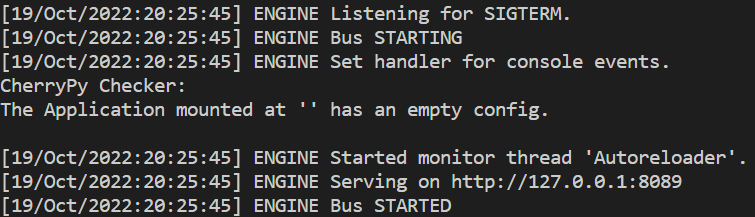
Output:

Run
The simplest way to run your application during development is as follows:
$ Python myapp.py
It will work well as long as myapp.py contains a "__main__" section.
Cherryd
The cherryd script, installed alongside CherryPy, may also be used to launch the application.
Some Common Commands:
- -e, –environment
Use the specified configuration environment (defaults to None)
- -c, –config
Specify Config file
- -i, –import
Specify modules to import
- -P, –path
Add the given paths to the sys.path
- -d
Apply the given config environment


 7+ registered

