




Introduction
A for loop in Scala iterates over a collection of items, such as lists or arrays, executing a block of code for each element. It offers a concise syntax and supports various iteration patterns, including filtering and pattern matching. The for loop enhances code readability and expressiveness, making it a powerful tool for data processing and manipulation in Scala programs.

In this article, we will discuss about for loop in Scala in more detail along with some examples.
Also see, Must Do Coding Questions
For Loop in Scala
A For loop in Scala can be used to iterate through the collection of elements and print the steps of instruction multiple times.
Let's see the syntax for the for loop in Scala.
Syntax:
for(x <- range)
{
  	// Statements
}
For example:
var value = Seq(“Soumya”, “Charmi”, “Shruti”)
for(x<- value) {
	println(x)
}
Here, x is any variable, <- operator is known as a "generator"; this is used to generate individual values from the range, and the range holds starting and ending values. We can pass range using the to or until keyword.
It's time to move towards some examples to clarify how the for loop in Scala is implemented.
Using Ranges
In Scala, ranges are represented by the to and until methods, which allow you to create sequences of numbers or characters between a specified start and end point. The to method includes the end value in the range, while the until method excludes it.
Here are examples of using ranges in Scala:
1. Iterating over a range of numbers using the to method:
for (num <- 1 to 5) {
  println(num)  // Outputs: 1, 2, 3, 4, 5
}
2. Iterating over a range of numbers using the until method:
for (num <- 1 until 5) {
  println(num)  // Outputs: 1, 2, 3, 4
}
3. Specifying a step size:
for (num <- 1 to 10 by 2) {
  println(num)  // Outputs: 1, 3, 5, 7, 9
}
4. Creating a range and converting it to a collection:
val numRange = (1 to 5).toList // Creates a list: List(1, 2, 3, 4, 5)
Ranges provide a concise way to generate sequences of numbers in Scala and are commonly used in loops, sequence generation, and other programming tasks.
Using to Keyword
In this example, we will show the use of for loop using the to keyword. In the for loop, if we are using to keyword, then we have to specify the start and the end value. Let's see this in our program mentioned below.
Example:
// Scala program to create a for loop
object Class {
   def main(args: Array[String]) {
       // Prints from 1 to 5
        for( x <- 1 to 5 ){
         println(x);
      }
   }
}
Output:

Explanation:
In the above example, the start value inside the for loop is 1 and the end value is 5, So the loop will iterate from 1 to 5 elements, and 5 elements are printed as a result.
Also Read - Ibegin TCS
Using until Keyword
Here we will use until keyword instead of the to keyword. The major difference between until and to is to include start and end values given in the range, while until excludes the last value of the range. Let's understand the until keyword with the help of an example.
Example:
// Scala program to create a for loop
object Class {
   def main(args: Array[String]) {
       // Prints from 1 to 4
        for( x <- 1 until 5 ){
         println(x);
      }
   }
}
Output:
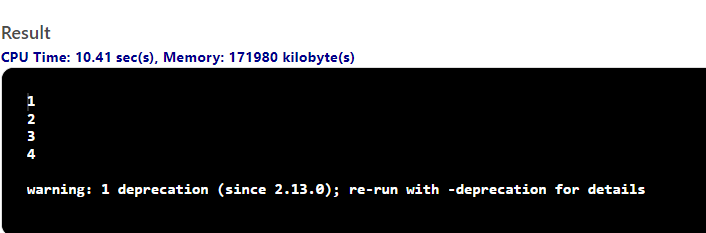
Explanation:
As we said, the until keyword excludes the last value of the range, so only four elements are printed instead of five. The until keyword is very useful while iterating an array or string, as the array ranges from 0 to n-1, and until the keyword doesn't exceed to n-1.
Using Collection
In Scala, we can use a for-loop to iterate collections like List, Sequence, etc. It provides an efficient way to iterate over the collections.
Let's understand the collection in for loop with the help of an example.
Example:
// Scala for loop with Collections
object Class {
   def main(args: Array[String]) {
       // Creating a list of 8 integers
        var list = List(5, 6, 7, 8, 9, 10, 11, 12)
        for( x <- list){
            println(x)
        }
   }
}
Output:

Explanation:
In the above-mentioned example, a list of 8 integers is created, and then that list is iterated using a for loop. All the elements in the list are printed as a result.
Using Maps
The difference with iterating over a Map is that the receiver will get a Tuple of two values – the key and the value associated with this key:
Example:
// For loop for Maps
object MyClass {
    def main(args: Array[String]) {
        val mp = Map(1 -> "Hello", "2" -> "Coders")
        for ((key,value) <- mp) {
             println(s"""$key -> $value""")
        }
    }
}
Output:

Explanation:
Here in the example above we are iterating over the map using a for loop. Println prints the key and value associated with each other.
With Filters
For loop in Scala allows you to filter your data by passing a conditional expression in your for loop. Let's understand Filters in for loop with the help of an example.
Example:
// Scala for loop with Filters
object Class {
   def main(args: Array[String]) {
       // For loop with filters
       for( x <- 1 to 20 if x%2==0 ; if x<18 ){
         println(x);
      }
   }
}
Output:

Explanation:
In the example mentioned earlier, the for loop uses two filters to filter the range of 1 to 20. These filters eliminate the integers which are odd and more than 18.
With Yield
In Scala language, the return value of the for loop is stored in a variable or may return through a function. To do this, you should use the yield keyword to prefix the for loop body.
Let's understand the Yield keyword with the help of an example.
Example:
// Scala for loop illustration
object Class {
   def main(args: Array[String]) {
       // For loop with yield
        var ret = for( x <- 1 to 15) yield x
        for(y<-ret){
            println(y)
        }
   }
}
Output:
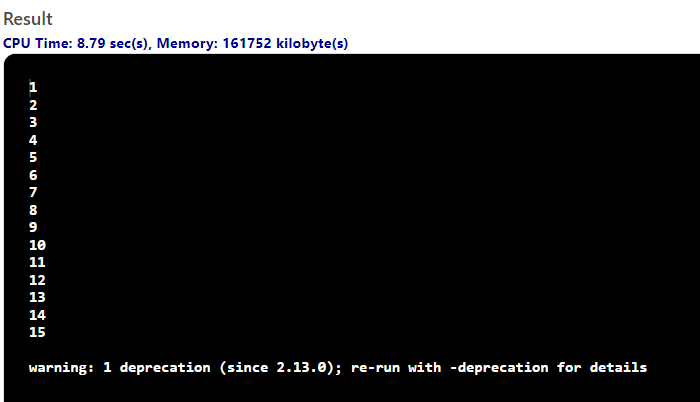
Explanation:
The returned value of the for loop is stored in the ret variable, and the yield keyword is used to return the result of the body of for loop.
Using by Keyword
In Scala, the by keyword is used to skip the iteration. Let's understand by keyword with the help of an example.
Example:
// Scala for loop illustration
object Class {
   def main(args: Array[String]) {
       // For loop using by keyword
       for(x<-1 to 20 by 2){
            println(x)
        }
   }
}
Output:

Explanation:
In the above example, the by keyword in the for loop skips all the even iterations.
Having Multiple Values
We can define multiple ranges in a single for loop, and all these ranges are separated using semicolons. Let's understand this in detail using an example.
Example:
// Scala for loop illustration
object Class {
   def main(args: Array[String]) {
       // For loop having multiple values
       for( x <- 1 to 4; y<- 7 until 10 )
        {
            println("Value of x is :" +x);
            println("Value of y is :" +y);
        }
   }
}
Output:

Explanation:
In the above example, we use two different ranges in a single loop, i.e., x<- 1 to 4; y<- 7 until 10.
You can also read about mock interview.


 1+ registered

