Do you think IIT Guwahati certified course can help you in your career?
Introduction
Grails, released in 2008, can stream web development for developers and businesses who want to use less time configuring and more time to code.
It uses the traditional model-view-controller (MVC) software architecture. This makes Grails even good at speeding up development because the pattern separates concerns between the model (business logic) and view (graphical interface). The controller in this pattern works as a liaison between the logic and the interface, transforming data from the model to the view and vice versa.
Configuration
With Grails' default settings, you can develop an application without configuration, as the quick start demonstrates. Still, knowing where and how to override the conventions when you need to is essential. Later sections of the article will mention what configuration settings you can use but not how to set them. But first, at least you have to read the first section of this article!
Basic Configuration
Build configuration and runtime configuration are the two main categories for configuration in Grails.
The build.gradle file and Gradle are typically used for build setup. The grails-app/conf/application.yml file by default, specifies runtime configuration in YAML.
It is possible to specify configuration with the help of Groovy's ConfigSlurper syntax if you would instead utilize Groovy configuration in the manner of Grails 2.0.
2 Groovy configuration files are available:
Use application.groovy for configuration that does not rely on application classes
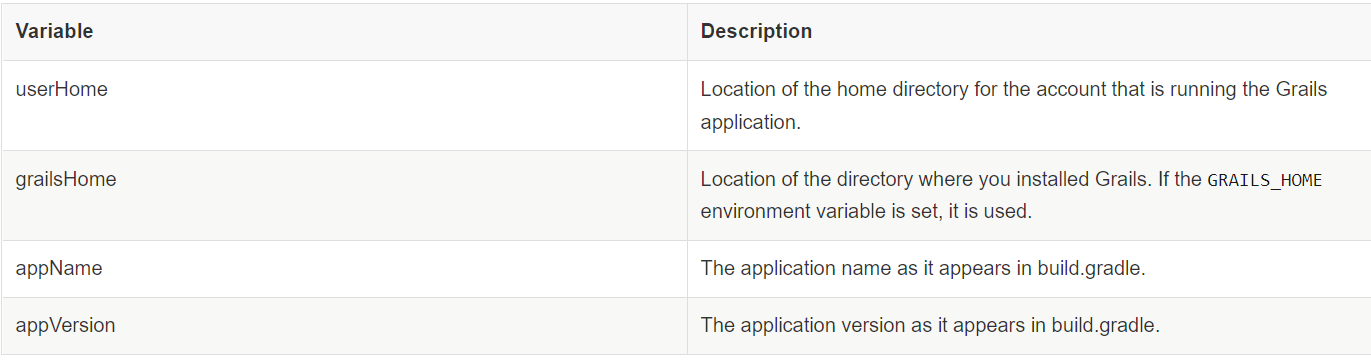
Use runtime.groovy for configuration that does rely on application classes or Groovy configuration. The following variables are available to the configuration script
Use the grailsApplication object, which is present as a variable in controllers and tag libraries, to retrieve runtime configuration values, i.e. those defined in application.yml:
Several helpful methods to read the application's configuration are provided by the config property of the grailsApplication object, which is an instance of the Config interface.
The getProperty function, in particular (seen above), is helpful for quickly collecting configuration properties while defining the property type (the default type is String) or/and offering a default fallback value.
class MyController {


    def hello(Recipient recipient) {
        //Retrieve Integer property 'foo.bar.max.hellos', otherwise use value of 5
        def max = grailsApplication.config.getProperty('foo.bar.max.hellos', Integer, 5)


        //Retrieve property 'foo.bar.greeting' without specifying type (default is String), otherwise use value "Hello"
        def greeting = grailsApplication.config.getProperty('foo.bar.greeting', "Hello")


        def message = (recipient.receivedHelloCount >= max) ?
          "Sorry, you've been greeted the max number of times" :  "${greeting}, ${recipient}"
        }


        render message
    }
}
Keep in mind that the Config instance reads configuration from the environment, system properties, and the local application configuration and merges them into a single object based on Spring's PropertySource notion.
GrailsApplication can be easily injected into services and other Grails artifacts:
The performance of a program may be slightly impacted by dynamically accessing configuration during runtime. Implementing the GrailsConfigurationAware interface, which offers the setConfiguration function and accepts the application configuration as an argument when the class is initialized, is an alternate strategy. Then, for later use, you can add pertinent configuration properties to instance properties on the class.
The features and functionality of the Config instance match those of the injected GrailsApplication config object. As an alternative to injecting GrailsApplication, here is the service class from the previous example:
As you can see, when accessing configuration settings, you utilize the exact dot notation as when you define them.
Logging
The Logback logging framework has been used to handle logging since Grails 3.0, and it may be customized using the grails-app/conf/logback.groovy file.
Before Grails 3.3.0, the logger's name for a Grails Artifact was formatted as grails.app.<type>.className>, where type denotes the type of the artefact, such as controllers or services, and className denotes the artifact's fully qualified name.
Masking Request Parameters From Stacktrace Logs
The names and values of each request parameter used in the current request may be included in the log message when Grails reports a stack trace. Use the parameter names in the grails.exceptionresolver.params.exclude config setting to hide the values of secure request parameters:
Setting the grails will disable request parameter logging completely. Set the configuration value for grails.exceptionresolver.logRequestParameters to false. When the application operates in DEVELOPMENT mode, the default value is true; in all other circumstances, it is false.
External Configuration File
If you set the configuration property logging.config, you can instruct Logback to use an external configuration file.
logging:
    config: /Users/me/config/logback.groovy
GORM
Grails gives the following GORM configuration options:
grails.gorm.failOnError - If true, a grails exception is thrown by domain classes' save() method on validation. If validation fails during saving, a ValidationException is thrown. Additionally, a list of Strings representing the package names may be provided to this option. The failOnError behaviour will only be used with domain classes in those packages if the value is a list of Strings (including sub-packages).
For example, to enable failOnError for all domain classes:
grails:
    gorm:
        failOnError: true
and to enable failOnError for domain classes by package:
There are many ways to run the Application class, if you are having an IDE then you can simply right-click on the class and run it directly from your IDE which will begin your Grails application.
This is also beneficial for debugging since you can debug directly from the IDE without connecting a remote debugger when utilizing the run-app --debug-jvm command from the command line.
You can even package your application into a runnable WAR file, for eg:
$ grails package
$ java -jar build/libs/myapp-0.1.war
This is useful if you plan to deploy your application using a container-less approach.
Environments
Grails support the concept of per-environment setup. Both YAML and the syntax offered by ConfigSlurper can be used for per-environment setup in the application.yml and application.groovy files found in the grails-app/conf directory. Take the following example from the Grails default application.yml definition:
Setting up a data source in Grails takes some JDBC knowledge because it is designed using Java technology (the technology that stands for Java Database Connectivity).
A JDBC driver is required if you utilise a database other than H2. For instance, you would require Connector/J for MySQL.
Usually, drivers are packaged as JAR archives. If the jar is present in a Maven repository, it is recommended to utilise the dependency resolution to resolve it. For instance, you may add a dependence for the MySQL driver as follows:
You must familiarize yourself with how Grails manages its database setup after rectifying the JAR issue. Either grails-app/conf/application.groovy or grails-app/conf/application.yml can be used to manage the configuration.The dataSource specification is contained in these files and includes the following settings:
driverClassName - The name of class of the JDBC driver
username - The username for establishing a JDBC connection
password - The password for establishing a JDBC connection
url - The JDBC URL of the database
dbCreate - Whether to auto-generate the database from the domain model - one of 'create', 'create-drop', 'update', 'validate', or 'none'
Versioning
Detecting Versions at Runtime
The GrailsApplication class's support for application metadata allows you to determine the application version. There is an implicit grailsApplication variable that can be utilized in controllers, for instance:
def version = grailsApplication.metadata.getApplicationVersion()
You can retrieve the version of Grails that is running with:
Dependency resolution is controlled by the Gradle built tool, all dependencies are defined in the build.gradle file.
Frequently Asked Questions
What is Grail Java?
Grails is Java and Groovy framework used when developing agile web applications. Grails implements the MVCS (Model, View, and Controller) design pattern.
What is the difference between Java and Groovy?
Groovy can be used as both programming and scripting Language. Groovy is a superset of Java which means the Java program will run in a Groovy environment but vice-versa may or may not be possible. Whereas Java is strongly and statically typed programming language.
Are Groovy and grails are same?
Grails is an open-source web application framework that uses the Apache Groovy programming language (which is in turn based on the Java platform).
Conclusion
In this article, we understood a new java backend framework known as Grails. We also learned about its configuration details specially the logging GORM, application class, environments, the data source, versioning, and dependency resolution.








 5+ registered

