Do you think IIT Guwahati certified course can help you in your career?
Introduction
In this article, we’ve covered everything you need to know about GWT FlexTable Widget. A flexible table with dynamically generated cells is represented by the FlexTable widget. Individual cells can be made to span many rows or columns, and the structure can be jagged, meaning that each row may have a variable amount of cells.
Class Declaration
Let's look at the declaration of com.google.gwt.user.client.ui.FlexTable.
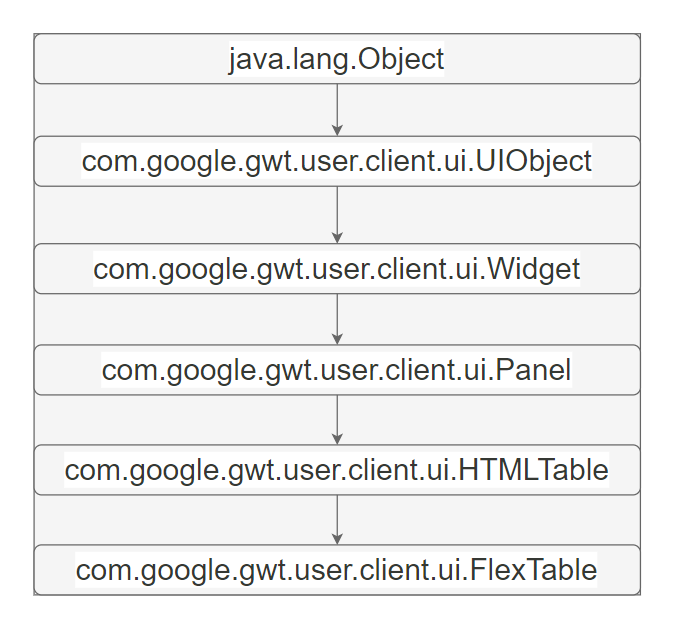
public class FlexTable extends HTMLTable
Here’s a diagram that shows the levels of inheritance and all the classes from which FlexTable is inherited:
GWT FlexTable Nested Classes
It is a specific implementation of HTMLTable.CellFormatter.
class FlexTable.FlexCellFormatter
GWT FlexTable Constructor
It is a constructor for the creation of an empty FlexTable. It is pubic in nature.
Eg. FlexTable temp = new FlexTable();
GWT FlexTable Methods
Here is a list of all important GWT Flextable Widget methods:
GWT FlexTable Widget Example
This example will walk you through some basic GWT FlexTable Widget usage procedures.
Step 1: Create a project with the name HelloWorld under your package(com.your_email_id)
Step 2: Create files HelloWorld.gwt.xml, HelloWorld.css, HelloWorld.html and HelloWorld.java
Step 4: Here is what the changed module descriptor contains( src/com.example/HelloWorld.gwt.xml.) :
<?xml version = "1.0" encoding = "UTF-8"?>
<module rename-to = 'helloworld'>
<!-- Inheriting core Web Toolkit stuff and default GWT style sheet. →
<inherits name = 'com.google.gwt.user.User'/>
<inherits name = 'com.google.gwt.user.theme.clean.Clean'/>
<!-- Specify entry point class of the app                       →
<entry-point class = 'com.example.client.HelloWorld'/>
<!-- Specify the paths for translatable code                   →
<source path = 'client'/>
<source path = 'shared'/>
</module>
Step 5: The changed HTML host file HelloWorld.html's content is as follows.
Step 6: Let's look at the Java file src/com.example/HelloWorld.java with the following contents to see how to use the FlexTable widget.
package com.example.client;

import com.google.gwt.core.client.EntryPoint;
import com.google.gwt.event.dom.client.ClickEvent;
import com.google.gwt.event.dom.client.ClickHandler;
import com.google.gwt.user.client.ui.Button;
import com.google.gwt.user.client.ui.DecoratorPanel;
import com.google.gwt.user.client.ui.FlexTable;
import com.google.gwt.user.client.ui.FlexTable.FlexCellFormatter;
import com.google.gwt.user.client.ui.HasHorizontalAlignment;
import com.google.gwt.user.client.ui.HasVerticalAlignment;
import com.google.gwt.user.client.ui.RootPanel;

public class HelloWorld implements EntryPoint {
	public void onModuleLoad() {
		// Creating Flex Table
		FlexTable t = new FlexTable();
		// Putting some text at the table's ends, forcing table to be 3 X 3.
		t.setText(0, 0, "upper-left corner");
		t.setText(2, 2, "bottom-right corner");
		// Let's put a button in the middle...
		t.setWidget(1, 0, new Button("Button Widget"));
		t.setWidget(1, 0, new Button("Button Widget"));
		t.setWidget(2, 0, new Checkbox("Chechbox Widget"));
		t.setWidget(2, 0, new Checkbox("Chechbox Widget"));
		// setting column span so that it takes up the whole row.
		t.getFlexCellFormatter().setColSpan(1, 0, 3);
		RootPanel.get().add(t);
	}
}
Output:
Frequently Asked Questions
What is GWT FlexTable Widget?
A flexible table with dynamically generated cells is represented by the FlexTable widget.
What are the advantages of GWT?
An open-source Java software development platform; Google Web Toolkit (GWT) makes it simple to create AJAX apps. You can use the Java development tools to create and debug AJAX apps with GWT.
What advantages does GWT offer?
If you are a Java programmer with knowledge of Swing or AWT, selecting GWT should be simple. Even if you lack experience in Java GUI development, the years spent working on server-side Java will be helpful when creating GWT applications.
How advantageous is learning GWT?
Many Google projects, both internal and external, are based on GWT, therefore Google will need to sustain the technology as long as they need to keep improving the front-end.
Does Google use still GWT?
Some of Google's products, including Blogger, AdWords, Flights, Wallet, Offers, Groups, and Inbox, areGWT-based.
Conclusion
In this article, we have discussed everything you need to know about GWT FlexTable Widget. Here are more articles to the rescue:











 1+ registered

