Table of contents
1.
Introduction
2.
The GWT PopupPanel
3.
GWT PopupPanel Class Declaration
4.
Nested Class
5.
Class Constructors
6.
Common Methods
7.
Example
8.
Frequently Asked Questions
8.1.
What is a Popup panel?
8.2.
What is RootPanel GWT?
8.3.
What is GWT programming?
8.4.
Is GWT a framework?
8.5.
What are the advantages of GWT?
9.
Conclusion
Last Updated: Mar 27, 2024
Medium

GWT PopupPanel

Career growth poll
Do you think IIT Guwahati certified course can help you in your career?

Introduction

Many times developers want to use certain widgets in GWT without making the code overly complicated and at the same time keeping the implementation easier. GWT provides a way to use a widget namely the PopupPanel to make the application more user-interactive and developer-friendly at the same time. 

The PopupPanel widget displays a panel that can appear on top of other widgets. It covers the client area of the browser and any previously-created popups. As we continue reading this blog, we will learn all about the GWT StackLayout panel, so let's get started right away.

The GWT PopupPanel

The widgets behind GWT PopupPanel can optionally be greyed out using a "glass" element that is displayed behind it. SetGlassEnabled can be used to enable it (boolean). Its "gwt-PopupPanelGlass" default style name can be altered by using setGlassStyleName (String).

GWT PopupPanel Class Declaration

The declaration for the com.google.gwt.user.client.ui.PopupPanel class is as follows:

public class PopupPanel
   extends SimplePanel
      implements SourcesPopupEvents, EventPreview, 
         HasAnimation, HasCloseHandlers<PopupPanel>
You can also try this code with Online Java Compiler
Run Code

Nested Class

The following table gives the list of all the GWT PopupPanel nested classes. 

Class Constructors

The following table gives the list of all the GWT PopupPanel constructors.

Common Methods

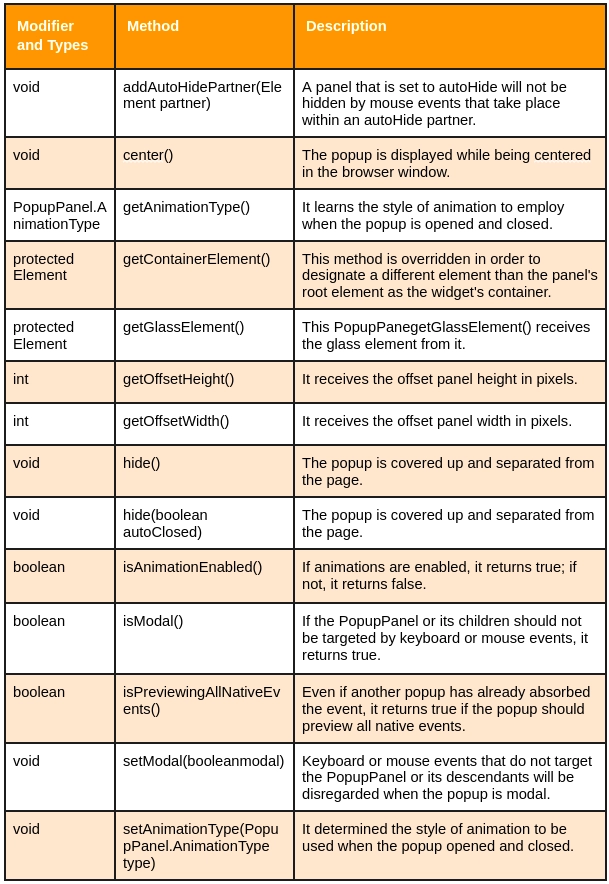
The following table gives the list of all the GWT PopupPanel Common methods.

Example

The following code opens the popup panel in GWT on clicking the given button. 

Code:

import com.extjs.gxt.ui.client.event.ButtonEvent;  
import com.extjs.gxt.ui.client.event.SelectionListener;  
import com.extjs.gxt.ui.client.widget.Window;  
import com.extjs.gxt.ui.client.widget.button.Button;  
import com.extjs.gxt.ui.client.widget.form.FormPanel;  
import com.extjs.gxt.ui.client.widget.form.HtmlEditor;  
import com.extjs.gxt.ui.client.widget.form.TextField;  
import com.extjs.gxt.ui.client.widget.layout.FitLayout;  
import com.extjs.gxt.ui.client.widget.layout.FormData;  
import com.google.gwt.core.client.EntryPoint;  
import com.google.gwt.user.client.ui.RootPanel;  
  
public class Popup implements EntryPoint {  
  
  public void onModuleLoad() {  
    final Window w = new Window();  
    w.setPlain(true);  
    w.setSize(500, 300);  
    w.setHeading("Resize Me");  
    w.setLayout(new FitLayout());  
  
    FormPanel panel = new FormPanel();  
    panel.setBorders(false);  
    panel.setBodyBorder(false);  
    panel.setLabelWidth(55);  
    panel.setPadding(5);  
    panel.setHeaderVisible(false);  
  
    TextField<String> field = new TextField<String>();  
    field.setFieldLabel("Sent To");  
    panel.add(field, new FormData("100%"));  
  
    field = new TextField<String>();  
    field.setFieldLabel("Subject");  
    panel.add(field, new FormData("100%"));  
  
    HtmlEditor html = new HtmlEditor();  
    html.setHideLabel(true);  
    panel.add(html, new FormData("100% -53"));  
  
    w.addButton(new Button("Send"));  
    w.addButton(new Button("Cancel"));  
    w.add(panel);  
  
    Button b = new Button("Open", newSelectionListener<ButtonEvent>() {  
  
      @Override  
      public void componentSelected(ButtonEvent ce) {  
        w.show();  
      }  
  
    });  
    RootPanel.get().add(b);  
  
  }  
}  
You can also try this code with Online Java Compiler
Run Code

Output:

PopupPanel output Image

Frequently Asked Questions

What is a Popup panel?

The PopupPanel widget represents a panel that can appear on top of other widgets. It covers the browser's client area (and any previously-created popups).

What is RootPanel GWT?

The first or topmost panel in the GWT framework is called the RootPanel, to which all other widgets are tied. The following syntax can be used to reach the application's root panel: RootPanel (). HTML pages make up this panel. The Root panel returns the singleton value used to bind the GWT application.

What is GWT programming?

A GWT development toolkit is used to create and improve sophisticated browser-based apps. Its objective is to make it possible to construct high-performance web apps productively without the developer having to be an expert in JavaScript, XMLHttpRequest, or browser quirks.

Is GWT a framework?

An open-source Java software development platform called Google Web Toolkit (GWT) makes it simple to create AJAX apps. You can use your own Java development tools to develop and debug AJAX apps with GWT.

What are the advantages of GWT?

If you are a seasoned Java programmer with knowledge of Swing or AWT, selecting GWT should be simple. With this foundation, the learning curve is the shortest. Even if you lack familiarity with Java GUI development, your years spent dealing with server-side Java will be helpful when creating GWT applications.

Conclusion

In this article, we have extensively discussed the GWT Popup panel. We began with a brief introduction about the popup panel followed by its extended classes, its constructors, and the methods it can implement.


After reading about the GWT PopupPanel, also refer to GWT DocumentationIntroduction to GWTGWT Tutorial15 Best Java FrameworksJavaFX and Coding Ninjas for a deeper understanding of GWT development and other related topics.

Thank You Image
Live masterclass