Do you think IIT Guwahati certified course can help you in your career?
Introduction
The HorizantalSplitPanel widget simulates a panel with two widgets arranged in a single horizontal row, allowing the user to interactively modify the percentage of the width allocated to each widget. When required, scrollbars will automatically be added to widgets included within a HorizontalSplitPanel.
A panel that arranges two widgets in a single horizontal row
Class Declaration
Let's look at the declaration of com.google.gwt.user.client.ui.HorizontalSplitPanel class
@Deprecated
public final class HorizontalSplitPanel
extends SplitPanel
CSS Style Rules
The HorizontalSpiltPanel widget will all be styled according to the following default CSS rules. In accordance with your needs, you can override it.
.gwt-HorizontalSplitPanel { the panel itself }
.gwt-HorizontalSplitPanel hsplitter { the splitter }
Class Constructors and Description
GWT HorizontalSplitPanel widget constructors and their descriptions are listed below
Deprecated. Affected Elements: -splitter, left splitter,right splitter.
8
protected void onUnload()
Deprecated. This method of GWT is called immediately before a widget will be detached from the browser's document.
9
void setEndOfLineWidget(Widget w)
Deprecated. This method sets the widget in the pane that is at the end of the line direction for the layout.
10
void setRightWidget(Widget w)
Deprecated. This method sets the widget in the right side of the panel.
11
void setStartOfLineWidget(Widget w)
Deprecated. This method sets the widget in the pane that is at the start of the line direction for the layout.
12
Widget getEndOfLineWidget()
Deprecated. It gets the widget on the pane that is at the end of the line direction for the layout.
13
Widget getRightWidget()
Deprecated. It gets the widget on the right side of the panel.
14
Widget getStartOfLineWidget()
Deprecated. It gets the widget in the pane that is at the start of the line direction for the layout.
15
boolean isResizing()
Deprecated. This Indicates whether the split panel is being resized.
16
void onBrowserEvent(Event event)
Deprecated. It is fired whenever a browser event is received.
17
protected void onLoad()
Deprecated. This method of GWT is called immediately after a widget becomes attached to the browser's document.
18
boolean remove(Widget widget)
Deprecated. It removes a child widget.
19
voidsetLeftWidget(Widget w)
Deprecated. This method sets the widget in the left side of the panel.
20
void setSplitPosition(java.lang.String pos)
Deprecated. Moves the position of the splitter.
Methods Inherited
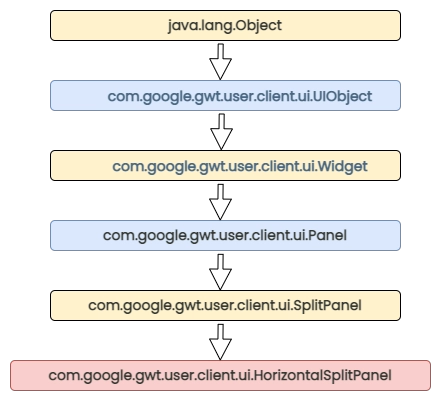
GWT HorizontalSplitPanel widget inherits methods from the following classes
Here’s a diagram that shows the levels of inheritance and all the classes from which Horizontal Split Panel is inherited
GWT HorizontalSplitPanel widget Code Example
This example will walk you through a few easy steps to demonstrate how to use a GWT HorizontalSplitPanel Widget. Now let's have a look at step-wise construction of the GWT HorizontalSplitPanel widget.
Steps
Description
1
Create a project with the name HorizontalSplitPanel under a package com.codingninjas.
2
Change HorizontalSplitPanel.gwt.xml, HorizontalSplitPanel.css, HorizontalSplitPanel.html and HorizontalSplitPanel.java as explained below.
3
Compile and run the application to get the output
Content of the modified module descriptor src/com.codingninjas/HorizontalSplitPanel.gwt.xml.
<?xml version = "1.0" encoding = "UTF-8"?>
<module rename-to = 'HorizontalSplitPane'>
   <inherits name = 'com.google.gwt.user.User'/>
   <inherits name =  'com.google.gwt.user.theme.clean.Clean'/>
   <entry-point class = 'com.codingninjas.client.HorizontalSplitPane'/>
   <source path = 'client'/>
   <source path = 'shared'/>
</module>
Content of the modified Style Sheet file war/HorizontalSplitPanel.css.
Let us have the following content of the Java file src/com.codingninjas/HorizontalSplitPanel.java, which will demonstrate the use of the GWT HorizontalSplitPanel widget.
package com.codingninjas.client;
import com.google.gwt.core.client.EntryPoint;
import com.google.gwt.user.client.ui.CheckBox;
import com.google.gwt.user.client.ui.DecoratorPanel;
import com.google.gwt.user.client.ui.HTML;
import com.google.gwt.user.client.ui.HorizontalSplitPanel;
import com.google.gwt.user.client.ui.RootPanel;
import com.google.gwt.user.client.ui.VerticalPanel;

public class HorizontalSplitPanel implements EntryPoint {

   public void onModuleLoad() {
      HorizontalSplitPanel horizontalSplitPanel = new HorizontalSplitPanel();
      horizontalSplitPanel.setSize("200px", "400px");
      horizontalSplitPanel.setSplitPosition("30%");

      String text_content = "Lorem ipsum dolor sit amet, consectetur adipiscing elit.Fusce tincidunt libero in pretium consequat.
      Vestibulum quis lectus tempor, varius nulla vel, fringilla lacus."
      horizontalSplitPanel.setRightWidget(new HTML(text_content));
      horizontalSplitPanel.setLeftWidget(new HTML(text_content));

      DecoratorPanel decoratorPanel = new DecoratorPanel();
      decoratorPanel.add(horizontalSplitPanel);
      /*Add the widgets to the root panel. */
      RootPanel.get().add(decoratorPanel);
   }
}
You can also try this code with Online Java Compiler
Use widgets to communicate with users. The positioning of user interface elements on the page is managed via panels. By utilizing widgets and panels, you may avoid writing unique code for every browser because they function the same way on all of them.
How advantageous is learning GWT?
Many Google projects, both internal and external, are based on GWT, therefore, Google will need to sustain the technology as long as they need to keep improving the front-end.
What is GWT Horizontal Split Panel Widget?
The HorizantalSplitPanel widget simulates a panel with two widgets arranged in a single horizontal row, allowing the user to interactively modify the percentage of the width allocated to each widget.
What characteristics does GWT have?
Asynchronous remote procedure calls, history management, bookmarking, UI abstraction, internationalization, and cross-browser portability.
Who uses GWT - Google Web Toolkit?
Companies like Crimsonlogic Pte. Ltd., StudyBlue Inc., and Intrado Inc. are using GWT.
Conclusion
In this article, we have extensively discussed how the project GWT HorizontalSplitPanel widget. We have discussed its constructors, methods, and implementation. GWT HorizontalSplitPanel widget is a part of form widgets that are used in many places while developing applications. and if you would like to learn more, check out our articles on













 7+ registered

