Implementation
In the implementation of GWT JSON, we will see an example of Creating a Stock Exchange JSON data source.
We used the stock price class and refreshed the watch list function as follows:
/**
   * Generate random stock prices.
   */

  private void refreshWatchList() {
    final double MAX_PRICE = 100.0; // $100.00
    final double MAX_PRICE_CHANGE = 0.02; // +/- 2%

    StockPrice[] prices = new StockPrice[stocks.size()];

    for (int i = 0; i < stocks.size(); i++) {
      double price = Random.nextDouble() * MAX_PRICE;
      double change = price * MAX_PRICE_CHANGE
          * (Random.nextDouble() * 2.0 - 1.0);

      prices[i] = new StockPrice(stocks.get(i), price, change);
    }

    updateTable(prices);
  }

You can also try this code with Online Java Compiler
Creating Servlet
In this section, we develop a JSON-formatted servlet file for stock quotations. The steps for building a servlet are as follows:
Step 1.
In this step, we will create a servlet. This step can be completed in the following steps:
1. In the Package Explorer, select the client package:com.google.gwt.sample.stockwatcher.client
2. Open the New Java Class wizard in Eclipse (File > New > Class).

Step 2:
In the second step, we will change the package's name .client to .server. This step can be done in the following steps
1. Under the name, enter JsonStockData.
2. The eclipse will provide a stub for the JsonStockData class and a package for the server-side code.
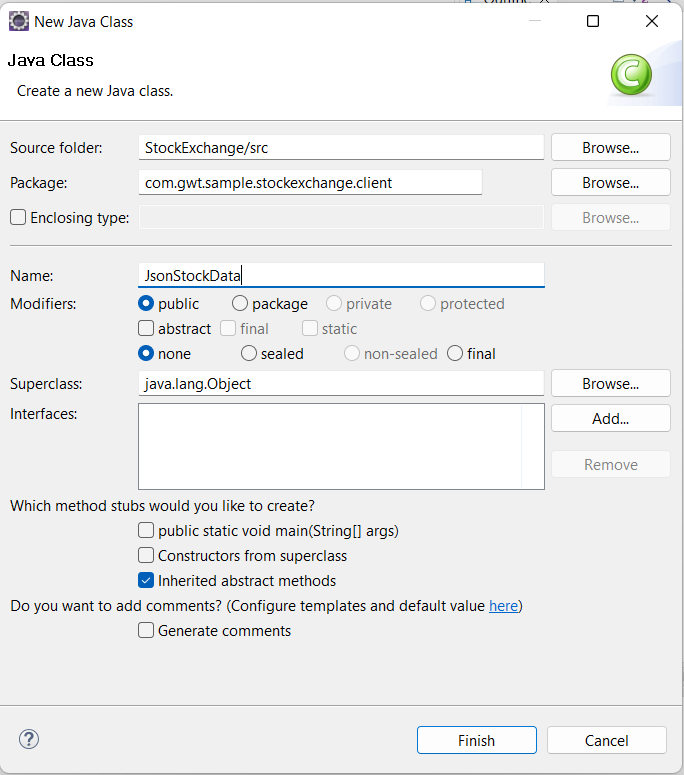
Step 3:
In the final step, we will replace the stub with the following code:
package com.google.gwt.sample.stockexchange.server;

import java.io.IOException;
import java.io.PrintWriter;
import java.util.Random;
import javax.servlet.ServletException;
import javax.servlet.http.HttpServlet;
import javax.servlet.http.HttpServletRequest;
import javax.servlet.http.HttpServletResponse;

    public class JsonStockData extends HttpServlet {

    private static final double MAX_PRICE = 100.0; // $100.00
  	private static final double MAX_PRICE_CHANGE = 0.02; // +/- 2%

    @Override
  	protected void doGet(HttpServletRequest req, HttpServletResponse resp)
    throws ServletException, IOException {

        Random rnd = new Random();
    	PrintWriter out = resp.getWriter();
    	out.println('[');
    	String[] stockSymbols = req.getParameter("q").split(" ");
    	boolean firstSymbol = true;
    	for (String stockSymbol : stockSymbols) {

       	double price = rnd.nextDouble() * MAX_PRICE;
      	double change = price * MAX_PRICE_CHANGE * (rnd.nextDouble() * 2f - 1f);

       	if (firstSymbol) {
        	firstSymbol = false;
      	}
      	else {
        	out.println("  ,");
      	}

      	out.println("  {");
      	out.print("    \"symbol\": \"");
      	out.print(stockSymbol);
      	out.println("\",");
      	out.print("    \"price\": ");
      	out.print(price);
      	out.println(',');
      	out.print("    \"change\": ");
      	out.println(change);
      	out.println("  }");
    	}
    	out.println(']');
    	out.flush();
  	}
  }
You can also try this code with Online Java Compiler
Including Server Side Code
The GWT framework includes the Jetty servlet container, which hosts the servlet that produces stock data in JSON format. Following are the steps for adding server-side code to GWT:
-
Change the code below in StockWatcher/war/WEB-INF/web.xml.
<?xml version="1.0" encoding="UTF-8"?>
<!DOCTYPE web-app
    PUBLIC "-//Sun Microsystems, Inc.//DTD Web Application 2.3//EN"
    "http://java.sun.com/dtd/web-app_2_3.dtd">

    <web-app>

      <!-- Default page to serve -->
  <welcome-file-list>
    <welcome-file>StockExchange.html</welcome-file>
  </welcome-file-list>

      <!-- Servlets -->
 <servlet>
    <servlet-name>jsonStockData</servlet-name>
    <servlet-class>com.google.gwt.sample.stockexchange.server.JsonStockData</servlet-class>
  </servlet>

      <servlet-mapping>
    <servlet-name>jsonStockData</servlet-name>
    <url-pattern>/stockexchange/stockPrices</url-pattern>
  </servlet-mapping>

    </web-app>
Retrieving JSON Data
To get the JSON data, we follow the following steps:
1. In developer mode, debug the StockExchange. The client-side function is still providing the stock data at this time.
2. Run a test on the stock quotation server. A stock code should be passed to the servlet URL http://localhost:8888/stockexchange/stockPrices?q=ABC+DEF after ensuring the active development mode code server.
3. The servlet produces a JSON-encoded array of simulated stock data.

Frequently Asked Questions
What is GWT?
A development tool for creating and optimising sophisticated browser-based apps is called Google Web Toolkit (GWT). Many Google products, including Google AdWords and Orkut, employ GWT.
What elements make up a GWT application?
A GWT application is made up of the following four crucial components, the last of which is optional but the first three of which are required: The elements are Descriptors for modules, Public assets, Customer-side code, and code on the server.
What does GWT's module descriptor mean?
The XML configuration file required to set up a GWT application is called a module descriptor. A module descriptor file has the extension *.gwt.xml, where * stands for the application name and should be located at the project's root.
What is JSON?
A text-based standard for encoding structured data based on JavaScript object syntax is called JavaScript Object Notation (JSON). It is frequently employed for data transmission in online applications (e.g., sending data from the server to the client so it can be displayed on a web page, or vice versa).
Does the GWT compiler, by default, produce an Id property for its widgets?
No! Neither the browser nor GWT provides default id properties for widgets by default.
Conclusion
In this article, we have extensively discussed the GWT JSON. After giving a quick overview of the GWT JSON, we spoke about how to put it into practice.
Do you not feel eager to read/explore additional information on the subject of GWT after reading about the GWT JSON? See the GWT ScrollPanel Widget, GWT RootLayoutPanel, and GWT TabPanel Widget learn more.
Nevertheless, you may consider our paid courses to give your career an edge over others!
Do upvote our blogs if you find them helpful and engaging!
Happy Learning!









 7+ registered

