Do you think IIT Guwahati certified course can help you in your career?
Introduction
The Google Web Toolkit (GWT) is a development toolkit for creating and improving sophisticated browser-based applications. For typical web-app activities like bookmarking, UI abstraction, cross-browser compatibility, etc., GWT focuses on reusable techniques. Google AdWords and Orkut are just some of the products that use GWT. A large number of developers use GWT, which is open source and totally free.
In this blog, we will deep dive into the concepts of GWT XML.
XML Files in GWT
GWT XML (eXtensible Markup Language) employs custom tags to define data and encode the data into plain text. It is easier to work with and more versatile.
The list of Java classes and other resources included in the GWT module is specified in the gwt.xml file.
Module definitions are contained in XML documents with the .gwt.xml extension. It may be found in the project package's root directory. The code for applying standard project structure is as follows:-
To parse the XML content, we must first convert the raw XML text to an XML DOM structure. The DOM structure facilitates data navigation. The XMLParser class contains the XML parser. The XMLParser class includes a static method called parse(String) that is used to parse the XML and return a Document object.
To handle a parsing error (for example, if the XML is not well-formed), XMLParser will throw a DOMException. If parsing is successful, the Document object we get serves as a memory representation of the XML file.
The nodes that are created upon successful parsing are:-
1.) Element: It represents DOM elements, that are specified by tags in XML: <anyElement></anyElement>.
2.) Text: It represents the text between the opening and closing tag of an element: <anyElement>Text Here!</anyElement>.
3.) Comment: It represents an XML comment: <!-- It is a comment-->.
4.) Attr: It represents an attribute of an element: <anyElement theAttribute="786" />.
Let’s learn the XML parsing concept with the help of a Code Example.
Code Implementation
The XML code for the email message is shown below:
In gmailService.gwt.xml.
<?xml version="1.0" ?>
<message>
  <header>
    <to displayName="codingninjas" address="hr@codingninjas.com" />
    <from displayName="ninjas" address=?hr@ninjas.org" />
    <sent>2022-07-05T12:03:55Z</sent>
    <subject>GWT XML Blog</subject>
  </header>
  <body>Learn GWT XML through this blog.</body>
</message>
The following code is for extracting information from the xml file gmailService.gwt.xml:-
private void parseInfo(String infoXml) {
  try {
    // Parsing the XML document into a DOM
    Document infoDom = XMLParser.parse(infoXml);

    Node fromNode = infoDom.getElementsByTagName("from").item(0);
    String from = ((Element)fromNode).getAttribute("displayName");
    fromLabel.setText(from);

    String subject = infoDom.getElementsByTagName("subject").item(0).getFirstChild().getNodeValue();
    subjectLabel.setText(subject);

    Text bodyNode = (Text)infoDom.getElementsByTagName("body").item(0).getFirstChild();
    String body = bodyNode.getData();
    bodyLabel.setText(body);

  } catch (DOMException e) {
    Window.alert("Unable to parse the XML document.");
  }
}
You can also try this code with Online Java Compiler
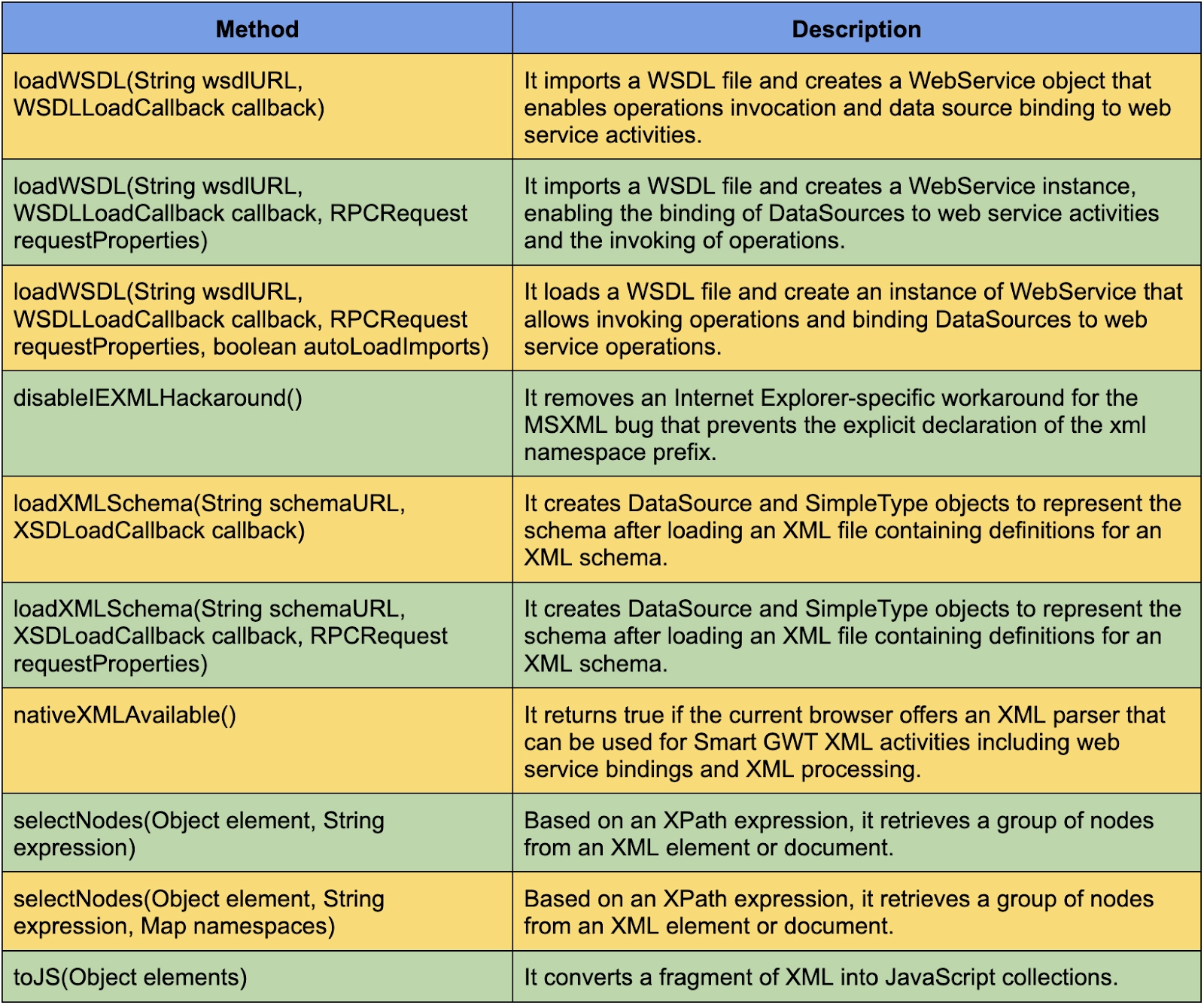
XMLTools() is a constructor in GWT which construct different tools option.
Here is the list of some common XML methods.
Frequently Asked Questions
What is GWT?
The Google Web Toolkit (GWT) is a development toolkit for creating and improving sophisticated browser-based applications. For typical web-app activities like bookmarking, UI abstraction, cross-browser compatibility, etc., GWT focuses on reusable techniques.
What are XML files in GWT?
GWT XML (eXtensible Markup Language) employs custom tags to define data and encode the data into plain text. It is easier to work with and more versatile. The list of Java classes and other resources included in the GWT module is specified in the gwt.xml file.
What is Event Handler in GWT?
A handler interface specifies one or more methods the widget can use to call an event. When a class wants to listen to a group of events of a certain type, it implements the handler interface and then passes a reference to that class to the widget.
What is GWT UI Binder?
GWT UI Binder is a framework that enables users to create GWT applications as HTML pages. The GWT UI Binder is used to declarative design the user interface of a web application built with GWT, i.e., to isolate the programming logic from the UI.
What is GWT Servlet?
GWT supports several methods for communicating with a server through HTTP. You may use the GWT RPC framework to perform transparent calls to Java servlets while GWT handles low-level complexities like object serialization.







 7+ registered

