

Table of contents
1.
Introduction
1.1.
GWT
2.
SuggestionBox
3.
Time for an Example
3.1.
Output
4.
Frequently asked question
4.1.
What is the primary objective of GWT?
4.2.
What is the feature of the module tag in the * GWT XML file in GWT?
4.3.
What does a GWT *.nocache.js file do?
4.4.
What is Module Descriptor? 
4.5.
What does a Suggestbox represent?
5.
Conclusion
Last Updated: Mar 27, 2024

GWT SuggestBox

Author dhananjay
0 upvote
Career growth poll
Do you think IIT Guwahati certified course can help you in your career?

Introduction

In this blog, we are going to learn what a suggested box is and how we implement a SuggestBox using GWT also we will get to know about some inbuilt methods of GWT that will assist us in efficiently implementing it. 

But before that let's get to know about GWT.

GWT

GWT

A development toolkit called GWT enables programmers to create internet or web applications. For typical web-app chores like bookmarking, UI abstraction, cross-browser compatibility, etc., GWT insists on reusable techniques. It offers characteristics like:

  • Because GWT solves browser incompatibilities through various bindings, developers do not need to be experts in this area.
     
  • The client and server code bases for GWT are the same.
     
  • Java was the platform of choice for GWT because it offers features like code navigation and refactoring that make development more efficient.
     
  • GWT MVP (Model View Presenter) enables collaborative working and more rapid JUnit testing. By adding events to the event bus, the client-side program can make several modifications.
     
  • It enables the integration of numerous Java technologies, including hibernate via gilead.

SuggestionBox

The SuggestionBox widget simulates a text box or text area that shows a series of pre-configured options that correspond to the user's input. One SuggestOracle is connected to each SuggestBox. Given a specified query string, the SuggestOracle is used to suggest a collection of choices.
 

Class declaration of suggestionbox in GWT
 

com.google.gwt.user.client.ui.SuggestionBox
You can also try this code with Online Java Compiler
Run Code

Lets see the extended version of class SuggestionBox:
 

public final class SuggestBox
   extends Composite
      implements HasText, HasFocus, HasAnimation, 
         SourcesClickEvents, SourcesFocusEvents, 
            SourcesChangeEvents, SourcesKeyboardEvents, 
               FiresSuggestionEvents
You can also try this code with Online Java Compiler
Run Code


Following are the class constructors we can implement in GWT suggestionbox class

Sr.no

Constructors in GWT

1.

SuggestBox()

2.

SuggestBox(SuggestOracle oracle)

3.

SuggestBox(SuggestOracle oracle, TextBoxBase box)

Below are the class methods we can use in the SuggestionBox to implement various features.
 

Class Methods:

Sr.no

Methods and Description

1.


void addChangeListener(ChangeListener listener)


Establishes a listener to receive change events for the text box of the SuggestBox.

2.

void addClickListener(ClickListener listener)


the addition of a listener to receive click events on the text box of the SuggestBox.

3.


void addEventHandler(SuggestionHandler handler)


the addition of a handler interface for recommendation event reception.

4.

void addFocusListener(FocusListener listener)
 

the addition of a listener to receive focus events on the text box of the SuggestBox.

5.

void addKeyboardListener(KeyboardListener listener)


Adds a listener to the SuggestBox's text box to receive keyboard events.

6.

int getLimit()


The maximum number of suggestions that can be displayed in this box is obtained.

7.

SuggestOracle getSuggestOracle()
 

gets the SuggestOracle from the suggestion box.

8.

int getTabIndex()
 

retrieves the widget's tab index position.

9.

java.lang.String getText() 


retrieves the text of this object.

10.

boolean isAnimationEnabled()
 

determines whether animation is on or off.


There are more methods available in suggestbox class that you can search and implement in your code.

Time for an Example

Following is the source code of css file for the project.war/Helloworld.css

body {
   text-align: center;
   font-family: verdana, sans-serif;
}
h1 {

   font-size: 2em;

   font-weight: bold;

   color: #777777;

   margin: 40px 0px 70px;

   text-align: center;

}
.gwt-SuggestBox { 

   color: green;

}

.gwt-SuggestBoxPopup { 

   border: thin 1px solid green; 

   width: 200px;

}

.gwt-SuggestBoxPopup.item { 

  color: red; 

}

.gwt-SuggestBoxPopup .item-selected { 

   color: gray;

}

.gwt-SuggestBoxPopup .suggestPopupTopLeft { 

   border: thin 1px solid green; 

}

.gwt-SuggestBoxPopup .suggestPopupTopLeftInner { 

   border: thin 1px solid green; 

}

.gwt-SuggestBoxPopup .suggestPopupTopCenter { 

   border: thin 1px solid green; 

}

.gwt-SuggestBoxPopup .suggestPopupTopCenterInner { 

   border: thin 1px solid green; 

}

.gwt-SuggestBoxPopup .suggestPopupTopRight {

   border: thin 1px solid green; 

}

.gwt-SuggestBoxPopup .suggestPopupTopRightInner {

   border: thin 1px solid green; 

}


.gwt-SuggestBoxPopup .suggestPopupMiddleLeft { 

   border: thin 1px solid green;

}


.gwt-SuggestBoxPopup .suggestPopupMiddleLeftInner { 


   border: thin 1px solid green;

}


.gwt-SuggestBoxPopup .suggestPopupMiddleCenter { 

   border: thin 1px solid green; width:200px;

}


.gwt-SuggestBoxPopup .suggestPopupMiddleCenterInner { 

   border: thin 1px solid green;

}


.gwt-SuggestBoxPopup .suggestPopupMiddleRight { 

   border: thin 1px solid green;

}


.gwt-SuggestBoxPopup .suggestPopupMiddleRightInner { 

   border: thin 1px solid green;

}


.gwt-SuggestBoxPopup .suggestPopupBottomLeft {

   border: thin 1px solid green;

}


.gwt-SuggestBoxPopup .suggestPopupBottomLeftInner { 

   border: thin 1px solid green;

}


.gwt-SuggestBoxPopup .suggestPopupBottomCenter {

   border: thin 1px solid green;

 }


.gwt-SuggestBoxPopup .suggestPopupBottomCenterInner { 

   border: thin 1px solid green;

}

.gwt-SuggestBoxPopup .suggestPopupBottomRight { 

   border: thin 1px solid green;

}

.gwt-SuggestBoxPopup .suggestPopupBottomRightInner { 


   border: thin 1px solid green;

}


Html code is found in the war/Helloworld.html

<html>
   <head>
      <title>Hello World</title>
      <link rel = "stylesheet" href = "Helloworld.css"/>
      <script language = "javascript" src = "helloworld/helloworld.nocache.js">
      </script>
   </head>
   <body>
      <h1>Widget of Suggestion Box</h1>
      <div id = "gwtContainer"></div>
   </body>
</html>


Let's look at the Java file src/com.hellofriendt/Helloworld.java with the following contents to see how to use the SuggestionBox widget.

package com.hellofriend.client;
import com.google.gwt.core.client.EntryPoint;
import com.google.gwt.user.client.ui.MultiWordSuggestOracle;
import com.google.gwt.user.client.ui.RootPanel;
import com.google.gwt.user.client.ui.SuggestBox;
import com.google.gwt.user.client.ui.VerticalPanel;


public class Helloworld implements EntryPoint {
   public void onModuleLoad() {
      //create the suggestion data    
      MultiWordSuggestOracle oracle = new MultiWordSuggestOracle();  
      oracle.add("Nike");
      oracle.add("Adidas");
      oracle.add("Converse");
      oracle.add("Vans");
      oracle.add("Reebok");
      
      //create the suggestion box and pass it the data created above
      SuggestBox suggestionBox = new SuggestBox(oracle);
 
      //set width to 200px.
      suggestionBox.setWidth("200");
      
      // Add suggestionbox to the root panel. 
      VerticalPanel panel = new VerticalPanel();
      panel.add(suggestionBox);


      RootPanel.get("gwtContainer").add(panel);
   }
}
You can also try this code with Online Java Compiler
Run Code

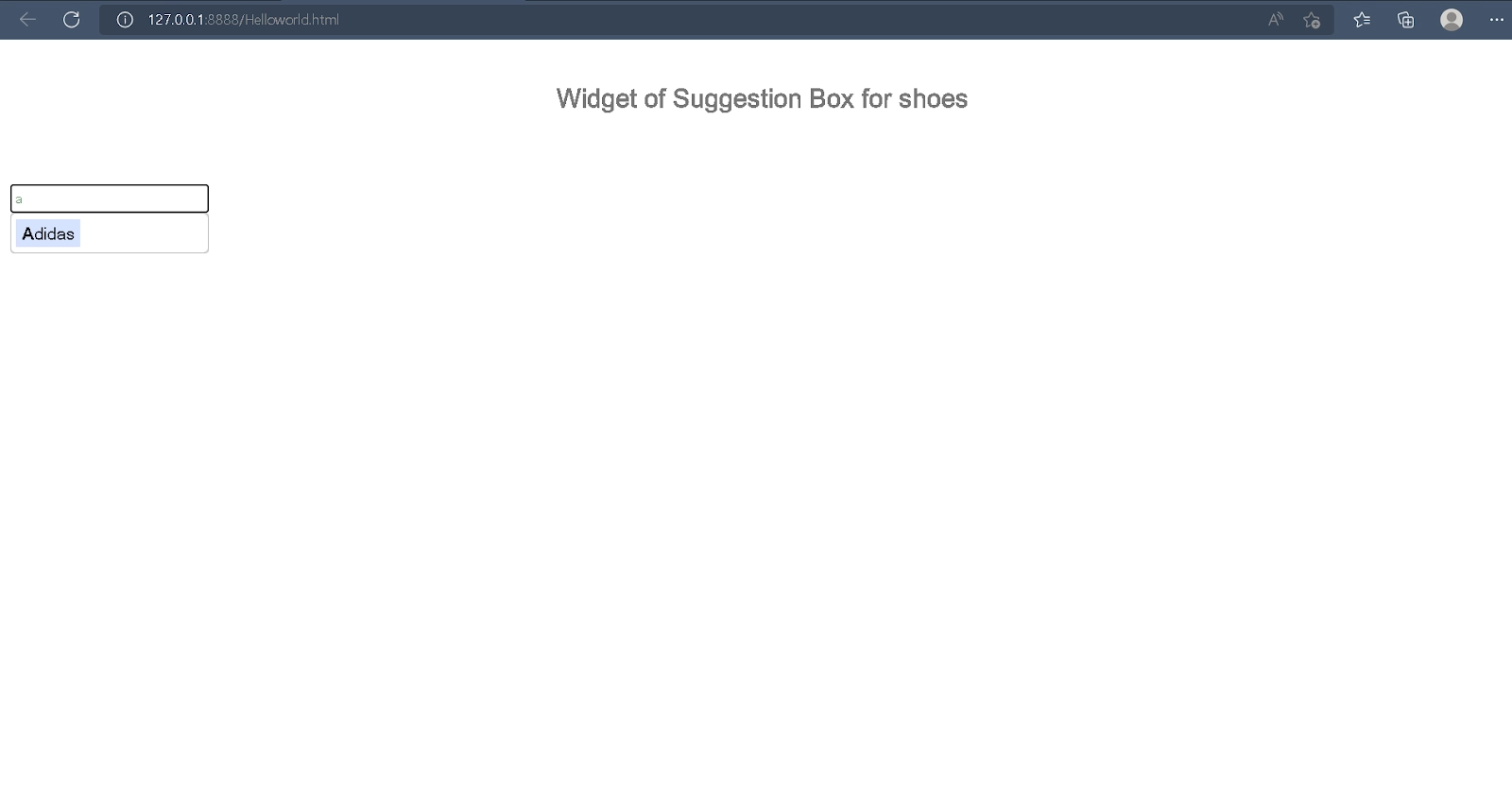
Output

output1

Frequently asked question

What is the primary objective of GWT?

GWT is a development toolkit that allows you to create and optimise complex browser-based applications. Its goal is to make productive development of high-performance web applications possible without the need for a developer.

What is the feature of the module tag in the * GWT XML file in GWT?

The module descriptor file extension is *. gwt. xml, where * is the application name, and this file should be located in the project's root.

What does a GWT *.nocache.js file do?

It includes the javascript code needed to retrieve a.cache.html file using a lookup table created by the GWT compiler and resolve deferred binding configurations (for example, browser detection).

What is Module Descriptor? 

A module descriptor is an XML configuration file that is used to configure a GWT application.

What does a Suggestbox represent?

The SuggestBox widget is a text box or text area that displays a pre-configured set of options that correspond to the user's input.

Conclusion

In this article, we learned about GWT and GWT suggestBox and how we can implement the GWT Suggestbox class with the help of the methods available for this particular class. We have also learned about the basic css and html code in order to implement the suggestbox.

To learn more about the GWT article please refer to the following articles:

GWT Ui Binder

GWT focus panel

GWT grid

To learn more about DSA, competitive coding and many more knowledgeable topics, please look into the guided paths on Coding Ninjas Studio. Also, you can enroll in our courses and check out the mock test and problems available to you. Please check out our interview experiences and interview bundle for placement preparations.

thank you

Please upvote our blog to help other ninjas grow.

Happy Learning

Live masterclass


