Do you think IIT Guwahati certified course can help you in your career?
Introduction
Django is one of Python's most popular, trusted, and reliableweb development frameworks. With Django, we can quickly create web applications without worrying about installation or dependency problems that we usually find with other frameworks.
AJAX (Asynchronous JavaScript And XML) allows websites to update asynchronously by exchanging data from the server. It means that we can update parts of our website without reloading it completely. It involves a combination of a browser-in-built XMLHttpRequestobject, HTML DOM, and JavaScript.
In the article, we will learn how to handle Ajax requests in Django.
How AJAX Works
There are many scenarios where we may make POST and GET requests to post and load data from the server asynchronously. Additionally, we can make our web application more dynamic and reduce the page load time with the help of Ajax. Some such scenarios are:
When an event occurs on the web application, such as a first-page load, link or button click, form submission, etc.,
When an XMLHttpRequest object is created to send the request to the server.
When the server responds to the requests.
When the response is captured, the server responds with response data.
How AJAX works
This article will make an app to validate if the username field is available as soon as the user enters the username. We will perform a simple check to see whether the username is already taken or not.
Initial Setup
First of all, we will create a project for handling Ajax requests in Django,
$ django-admin startproject django_ajax_example
The above command will create the Django project. Now let's make an app called "Coding Ninjas Studio” for the project by writing the following commands,
$ cd django_example
$ python manage.py startapp Coding Ninjas Studio
Making templates to carry out ajax requests in Django
In this article, we will use the jQuery library to implement JavaScript easily. Let's add jQuery in our Django application using jQuery CDN in the base.html file of the application,
We added jQuery version - 3.6.0 using jQuery CDN in the above code. In the code, we can see that we have a file app.js in the root/js directory; we will write all our javascript code in the app.js file.
Now, we will write for the urls.py file,
from django.urls import path
from . import views


urlpatterns = [
    # index view at /
    path('/',views.index,name="index"),
]
You can also try this code with Online Python Compiler
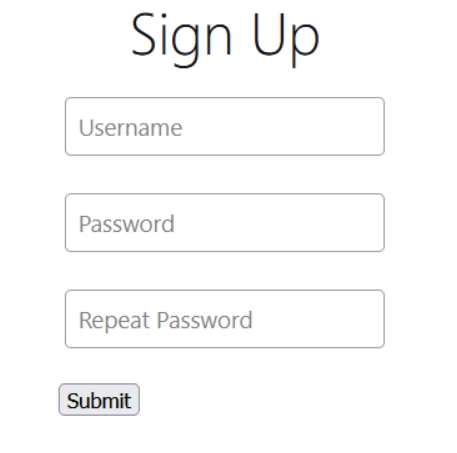
In the above code for the register.html template, we built a signup form to take input from the username and password field. Let's look at the output after rendering the template,
OUTPUT
Handling Ajax requests in Django
Till now, we have successfully created a signup form using Django templates. Now let's add ajax requests in the Django project to check whether the username is taken as soon as the user enters the username. We will use the id of the username field to add a listener to its change events.
In our app.js file in the root/js directory, we will write all our javascript code,
In the code above, the change event will trigger every time there is a change in the username value. We are using the POST method for the Ajax request (we can use any method according to our needs). And we can see that the success function is triggered if the username is already taken, which alerts the text "The username is taken".
We will update our view.py file to validate username data by adding the below code
from django.shortcuts import render
from django.http import HttpResponse
from django.contrib.auth.models import user


def index(request):
    return render(request,'register.html')


def validateUsername(request):
    username = request.POST['username']
    data = {
        'taken' : User.objects.filter(username__iexact=username).exists()
    }
    return JsonResponse(data)
You can also try this code with Online Python Compiler
In the above code, view.py is updated by adding the validateUsername function to check if the username is taken or not.
Now Let's update our urls.py file according to our updated view.py file. The updated code for urls.py is as,
from django.urls import path
from . import views


urlpatterns = [
    # index view at /
    path('/',views.index,name="index"),
    path('validate',views.validateuname,name="validate")
]
You can also try this code with Online Python Compiler
Now let's see if the validation of username by ajax requests in Django works appropriately in our browser,
(OUTPUT)
Frequently Asked Questions
What is AJAX? AJAX (Asynchronous JavaScript And XML) allows websites to update asynchronously by exchanging data from the server.
What is the use of POST, GET methods in AJAX requests? The POST request in AJAX is used to post data to the server, changing or manipulating the data in the database. At the same time, the GET request in AJAX helps retrieve the data from the server, which does not require any change or manipulation in the database.
Key Takeaways
Using examples, this article taught us how to handle Ajax requests in Django Model. We built a Django project with a signup page and validated if the username entered by the user is already taken or not by making Ajax requests.
Don't stop here. Check out the blogsBest Django Books, Top 30 Basic Django Interview Questions: Part 1, and Top 30 Intermediate Django Interview Questions: Part 2.
We hope you found this blog helpful. Liked the blog? Then feel free to upvote and share it.
Live masterclass
Ace 6-Figure GenAI Roles with AI-Engineering tool-kit
by Shantanu Shubham
29 Oct, 2026
11:30 AM
Build Your Own AI Data Analyst Using SQL + GenAI for 20L+ CTC
by Sumit Shukla
26 Oct, 2026
11:30 AM
Beyond Chatbots: Build an AI Support Agent & Prepare for AI Engineer Interviews
by Yogesh
27 Oct, 2026
11:30 AM
Prompt-to-Dashboard: Build Power BI Reports Faster with GenAI
by Abhishek Soni
28 Oct, 2026
11:30 AM
Ace 6-Figure GenAI Roles with AI-Engineering tool-kit
by Shantanu Shubham
29 Oct, 2026
11:30 AM
Build Your Own AI Data Analyst Using SQL + GenAI for 20L+ CTC







 7+ registered

