Do you think IIT Guwahati certified course can help you in your career?
Introduction
Hello Reader!!
We all come across web tables in our development journey. Web tables are similar to normal tables having rows and columns that we generally use. Handling Web tables is more difficult than dealing with any other components or controls.
Today, we are going to learn to handle these web tables in Katalon Studio.
Let’s get started!
How to handle Web Tables
Web tables
Like normal tables, web tables use rows and columns to show the data in an organized manner. The main difference is that they are presented on the web using HTML code. The HTML tag used to define a web table is <table>.
The web table contains the following tags:
table - This tag denotes a table.
tbody - This tag gives a container for rows and columns.
tr - This tag represents a row in the table.
td / th - Table data and table headers (td and th) show the columns in the corresponding table rows.
Below is an example of a basic web table
The HTML code to implement the above table is given below:
Example 1: Getting a text from a Web table and verifying it.
Scenario: Let us assume that we need to find the branch of the student “Nadia” in the above table.
Steps:
We will first find the location of the table.
We will then store all the table elements in the list.
We will iterate through each row and column using a loop. Hence we will capture the value in each cell.
Script Mode
import org.openqa.selenium.By as By
import org.openqa.selenium.WebDriver as WebDriver
import org.openqa.selenium.WebElement as WebElement
import com.kms.katalon.core.webui.driver.DriverFactory as DriverFactory
import com.kms.katalon.core.webui.keyword.WebUiBuiltInKeywords as WebUI

'Enter your html file location'
WebUI.openBrowser('file:///E:/CodingNinjas/Katalon/Web%20table/WebTable.html')

WebUI.maximizeWindow()

WebDriver driver = DriverFactory.getWebDriver()

'The value to be expected from the table'
String ExpectedValue = 'Nadia'

'Locating the table'
WebElement Table = driver.findElement(By.xpath('//table/tbody'))

'Locating the rows of the table'
List<WebElement> rows_table = Table.findElements(By.tagName('tr'))

'To calculate no of rows  present in the table'
int rows_count = rows_table.size()

'Loop will run for all the rows of the table'
Loop: for (int row = 0; row < rows_count; row++) {

    'To locate columns(cells) of that particular row'
    List<WebElement> Columns_row = rows_table.get(row).findElements(By.tagName('td'))

    'Calculating the number of columns(cells)  present in that particular row'

    int columns_count = Columns_row.size()

    println((('Number of cells present in the Row ' + row) + ' : ') + columns_count)

    'This will give the last cell of the given row'
    for (int column = 0; column < columns_count; column++) {

        'This will retrieve text from each column'
        String celltext = Columns_row.get(column).getText()

        println((((('Cell Value Of the row number ' + row) + ' and column number ') + column) + ' Is ') + celltext)

        'Checking if the text present in Cell is matching with the expected value'
        if (celltext == ExpectedValue) {

            'Getting the Branch if cell text i.e Student Name matches with Expected value'
            println('Text in row 3 is: ' + Columns_row.get(2).getText())

            'The loop will terminate after gettting the desired output from the table'
            Loop: break
        }
    }
}
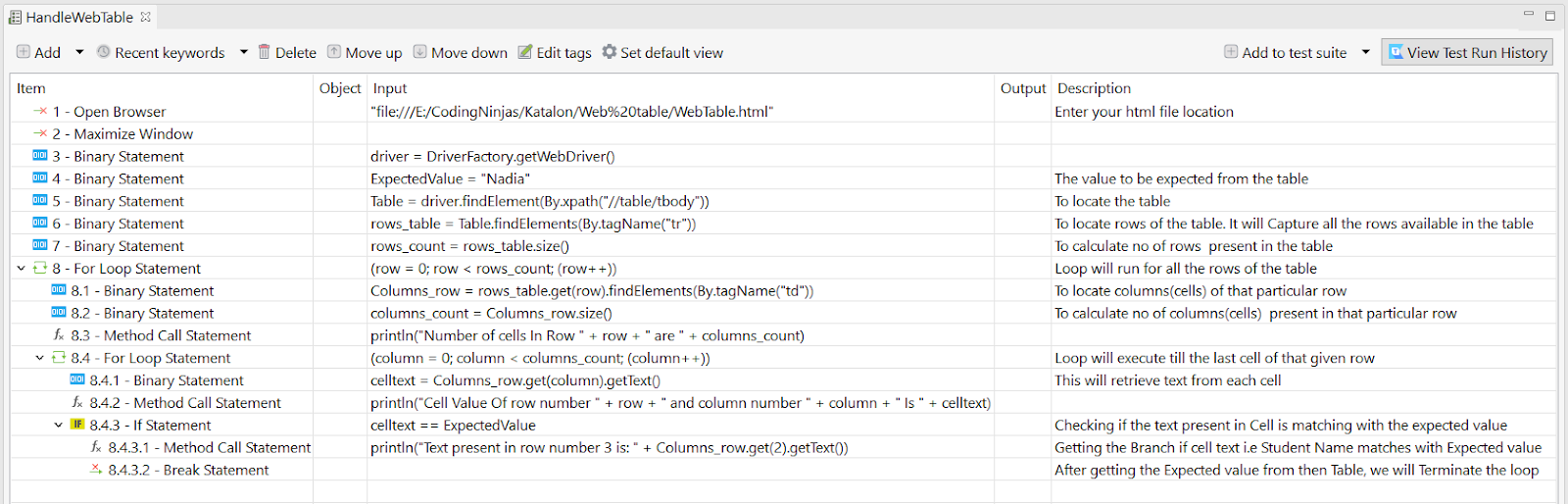
Manual Mode
Example 2: Performing actions on the Web table below.
Scenario: Let us edit the record with Student Id 912.
Script Mode
import org.openqa.selenium.By as By
import org.openqa.selenium.WebDriver as WebDriver
import org.openqa.selenium.WebElement as WebElement
import com.kms.katalon.core.webui.driver.DriverFactory as DriverFactory
import com.kms.katalon.core.webui.keyword.WebUiBuiltInKeywords as WebUI
import com.kms.katalon.core.mobile.keyword.MobileBuiltInKeywords as Mobile
import com.kms.katalon.core.cucumber.keyword.CucumberBuiltinKeywords as CucumberKW
import com.kms.katalon.core.webservice.keyword.WSBuiltInKeywords as WS
import com.kms.katalon.core.windows.keyword.WindowsBuiltinKeywords as Windows
import static com.kms.katalon.core.testobject.ObjectRepository.findTestObject
import static com.kms.katalon.core.testobject.ObjectRepository.findWindowsObject
import static com.kms.katalon.core.testdata.TestDataFactory.findTestData
import static com.kms.katalon.core.testcase.TestCaseFactory.findTestCase
import static com.kms.katalon.core.checkpoint.CheckpointFactory.findCheckpoint
import com.kms.katalon.core.model.FailureHandling as FailureHandling
import com.kms.katalon.core.testcase.TestCase as TestCase
import com.kms.katalon.core.testdata.TestData as TestData
import com.kms.katalon.core.testobject.TestObject as TestObject
import com.kms.katalon.core.checkpoint.Checkpoint as Checkpoint
import internal.GlobalVariable as GlobalVariable

'Enter the path of html file'
WebUI.openBrowser('file:///E:/CodingNinjas/Katalon/Web%20table/WebTable.html')

WebUI.maximizeWindow()

'Value to be Searched in Table'
String ExpectedValue = '912'

WebDriver driver = DriverFactory.getWebDriver()

'Locating the table'
WebElement Table = driver.findElement(By.xpath('//table/tbody'))

'Locating the row in the table '
List<WebElement> Rows = Table.findElements(By.tagName('tr'))

println('No. of rows: ' + Rows.size())

'Finding a matching text in the table and performing action'

'Loop will run for all the rows of the table'
table: for (int i = 0; i < Rows.size(); i++) {
    'To locate columns(cells) of that particular row'
    List<WebElement> Cols = Rows.get(i).findElements(By.tagName('td'))

    for (int j = 0; j < Cols.size(); j++) {
        'Verify the expected text in the each cell'
        if (Cols.get(j).getText().equalsIgnoreCase(ExpectedValue)) {

            'To perform action, locating the anchor tag in the desired value matched row.'
            Cols.get(4).findElement(By.tagName('a')).click()

            break
        }
    }
}
Manual Mode
Frequently Asked Questions
What is the use of a web table?
Tables provide for quick and easy reading of problems shown in rows and columns. Due to their simple design, adaptability, and convenience, they may often be used for benefit-risk communications.
What is a dynamic Web table?
There are two categories of HTML tables:
Static Tables: Data is static, meaning the number of columns and rows is constant.
Dynamic tables: Data is dynamic, meaning the number of rows and columns is not constant.
Is Katalon a framework?
A framework called Katalium offers a design for TestNG and Selenium-based test automation applications. To date, testers and automation developers prefer Katalon Studio when it comes to Selenium-based testing.
Conclusion
Let’s wind up!
With the help of this article, we got a basic understanding of how to manage web tables in Katalon Studio. We created our web table and handled several different scenarios with Katalon Studio.
We hope this blog has helped you understand the Katalon Studio and its working. To learn more about Katalon and its several features, you can refer to









 1+ registered

