Do you think IIT Guwahati certified course can help you in your career?
Introduction
Sorting is the process of placing objects in a specified order on a list or in a group. The following are some examples of popular sorting criteria: alphabetical or numerical. Sorting is done in ascending or descending order.
This article will go through the methods used for sorting strings in Java.
Why Sorting Strings Is Important in Java?
Sorting strings in Java plays a crucial role in making applications more efficient, user-friendly, and logically organized. It’s a common task in both interview questions and real-world software systems.
1. Improved Search and Retrieval Efficiency When strings are sorted, operations like binary search become possible, drastically improving retrieval times. For instance, in a contact list app, sorting names alphabetically makes it easier and faster for users to find a specific contact./
2. Lexicographical Data Presentation Displaying data in a readable order enhances user experience. Product catalogs, dropdown menus, or list views often require strings to be displayed in lexicographical (alphabetical) order for clarity and professionalism.
3. Essential in Data Cleaning and Processing Sorting strings is vital when processing logs, removing duplicates, or preparing reports. For example, in data pipelines, string sorting helps organize raw input data for further analysis or storage.
How to Sort a string in Java
A sequence of characters is referred to as a string. String objects are immutable in Java, meaning they can't be modified after being created. Although no string classes method is available for directly Sorting strings in Java, we may sort string array in Java by applying other methods one after the other. But first, we will see how we can operate over an immutable string in Java.
So, before we move on how to sort a string in Java, we first convert the given string into a character array using a string method - toCharArray(),
Code
class SortString {
    public static void main(String[] args) {
        String str = "codingninjas";
        char arr[] = str.toCharArray();
        // Testing if the string converted into array is mutable now.
        arr[2] = 'T';
        System.out.print(arr);
    }
}
You can also try this code with Online Java Compiler
A string array can be sorted by comparing each element to the remainder. We've done the same thing in the following example. Two for-loops have been utilized. In comparison, the inner (second) for loop avoids repeats. If the condition (arr[i].compareTo(arr[j])>0 is true, the swapping and sorting of the array is performed.
Let us see an example of sorting strings in Java using a user-defined algorithm, bubble sort.
Code
import java.io.*;
class SortString {

    // Main driver method
    public static void main(String[] args) throws Exception
    {
        // Custom string
        String str = "codingninjas";

        // Converting string into an array for operating
        char arr[] = str.toCharArray();

        // User-defined logic for sorting strings in java
        char temp;
        int i = 0;
        while (i < arr.length) {
            int j = i + 1;
            while (j < arr.length) {
                if (arr[j] < arr[i]) {

                    // Comparing the characters one by one
                    temp = arr[i];
                    arr[i] = arr[j];
                    arr[j] = temp;
                }
                j += 1;
            }
            i += 1;
        }
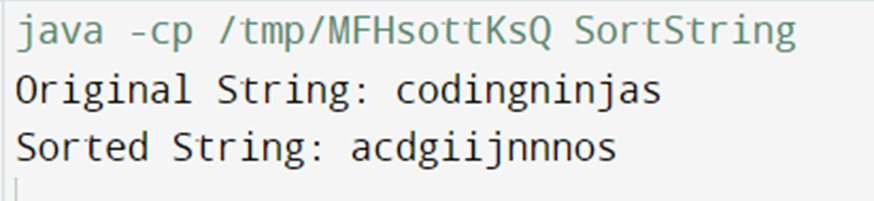
        System.out.println("Original String: "+ str);

		// Final sorted array
        System.out.println("Sorted String: "+ new String(arr));
    }
}
You can also try this code with Online Java Compiler
Arrays is a Java class that contains the sort() method for sorting an array in ascending order. It is part of the Java.util package. It sorts using the dual-pivot Quicksort algorithm. It has an O(n log(n)) complexity. It's a static method that takes an array as an argument but doesn't perform anything with it. We may use the class name to call it directly. It accepts int, float, double, long, char, and byte arrays.
Let as see an example how to sort a string in java using Arrays.sort().
Code
import java.util.Arrays;
class SortString {
    public static void main(String[] args) {
        String str = "codingninjas";
        char arr[] = str.toCharArray();
        System.out.println("Original String: "+ str);

        // Sorting strings in Java using Arrays.sort()
        Arrays.sort(arr);
        System.out.println("Sorted String: "+ new String(arr));
    }
}
You can also try this code with Online Java Compiler
Note: The Java compiler sorts the character array based on the element's ASCII codes. Therefore, it will put the uppercase letters at the starting and the lower case alphabets later. To overcome this, we can compare the lowercase of each element while sorting strings in java using a custom method.
Why do we need to convert a string into a character array?
Strings defined in Java are immutable, and we need to operate on them for sorting purposes, for which we need to convert them into characters array first.
How to sort a string in java in non-increasing order?
String or the converted character array can be sorted in descending order using the opposite logic used in the user-defined comparator.
What does the compare(char a, char b) function do and return?
public int compare(Object a, Object b) will return negative if a has to come before b, will return positive if a has to come after b, and return 0 if a is equal to b.
How to convert character array back to string?
We can make a new string using string builder and append elements into it or convert it using the Arrays.toString() method.
What are the most famous sorting algorithms used in Java?
Here are the top five Java sorting algorithms:
Merge Sort
Heap Sort
Insertion Sort
Selection Sort
Bubble Sort
Conclusion
In this article, we have intensively learned how to sort a string in Java with user-defined methods and the in-built Arrays.sort() method. We have more such articles on Java such as Wrapper classes, Multithreading in Java, exception handling in Java to enhance your knowledge in the field.
We hope that this blog has helped you enhance your knowledge of sorting strings in Java and if you'd like to learn more, check out our articles on Code Studio.







 1+ registered

