Table of contents
1.
Introduction
2.
What exactly are Web Services?
3.
Web Services Features
4.
Web Services Components
5.
RESTful Web Services
6.
Constraints of RESTful Services
7.
RESTful web services' benefits
8.
Service to search through all of a user's posts
8.1.
Step 1: Creating data Entities
8.2.
Step 2: Connecting the services to use JPA
8.3.
Step 3: Create dao services that will interact with our repositories
8.4.
Step 4: Creating controllers to access the service
8.5.
Step 5: Running the service
9.
Frequently Asked Questions
9.1.
What are RESTful Web Services?
9.2.
What are SOAP Web Services?
9.3.
Can we still use API versioning if we remove any functionality from an API?
9.4.
Can a browser accept the header method?
9.5.
What are some of the API version-breaking changes?
10.
Conclusion
Last Updated: Aug 13, 2025
Medium

Implementing a GET service to retrieve all Posts of a User

Career growth poll
Do you think IIT Guwahati certified course can help you in your career?

Introduction

REpresentational State Transfer is the abbreviation for REST. RESTful web services' primary objective is to increase web services' effectiveness. The various notions that are already available in HTTP are used to define services in RESTful web services. REST is not a protocol; it is an architectural strategy.

The typical structure of message exchange is not specified. REST services can be created using both XML and JSON. With REST, JSON is the more popular format. In REST, the essential abstraction is the resource. Anything can be a resource. Through a Uniform Resource Identifier, it can be accessed (URI).

The resource provides XML, HTML, and JSON representations. A resource represents the current status. We offer a representation of the resource when it is requested. The following HTTP methods are crucial:

  • GET: It does a resource read.
  • PUT: An existing resource is updated.
  • POST: A new resource is produced.
  • DELETE: The help is destroyed.

What exactly are Web Services?

Restful web services

Web services are a class of internet software that operates in a distributed environment using a defined message protocol. REST, SOAP, WSDL, and UDDI integrate web-based applications across the network. Java web services, for instance, can interface with. Internet software

Web Services Features

  • Web services are made for interactivity between applications.
  • It ought to be compatible.
  • It ought to support networked communication.

Web Services Components

The online services must meet the following requirements:

  • The web service needs to be reachable online.
  • You can find the web service using a widely used method like UDDI.
  • Any programming language or operating system must be able to use it.

RESTful Web Services

Client and server applications connected over the internet are known as RESTful Web Services. RESTful Web Services are Web Services built on the REST Architecture. Every element of the REST architecture is a resource. RESTful Web Services allow communication between software programs built on various frameworks and platforms. Web services are comparable to code-on-demand. A RESTful Web Service is a method or function that you can access by making an HTTP request to a URL, and the service responds by returning the result. With the help of appropriate projects and examples, you will learn the fundamentals of RSETful Web Services in this course.

Constraints of RESTful Services

  • Both a service provider and a service customer are required.
  • The service is without states.
  • The outcome of the service must be cacheable.
  • The interface is consistent and makes resources available.
  • The service should assume a layered architecture.

RESTful web services' benefits

  • Platform agnostic are RESTful web services.
  • It may be created and executed on any platform using any programming language.
  • It offers several data formats, including JSON, text, HTML, and XML.
  • Because there are no stringent specifications with SOAP, it is quicker than SOAP.
  • You can use them again.
  • They are linguistically inert.

Service to search through all of a user's posts

We shall gather all of a specific user's posts in one section.

Service to search through all of a user's posts

Step 1: Creating data Entities

  • Create User and Post class and @Entity annotation to represent these as a model/entity.
  • Add getters and setters to the User and Post class.
  • Add toString() method to the User and Post class. (Optional but better to have)
     

User.java

package com.example.starterProjectUsingMySql.model;

import javax.persistence.*;

@Entity
public class User {
   @Id
   @GeneratedValue(strategy= GenerationType.AUTO)
   private Integer id;

   private String firstName;

   private String lastName;

   private String email;

   private String address;

   //default constructor
   protected User() {

   }

   public User(Integer id, String firstName, String lastName, String email, String address) {
       super();
       this.id = id;
       this.firstName = firstName;
       this.lastName = lastName;
       this.email = email;
       this.address = address;
   }


   public Integer getId() {
       return id;
   }


   public void setId(Integer id) {
       this.id = id;
   }


   public String getFirstName() {
       return firstName;
   }


   public void setFirstName(String firstName) {
       this.firstName = firstName;
   }


   public String getLastName() {
       return lastName;
   }


   public void setLastName(String lastName) {
       this.lastName = lastName;
   }


   public String getEmail() {
       return email;
   }


   public void setEmail(String email) {
       this.email = email;
   }


   public String getAddress() {
       return address;
   }


   public void setAddress(String address) {
       this.address = address;
   }


   @Override
   public String toString() {
       return String.format("User [id=%s, firstName=%s, lastName=%s email=%s address=%s]", id, firstName, lastName, email, address);
   }

}
You can also try this code with Online Java Compiler
Run Code


Post.java

package com.example.starterProjectUsingMySql.model;

import javax.persistence.*;

@Entity
public class Post {

   @Id
   @GeneratedValue(strategy = GenerationType.AUTO)
   private Integer id;


   private String content;


   @ManyToOne(targetEntity = User.class)
   @JoinColumn(name = "userId")
   private User user;


   protected Post() {


   }


   public Post(String content, User user) {
       this.content = content;
       this.user = user;
   }
  
   public Integer getId() {
       return id;
   }


   public void setId(Integer id) {
       this.id = id;
   }


   public String getContent() {
       return content;
   }


   public void setContent(String content) {
       this.content = content;
   }


   public User getUser() {
       return user;
   }


   public void setUser(User user) {
       this.user = user;
   }


   @Override
   public String toString() {
       return String.format("Post [id=%s, description=%s]", id);
   }


}
You can also try this code with Online Java Compiler
Run Code


@JoinColumn notation tells the Post is mapped to User by a foriegn key user_id.

Step 2: Connecting the services to use JPA

  • Create UserRepository and PostRepository classes.
  • Let UserRepository extend JpaRepository<User, Integer>.
  • Let PostRepository extend JpaRepository<User, Integer>.


You will have to specify the entity that needs to be managed by JPARepository in <>.

UserRepository.java

package com.example.starterProjectUsingMySql.repository;

import com.example.starterProjectUsingMySql.model.User;
import org.springframework.data.jpa.repository.JpaRepository;

public interface UserRepository extends JpaRepository<User, Integer> {

}
You can also try this code with Online Java Compiler
Run Code


PostRepository.java

package com.example.starterProjectUsingMySql.repository;

import com.example.starterProjectUsingMySql.model.Post;
import org.springframework.data.jpa.repository.JpaRepository;
import org.springframework.data.jpa.repository.Query;

import java.util.List;

public interface PostRepository extends JpaRepository<Post, Integer> {

   @Query(value = "SELECT * FROM post WHERE user_id = :id", nativeQuery = true)
   List<Post> getAllPostsOfUser(Integer id);

}
You can also try this code with Online Java Compiler
Run Code

Step 3: Create dao services that will interact with our repositories

  • Create UserDao and PostDao interfaces. (The controller is directly going to call the methods defined in the interfaces, this will add the layer of abstraction above our direct logic)
     
  • Create UserDaoImpl and PostDaoImpl classes. 
     
  • Let UserDaoImpl and PostDaoImpl implement UserDao and PostDao respectively.
     
  • Add @Service annotation to UserDaoImpl and PostDaoImpl to represent that these are service providers.
     
  • Add the following methods to the UserDao.

    • User saveUser(User user): To save the user to the DB
       
    • List<User> getAllUsers(): To get all the users from the DB
       
    • void deleteUser(Integer id): To delete the user
       
    • Optional<User> getUser(Integer id) throws Exception: To get the user by id.
       
  • Add the following methods to the PostDao.

    • Post addPost(Post post): To add a post to the DB
       
    • List<Post> getAllPost(): To fetch all the posts from the DB
       
  • List<Post> getAllPostsOfUser(Integer id) throws Exception: To get all the posts of the user.
     

UserDao.java

package com.example.starterProjectUsingMySql.service;


import com.example.starterProjectUsingMySql.model.Post;
import com.example.starterProjectUsingMySql.model.User;


import java.util.List;
import java.util.Optional;


public interface UserDao {


   public User saveUser(User user);


   public List<User> getAllUsers();


   public void deleteUser(Integer id);


   public Optional<User> getUser(Integer id) throws Exception;


}
You can also try this code with Online Java Compiler
Run Code


PostDao.java

package com.example.starterProjectUsingMySql.service;
import com.example.starterProjectUsingMySql.model.Post;

import java.util.List;

public interface PostDao {

   public Post addPost(Post post);

   public List<Post> getAllPost();

   public List<Post> getAllPostsOfUser(Integer id) throws Exception;

}
You can also try this code with Online Java Compiler
Run Code


UserDaoImpl.java

package com.example.starterProjectUsingMySql.service;


import com.example.starterProjectUsingMySql.model.Post;
import com.example.starterProjectUsingMySql.repository.UserRepository;
import com.example.starterProjectUsingMySql.model.User;
import org.springframework.beans.factory.annotation.Autowired;
import org.springframework.stereotype.Service;


import java.util.List;
import java.util.Optional;


@Service
public class UserDaoImpl implements UserDao {


   @Autowired
   private UserRepository userRepository;


   @Override
   public User saveUser(User user) {
       return userRepository.save(user);
   }


   @Override
   public List<User> getAllUsers() {
       return userRepository.findAll();
   }


   @Override
   public void deleteUser(Integer id) {
       userRepository.deleteById(id);
   }


   @Override
   public Optional<User> getUser(Integer id) throws Exception {
       Optional<User> user = userRepository.findById(id);
       if(!user.isPresent()) {
           throw new Exception("User not found");
       }
       return user;
   }
}
You can also try this code with Online Java Compiler
Run Code


PostDaoImpl.java

package com.example.starterProjectUsingMySql.service;

import com.example.starterProjectUsingMySql.model.Post;
import com.example.starterProjectUsingMySql.model.User;
import com.example.starterProjectUsingMySql.repository.PostRepository;
import org.springframework.beans.factory.annotation.Autowired;
import org.springframework.stereotype.Service;


import java.util.List;
import java.util.Optional;


@Service
public class PostDaoImpl implements PostDao {


   @Autowired
   private PostRepository postRepository;


   @Override
   public Post addPost(Post post) {
       return postRepository.save(post);
   }


   @Override
   public List<Post> getAllPost() {
       return postRepository.findAll();
   }


   @Override
   public List<Post> getAllPostsOfUser(Integer id) throws Exception {
       return postRepository.getAllPostsOfUser(id);
   }
}
You can also try this code with Online Java Compiler
Run Code

Step 4: Creating controllers to access the service

  • Create a UserController.class and add the following endpoints

    • /addUser: to add a new user
       
    • /user/all: to get all the users
       
    • /user/{id}: to get details of a particular user
       
    • /user/delete/{id}: to delete a user by id.
       
  • Create a PostController.class and add the following endpoints.

    • /addPost: to add the post
       
    • /post/all: to get all the posts 
       
    • /user/post/{id}: to get all the posts of a user.


UserController.class

package com.example.starterProjectUsingMySql.controller;


import com.example.starterProjectUsingMySql.model.Post;
import com.example.starterProjectUsingMySql.service.UserDao;
import com.example.starterProjectUsingMySql.model.User;
import org.springframework.beans.factory.annotation.Autowired;
import org.springframework.http.MediaType;
import org.springframework.http.ResponseEntity;
import org.springframework.web.bind.annotation.*;
import java.util.List;
import java.util.Optional;


@RestController
public class UserController {


   @Autowired
   private UserDao userDaoService;


   @PostMapping(
       path = "/addUser",
       consumes = MediaType.APPLICATION_JSON_VALUE,
       produces = MediaType.APPLICATION_JSON_VALUE
   )
   public ResponseEntity<User> addNewUser(@RequestBody User user) {


       User savedUser = userDaoService.saveUser(user);
       return ResponseEntity.ok().body(savedUser);
   }


   @GetMapping(path = "/user/all")
   public ResponseEntity<List<User>> getAllUsers() {
       return  ResponseEntity.ok().body(userDaoService.getAllUsers());
   }


   @GetMapping(path = "/user/{id}")
   public ResponseEntity<Optional<User>> getUserById(@PathVariable Integer id) {
       try{
           return ResponseEntity.ok().body(userDaoService.getUser(id));
       } catch (Exception e) {
           return ResponseEntity.badRequest().body(null);
       }


   }


   @DeleteMapping(path = "/user/delete/{id}")
   public ResponseEntity deleteUser(@PathVariable Integer id) {
       userDaoService.deleteUser(id);
       return  ResponseEntity.ok().body("User deleted");
   }
}

You can also try this code with Online Java Compiler
Run Code


PostController.java

package com.example.starterProjectUsingMySql.controller;

import com.example.starterProjectUsingMySql.model.Post;
import com.example.starterProjectUsingMySql.service.PostDao;
import org.springframework.beans.factory.annotation.Autowired;
import org.springframework.http.MediaType;
import org.springframework.http.ResponseEntity;
import org.springframework.web.bind.annotation.*;
import java.util.List;


@RestController
public class PostController {
   @Autowired
   private PostDao postDaoService;


   @PostMapping(
       path = "/addPost",
       consumes = MediaType.APPLICATION_JSON_VALUE,
       produces = MediaType.APPLICATION_JSON_VALUE
   )
   public ResponseEntity<Post> addNewUser(@RequestBody Post post) {


       Post savedPost = postDaoService.addPost(post);

       return ResponseEntity.ok().body(savedPost);
   }


   @GetMapping(path = "/post/all")
   public ResponseEntity<List<Post>> getAllUsers() {
       return  ResponseEntity.ok().body(postDaoService.getAllPost());
   }


   @GetMapping(path = "/user/post/{id}")
   public ResponseEntity<List<Post>> getAllPostsOfUserById(@PathVariable Integer id) {
       try{
           return ResponseEntity.ok().body(postDaoService.getAllPostsOfUser(id));
       } catch (Exception e) {
           return ResponseEntity.badRequest().body(null);
       }
   }
}
You can also try this code with Online Java Compiler
Run Code

Step 5: Running the service

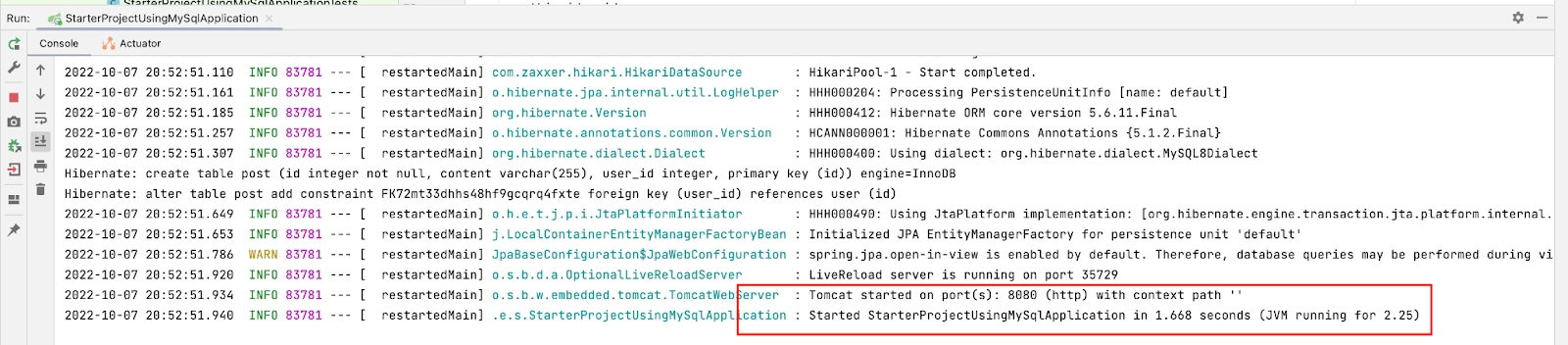
  • Build and run the project
Running the service.
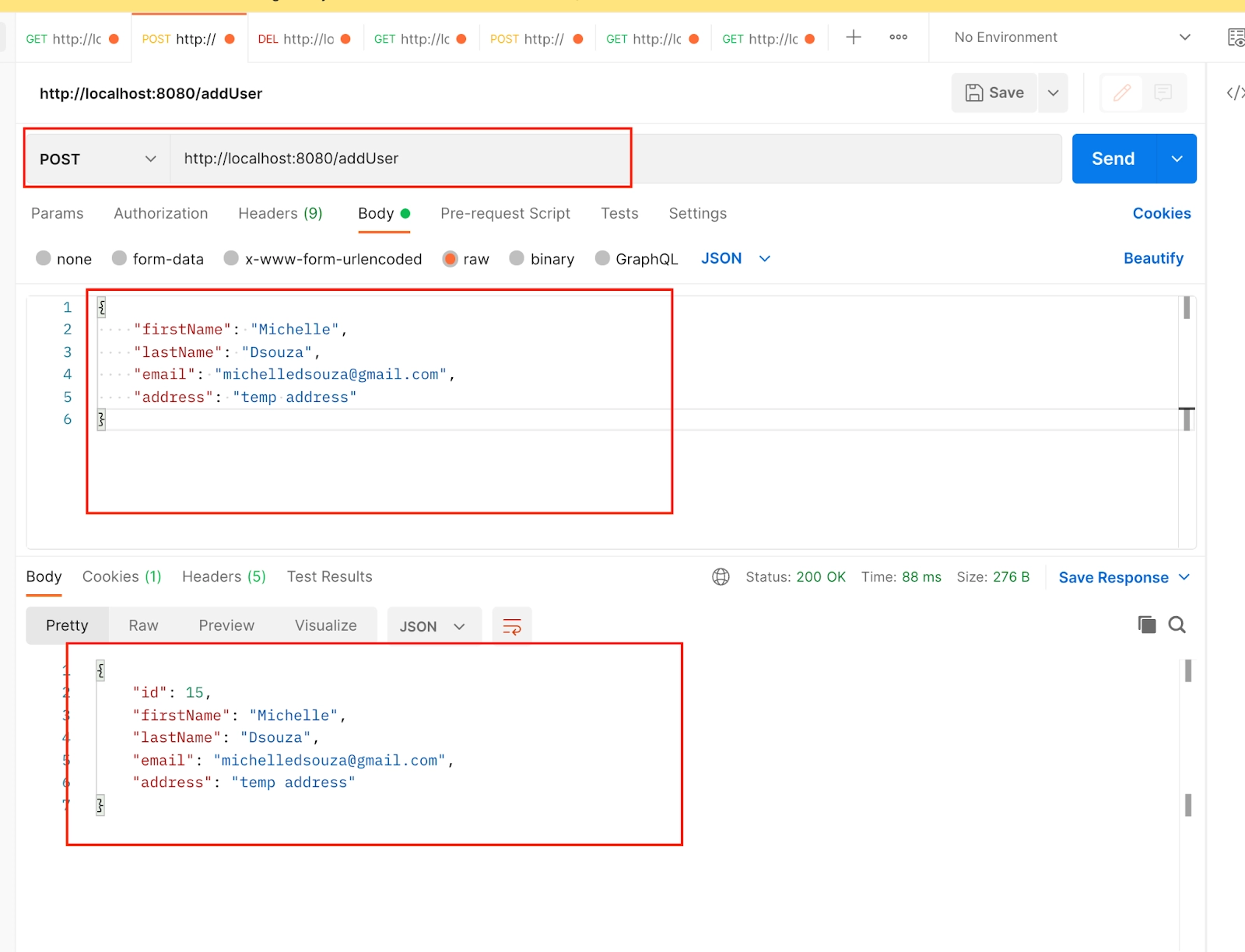
  • Open postman and add the URL http://localhost:8080/addUser to add the user. Choose Post as HTTP method. Select body, then select raw, and then select JSON from the dropdown. Add the following JSON and send the request. 
     
{
   "firstName": "Michelle",
   "lastName": "Dsouza",
   "email": "michelledsouza@gmail.com",
   "address": "temp address"
}


You can add more users in a similar way. To see if the user is saved or not in the new tab add the URL http://localhost:8080/user/all and HTTP method as GET and send the request.

Running the service.
  • Similar to we added the user, we will be adding the post of the user with the following JSON data, URL = http://localhost:8080/addPost, HTTP method: POST.
     
{
   "content": "Hey folks!! This is my first blog so let me know your views. I hope you like it",
   "user": {
       "id": 15,
       "firstName": "Michelle",
       "lastName": "Dsouza",
       "email": "michelledsouza@gmail.com",
       "address": "temp address"
   }
}


Running the service.
SQL query
Running the service.

Frequently Asked Questions

What are RESTful Web Services?

REST stands for REpresentational State Transfer. The main goal of RESTful web services is to make web services more effective. REST is an architectural approach, not a protocol. It tries to define services using the different concepts that are already present in HTTP.

What are SOAP Web Services?

SOAP is the acronym for Simple Object Access Protocol. It defines the standard XML format and the way to build web services. We use Web Service Definition Language (WSDL) to determine the format of the request XML and the response XML.

Can we still use API versioning if we remove any functionality from an API?

Removing functionality means modifying the features of the API; in this case, API versioning is required.

Can a browser accept the header method?

The Accept Header technique requires a plugin and is less universally applicable than URI versioning.

What are some of the API version-breaking changes?

We are modifying the data format, adding new features, and many other things.

Conclusion

Client and server applications that connect over the internet are known as RESTful Web Services. RESTful Web Services allow for communication between software programs that are built on various frameworks and platforms. A RESTful Web Service is a method or function that can be accessed by making an HTTP request to a URL, and the service responds by returning the result. With the help of appropriate projects and examples, you will learn the fundamentals of RESTful Web Services in this course. 

Refer to our Test Seriesproblems listsproblems, participate in contests, and take a look at our courses that will help you become proficient in DSA in PythonC++Java, and Competitive programming. These Interview experiences will give you a heads-up on what you must prepare for!
Live masterclass