Table of contents
1.
Introduction
1.1.
HTTP's key techniques
2.
REST Service Constraints
3.
Implementation of Creating A Post For Specific Users
3.1.
Step 1: Creating data Entities
3.2.
Step 2: Connecting the services to use JPA
3.3.
Step 3: Creating controllers to access the service
3.4.
Step 4: Running the service.
4.
Frequently Asked Questions
4.1.
What does Spring Boot's post method do?
4.2.
What is the POST API's operation?
4.3.
What distinguishes the REST and SOAP APIs from one another?
4.4.
I want to use the REST API, but how do I POST a request?
4.5.
Is it possible to update data using the POST method?
4.6.
In the REST, is it possible to use "Put" instead of "POST"?
5.
Conclusion
Last Updated: Mar 27, 2024
Medium

Create a Post for a User Implementing The POST Service

Career growth poll
Do you think IIT Guwahati certified course can help you in your career?

Introduction

REST’s name is referred to as "Representational State Transfer." It was invented by the same guy who designed HTTP, Roy Thomas Fielding. Enhancing the efficacy of web services is the primary goal of RESTful web services. RESTful web services define their services using several concepts that are already present in HTTP. The architectural approach known as REST is not a protocol.

It does not specify the usual message exchange format. REST services can be built using XML or JSON, respectively. JSON is the most popular format when it comes to REST. A resource is a critical abstraction in REST. Resources might be everything and anything. A Uniform Resource Identifier can lead to it (URI). An example would be:

Only a small number of the resource's formats, such as XML, HTML, and JSON, are currently covered by representational resources. We offer a fictitious version of the help when we ask for it.

HTTP's key techniques

Among HTTP's fundamental techniques are

  • GET: A resource is read.


  • PUT: It updates a resource that already exists.


  • POST: It creates a new resource when you POST.


  • DELETE: This operation ends the resource.


The following standard status code is defined by HTTP as well:

  • 404: RESOURCE NOT FOUND


  • 200: SUCCESS


  • 201: CREATED


  • 401: UNAUTHORIZED


  • 500: Server Error

REST Service Constraints

  • Both service providers and consumers are necessary.


  • It is an international service.


  • It must be possible to cache the service results.


  • Resources are exposed using a consistent interface.


  • A layered architecture for the service should be assumed.

Implementation of Creating A Post For Specific Users


To create a post for a specific user, we shall allow post-operation in this area.
 

Implementation of Creating A Post For Specific Users

Step 1: Creating data Entities

  • Create User and Post class and @Entity annotation to represent these as a model/entity.


  • Add getters and setters to the User and Post class.


  • Add toString() method to the User and Post class. (Optional but better to have)


User.java

package com.example.codingninjas;

import javax.persistence.*;

@Entity
public class User {
  @Id
  @GeneratedValue(strategy= GenerationType.AUTO)
  private Integer id;

  private String firstName;

  private String lastName;

  private String email;

  private String address;

  //default constructor
  protected User() {

  }

  public User(Integer id, String firstName, String lastName, String email, String address) {
      super();
      this.id = id;
      this.firstName = firstName;
      this.lastName = lastName;
      this.email = email;
      this.address = address;
  }


  public Integer getId() {
      return id;
  }


  public void setId(Integer id) {
      this.id = id;
  }


  public String getFirstName() {
      return firstName;
  }


  public void setFirstName(String firstName) {
      this.firstName = firstName;
  }


  public String getLastName() {
      return lastName;
  }


  public void setLastName(String lastName) {
      this.lastName = lastName;
  }


  public String getEmail() {
      return email;
  }

  public void setEmail(String email) {
      this.email = email;
  }

  public String getAddress() {
      return address;
  }

  public void setAddress(String address) {
      this.address = address;
  }

  @Override
  public String toString() {
      return String.format("User [id=%s, firstName=%s, lastName=%s email=%s address=%s]", id, firstName, lastName, email, address);
  }

}
You can also try this code with Online Java Compiler
Run Code


Post.java

package com.example.codingninjas;

import javax.persistence.*;

@Entity
public class Post {

  @Id
  @GeneratedValue(strategy = GenerationType.AUTO)
  private Integer id;

  private String content;

  @ManyToOne(targetEntity = User.class)
  @JoinColumn(name = "userId")
  private User user;

  protected Post() {
  }

  public Post(String content, User user) {
      this.content = content;
      this.user = user;
  }

  public Integer getId() {
      return id;
  }

  public void setId(Integer id) {
      this.id = id;
  }

  public String getContent() {
      return content;
  }

  public void setContent(String content) {
      this.content = content;
  }

  public User getUser() {
      return user;
  }

  public void setUser(User user) {
      this.user = user;
  }

  @Override
  public String toString() {
      return String.format("Post [id=%s, description=%s]", id);
  }


}
You can also try this code with Online Java Compiler
Run Code

@ManyToOne annotation indicates that a user can do many posts. The relationship between post and user is many-to-one. 

@Entity annotation indicates that it is an entity and a table needs to be created for it.

Step 2: Connecting the services to use JPA

  • Create UserRepository and PostRepository classes.


  • Let UserRepository extend JpaRepository<User, Integer>.


  • Let PostRepository extend JpaRepository<User, Integer>.
     

You will have to specify the entity that needs to be managed by JPARepository in <>.


UserRepository.java

package com.example.codingninjas;

import org.springframework.data.jpa.repository.JpaRepository;

public interface UserRepository extends JpaRepository<User, Integer> {

}
You can also try this code with Online Java Compiler
Run Code
PostRepository.java
package com.example.codingninjas;

import org.springframework.data.jpa.repository.JpaRepository;
import org.springframework.data.jpa.repository.Query;

import java.util.List;

public interface PostRepository extends JpaRepository<Post, Integer> {

     @Query(value = "SELECT * FROM post WHERE user_id = :id", nativeQuery = true)
     List<Post> getAllPostsOfUser(Integer id);

}
You can also try this code with Online Java Compiler
Run Code

@Query annotation is used to add dynamic queries in case we do  not find a suitable method provided by JPA to access the data from the table.

Step 3: Creating controllers to access the service

  • Create a UserController.class and add the following endpoints

    • /addUser: to add a new user
    • /user/all: to get all the users

       
  • Create a PostController.class and add the following endpoints.

     
  • /addPost: to add the post

     
  • /post/all: to get all the posts 

     
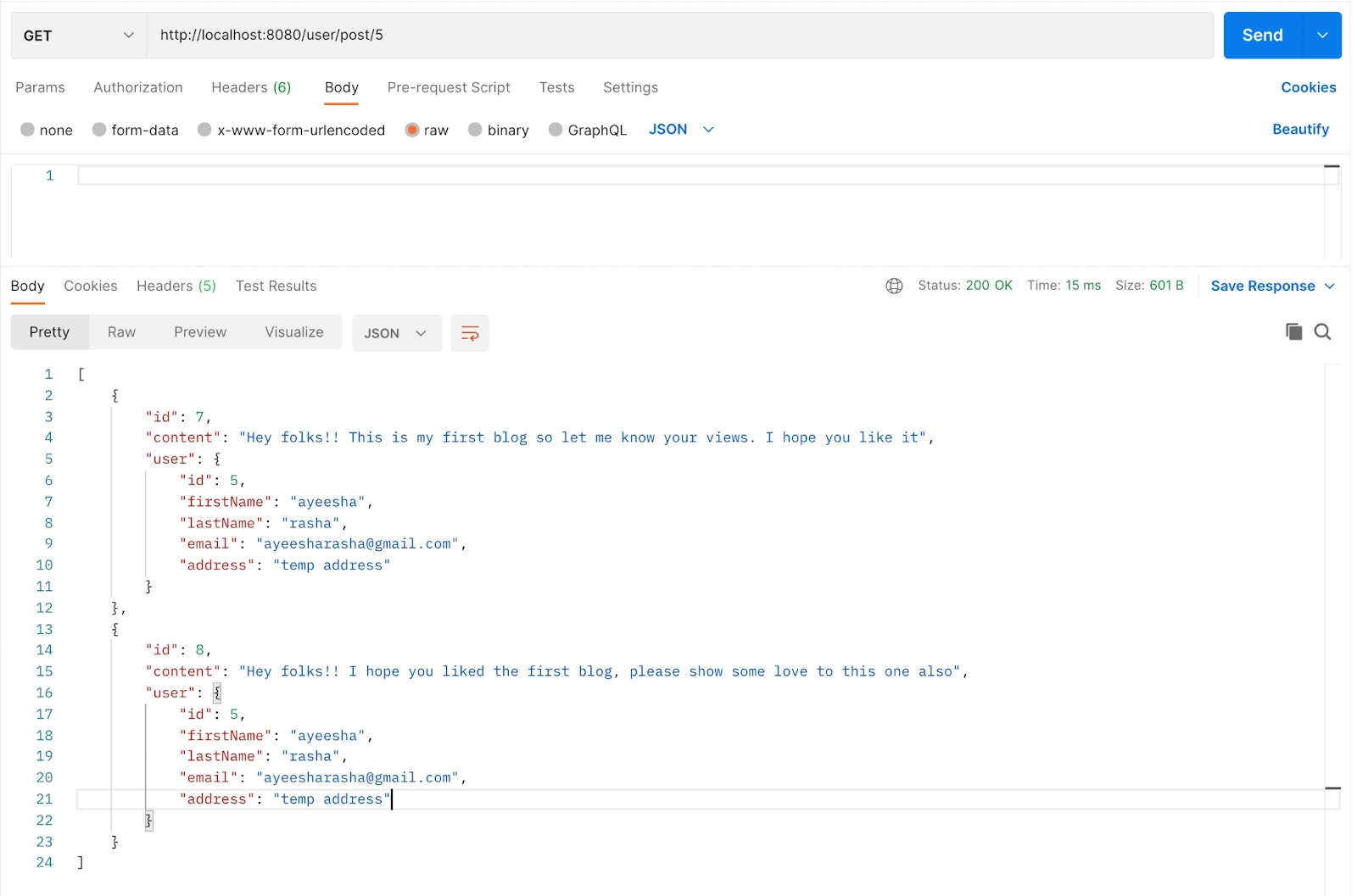
  • /user/post/{id}: to get all the posts of a user.


UserController.class

package com.example.codingninjas;


import org.springframework.beans.factory.annotation.Autowired;
import org.springframework.http.ResponseEntity;
import org.springframework.web.bind.annotation.GetMapping;
import org.springframework.web.bind.annotation.PostMapping;
import org.springframework.web.bind.annotation.RequestBody;
import org.springframework.web.bind.annotation.RestController;


import java.util.List;


@RestController
public class UserController {
   @Autowired
  private UserRepository userRepository;


  @PostMapping(path = "/addUser")
  public ResponseEntity<User> addNewUser(@RequestBody User user) {
      User savedUser = userRepository.save(user);
      return ResponseEntity.ok().body(savedUser);
  }


  @GetMapping(path = "/user/all")
  public ResponseEntity<List<User>> getAllUsers() {
      return  ResponseEntity.ok().body(userRepository.findAll());
  }


}
You can also try this code with Online Java Compiler
Run Code

PostController.java

package com.example.codingninjas;

import org.springframework.beans.factory.annotation.Autowired;
import org.springframework.http.ResponseEntity;
import org.springframework.web.bind.annotation.*;

import java.util.List;

@RestController
public class PostController {
    @Autowired
   private PostRepository postRepository;

   @PostMapping(path = "/addPost")
   public ResponseEntity<Post> addNewUser(@RequestBody Post post) {

       Post savedPost = postRepository.save(post);
       return ResponseEntity.ok().body(savedPost);
   }

   @GetMapping(path = "/post/all")
   public ResponseEntity<List<Post>> getAllPosts() {
       return  ResponseEntity.ok().body(postRepository.findAll());
   }

   @GetMapping(path = "/user/post/{id}")
   public ResponseEntity<List<Post>> getAllPostsOfUserById(@PathVariable Integer id) {
       try{
           return ResponseEntity.ok().body(postRepository.getAllPostsOfUser(id));
       } catch (Exception e) {
           return ResponseEntity.badRequest().body(null);
       }
   }
}
You can also try this code with Online Java Compiler
Run Code

Step 4: Running the service.

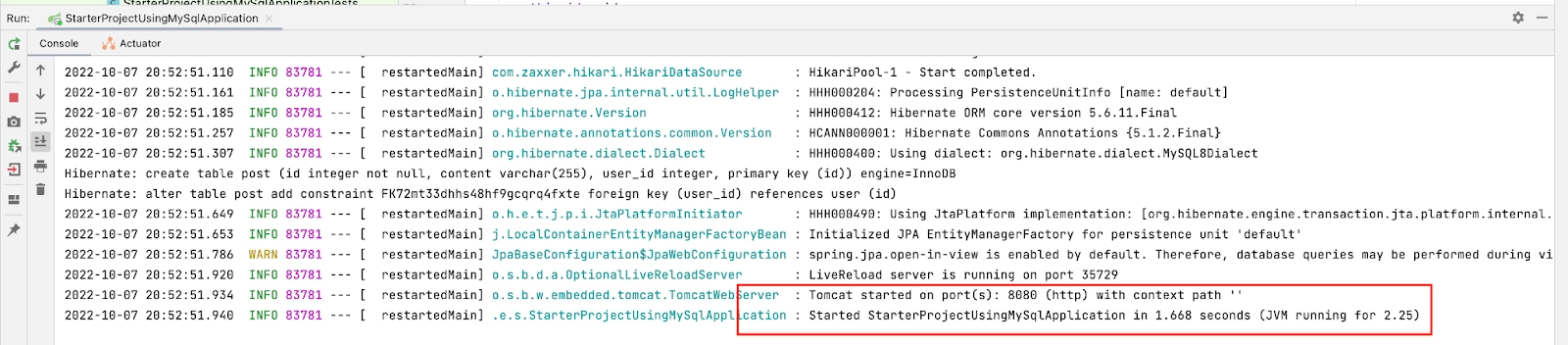
  • Build and run the project
run the project


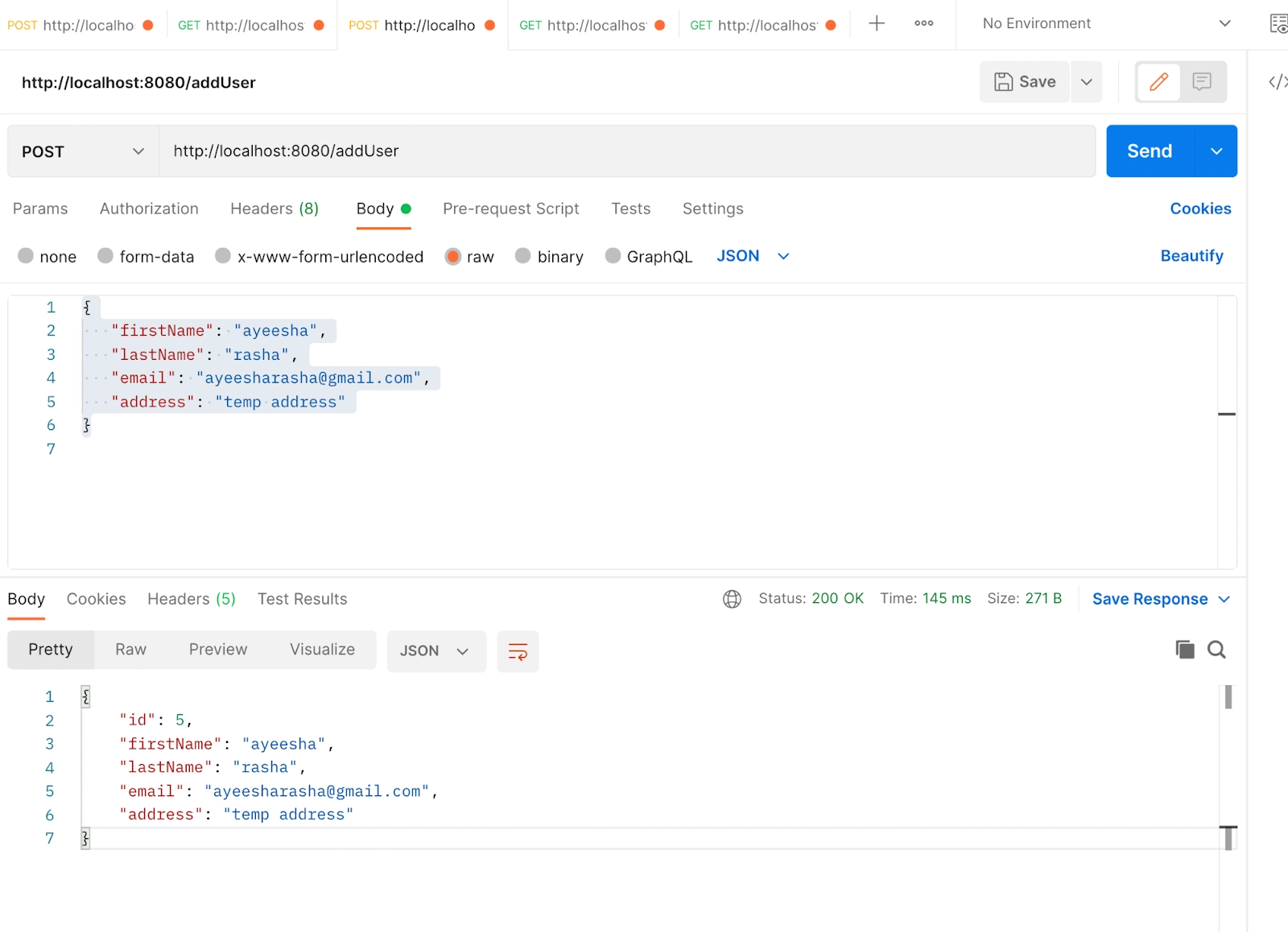
Open postman and add URL http://localhost:8080/addUser to add the user. Choose Post as HTTP method. Select body, then select raw and then select JSON from the dropdown. Add the following JSON and send the request. 
{
  "firstName": "ayeesha",
  "lastName": "rasha",
  "email": "ayeesharasha@gmail.com",
  "address": "temp address"
}
add users
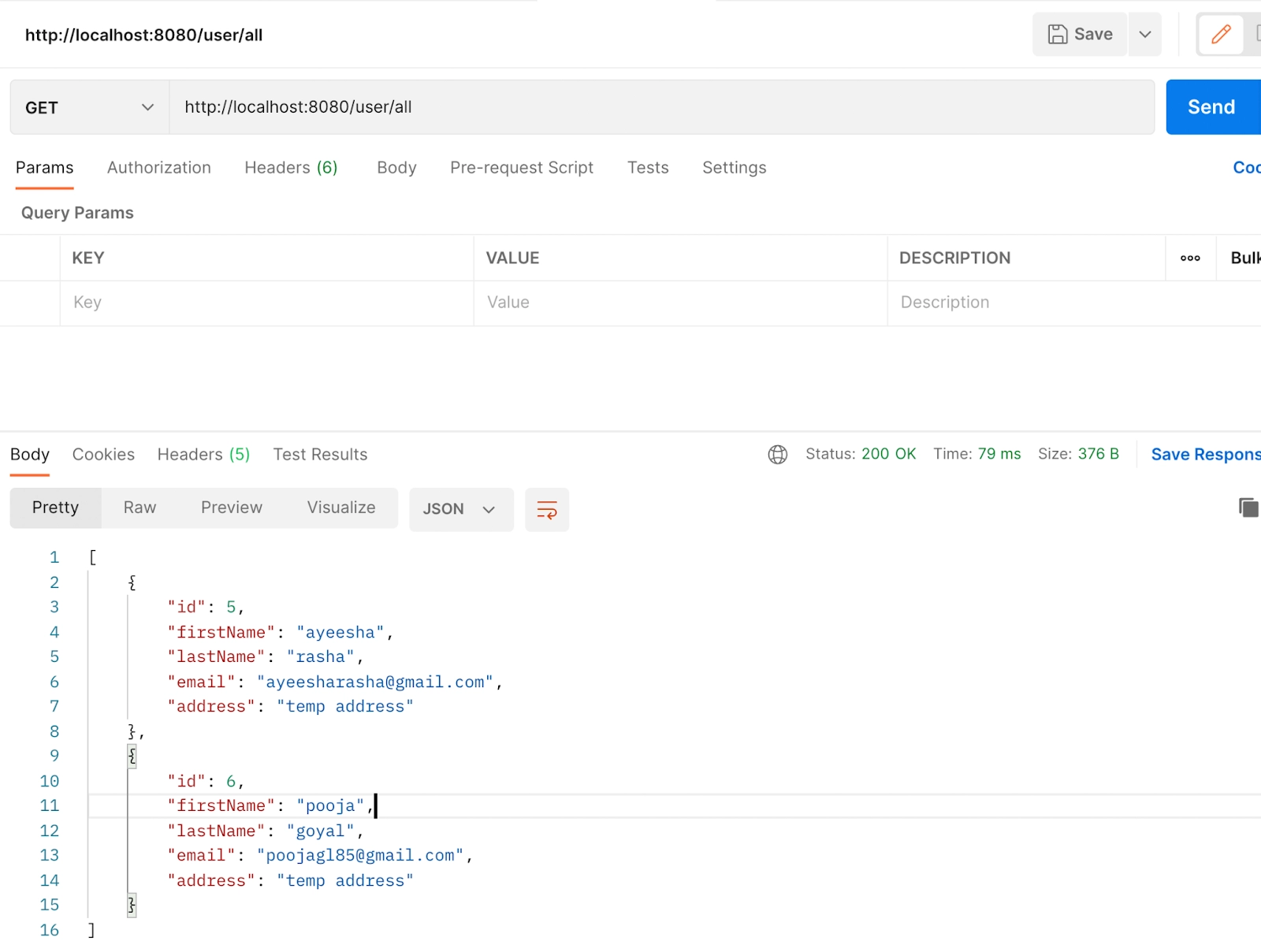
  • You can add more users in the similar way. To see if the user is saved or not in the new tab add the URL http://localhost:8080/user/all and HTTP method as GET and send the request.
add more users
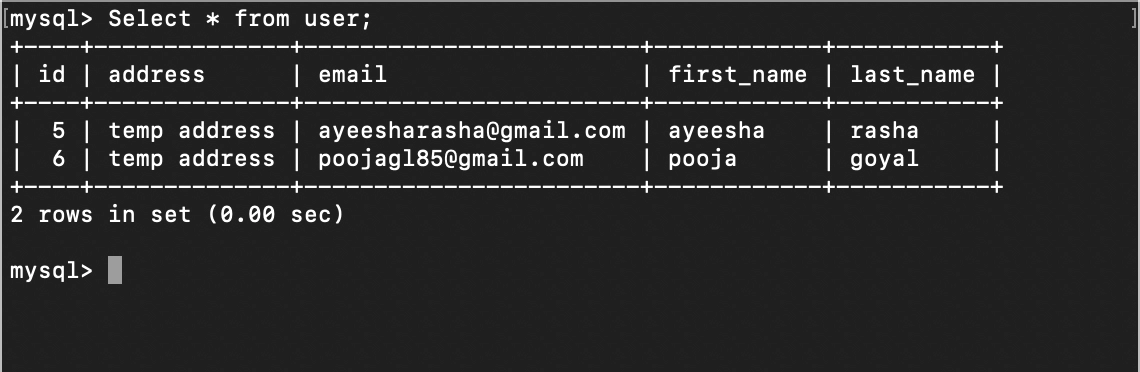
mysql
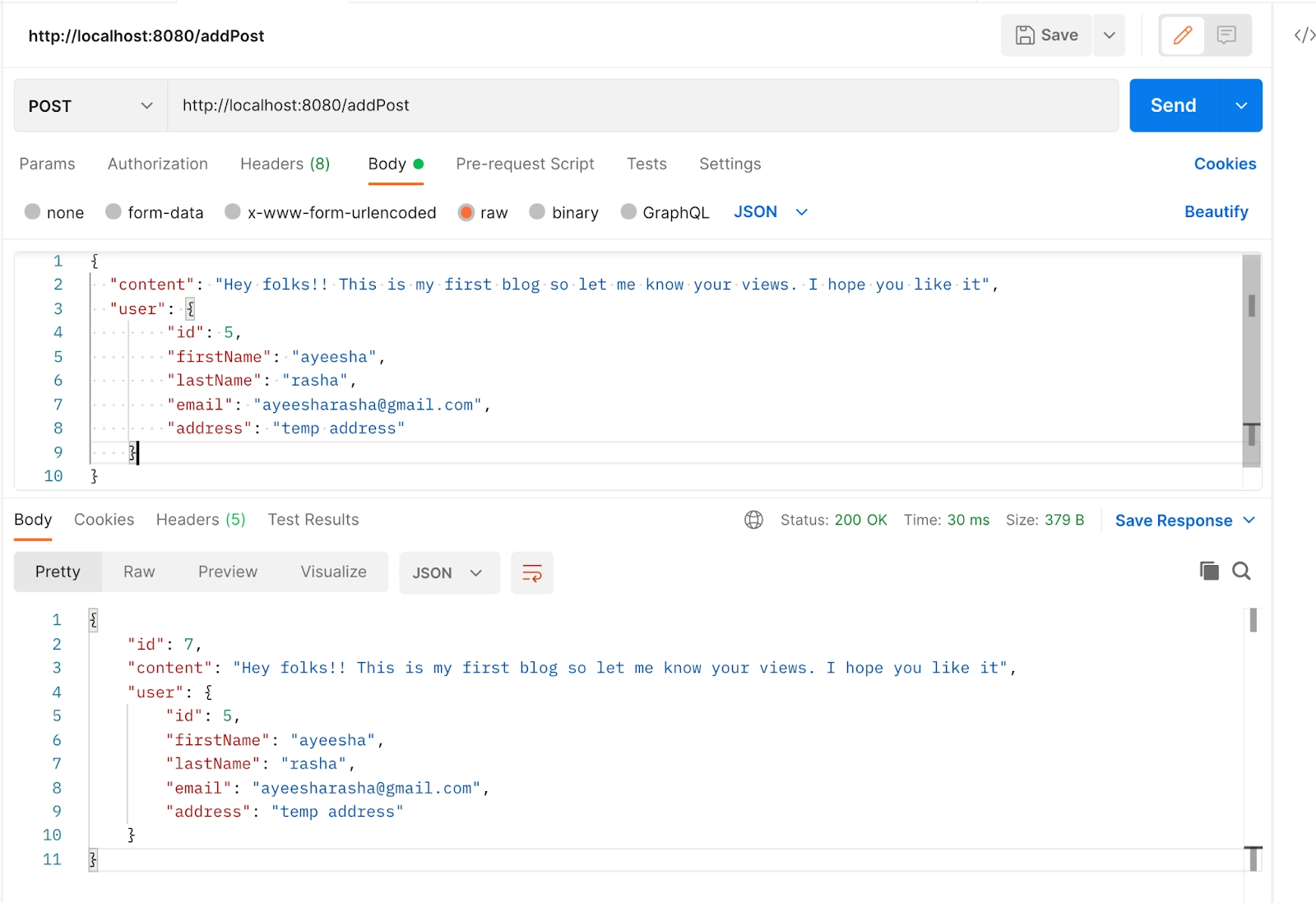
  • The similar as we added the user we will be adding the post of the user with following JSON data, URL = http://localhost:8080/addPost, HTTP method: POST
HTTP method: POST
HTTP method: POST mysql

The post is added to the table post.

Add some more post for some other users as well. After adding my POST table looks something like this.

mysql posts
all posts

Try it yourself -  test the endpoint /post/all and check if you get all the posts.

Frequently Asked Questions

What does Spring Boot's post method do?

The Spring Boot applications handle the post request performed by the client with the JSON data in the header area where the PostMapping () annotation is most frequently used. The project's Spring web is being initialized.

What is the POST API's operation?

To build or edit resources in web services, POST requests are used to submit data to the API server. In the request body of an HTTP request, the server stores the data that was delivered to it. A website's contact form serves as the most basic illustration.

What distinguishes the REST and SOAP APIs from one another?

REST is an architectural design approach, whereas SOAP is a protocol. A service interface is used by SOAP, whereas URIs are used by REST for an API, which is meant to expose certain portions of an application's business logic on a server.

I want to use the REST API, but how do I POST a request?

Sending an HTTP POST request to the REST API server and including JSON data in the body of the POST message are required steps in posting JSON to a REST API endpoint. Using the Content-Type: application/json request header, you must specify the data type in the body of the POST message.

Is it possible to update data using the POST method?

To update a resource, you can use POST, but not with the same URL as the resource you're changing.

In the REST, is it possible to use "Put" instead of "POST"?

POST would be applied to a list of questions if you wanted to utilize it. The PUT command would be used for a specific query if you wanted to utilize it.

Conclusion

This article demonstrates how to create a Post for a User by implementing the POST service by Spring Boot to produce a post for users in Spring

If you think this blog has helped you enhance your knowledge about the above question, and if you want to learn more, check out our articles. And many more on our website.

Visit our website to read more such blogs. Make sure you enroll in our courses, take mock tests, solve problems, and interview puzzles. Also, you can pay attention to interview stuff- interview experiences and an interview bundle for placement preparations. Do upvote our blog to help fellow ninjas grow.

Live masterclass