Do you think IIT Guwahati certified course can help you in your career?
Introduction
An input is a stream of bytes that flow from the keyboard to the CPU. Input is the way a user interacts with the computer program. Keyboards are the standard device to send input to the program. So learning how to take input from the user is an essential step of your coding journey.
In this blog, we will discuss various ways to take input from the user in R. So tighten up your seatbelts and let's start learning.
Input in R
In the development field, user input plays a very crucial role in adding interactivity and dynamic nature to our applications. User input refers to the data provided by the user to the program at runtime.
Just like other languages, we can take user input in R as well. In R, there are three methods to take user input.
readline() method
scan() method
read.csv() method (To read CSV files)
readline() method
The readline() method is useful whenever we want to take a single line input from the user. The readline simply means read a line from the terminal. This method prompts the user to enter input from the console. Once entered, it returns the input value as a string.
Syntax
readline (prompt = " ")
Parameter
prompt: It is an optional parameter. It is used to specify the user what type of input the program is expecting.
Return type
A character vector (string).
Examples
Now that we are aware of the readline() method, let’s now look at various examples to take user input using this method.
Example 1
#Taking user input
var <- readline()

#Printing type of variable
print(paste("Datatype: ",typeof(var)))

#Printing variable
print(paste("User Input:" ,var))
Output
Explanation
In the above example, we used the readline() method to take user input and store it in variable var. Once the user entered the input, we displayed the result using the print() function. Here, the default type of input is a character as R treats the sequence of characters, i.e. a string, as character data type.
Note: In R, you can print a string and a variable together using the paste() function inside the print() function.
We can convert character type values to some other data type using various methods in R.
Below are some conversion methods available in R:
as.integer() -> converts into integer
as.numeric() -> converts into numeric type (float, double)
as.complex() -> converts into a complex number
as.logical() -> convert into logical type (true or false)
Let us look at some examples using these methods.
Example 2
#Taking user input
val <- readline(prompt = "Enter the number: ")

#Printing type of variable
print(paste("Old datatype: ",typeof(val)))

#Converting into integer type
val <- as.integer(val)

#Printing the type of variable
print(paste("New datatype: ",typeof(val)))

#printing the variable
print(val)
Output
Explanation
In the above example, the prompt argument in the readline method is used to display the message to the user about the input. We used the as.integer() method to convert the type of variable from a character to an integer.
Example 3
#Taking user input
val <- readline(prompt = "Enter the input: ")

#Printing type of variable
print(paste("Old datatype: ",typeof(val)))

#Converting into logical type
val <- as.logical(val)

#Printing the type of variable
print(paste("New datatype: ",typeof(val)))

#printing the variable
print(val)
Output
Explanation
In the above example, we used the as.logical() method to convert the user input into a logical data type.
Similarly, you can use the rest of the other methods to convert the user input type into your desired input type.
The scan() method is another way using which we can take inputs in R. This method is used to read inputs from the console or even a file. This is a flexible method that allows you to specify the format or data type of an input. This method is very useful when a user wants to take inputs that are separated by spaces or new lines.
Note: This method takes input in the form of a vector or a list continuously.
Syntax
scan( file = “ “, what = “ “, nmax = -1, …)
Parameter:
file: It is an optional parameter that is used to specify the name of the file that a user wants to take input from. If it is not provided, then the input is taken from the console.
what: It is an optional parameter that is used to specify the data type or the format of the input.
nmax: It is also an optional parameter that is used to specify the maximum number of inputs to read from the console/file.
Examples
Now let’s look at various examples to know the working of the scan() method in R.
Example 1
# Simple R program to
# demonstrate scan() method

#Taking input using scan()
print("Enter the input:")
val <- scan()

#Printing variable
print(val)
Output
Explanation
In the above example, we used the scan() method to take 3 lines of input from the console. We entered a total of 9 items in the input and printed the result using the print() function.
Note: This method will continuously take input from the user in the console. In order to terminate the process, press the Enter key 2 times which will take the control to the next line and stop the process.
In the above example, the scan() method is used to take user input, and the what = “ “ argument is used to specify the string input type. In the first input, the nmax value is set to 1; thus, the compiler only reads a single string value from our input, i.e., Coding, but ignores the second, i.e., Ninjas. While in the second input, the nmax value is 2, thus the compiler reads both string values.
Example 3
# Even-Odd checker function
check <- function(x , y){
    #Check if a number is divisible by 2
    if(x %% 2 == 0){
        TRUE
    }else{
        FALSE
    }
}

#Taking User input
print("Enter the number to check: ")
num <- scan(what = integer())


#Check the return value
if(check(num)){
    print("Number is Even")
}else{
    print("Number is Odd")
}
Output
Explanation
In the above example, we created a simple function to check whether a number is even or odd. We used the scan() method and specified an integer type input using the what argument. The check function will return a TRUE value if the number is divisible by two; else, it will return FALSE.
Example 4
We can read a text file using the scan() method. In order to read a text file, we need to specify the location of the file and the data type of the file to the scan() method.
# Taking file input using scan()
data <- scan("C:/Users/sohai/Downloads/file.txt", what = " ")

# Printing the text file
print(data)
Output
Explanation
In the above example, we used a scan() method to access a text file. We passed the path to the file.txt and specified the data type as a string using what argument.
read.csv() Method
This method is used to read CSV files and import them into a data frame, mostly for data analysis.
Syntax
read.csv( file, header, sep, …)
Parameters:
file: This parameter is used to specify the path of the CSV file.
header: By default, the header is TRUE. If the header is TRUE, then the first row is treated as column names. If the header is FALSE, then the first row is treated as data.
sep: By default, the separator is set to comma ( “,”). This parameter is used to specify the field separator character of our CSV file.
Example
Now, let’s try to read a CSV file using the read.csv() method in R.
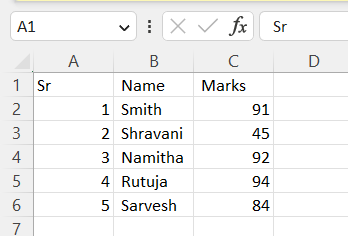
First, let’s take a look at our simple CSV file, which has three columns Sr, Name, and Marks.
Code
# Taking a CSV file input
data <- read.csv("C:/Users/sohai/Downloads/Students.csv", header = TRUE, sep = ",")

# Printing the CSV file
print(data)
Output
Explanation
In the above example, we used the read.csv() method to read the Students.csv file. The header is set to TRUE as the first row of the CSV file contains the column header for each data.
Frequently Asked Questions
What is R?
R is an open-source programming language mainly used for statistical computing and data analysis.
What is R Studio?
R studio is an open-source IDE (Integrated Development Environment) specially designed for the R language.
What are various methods to take user input in R?
There are mainly three methods through which we can take user input which are the scan(), readline(), and read.csv() methods.
What is the use of the print() function in R?
The print() function is used to print the provided message on the screen or any other standard output device.
How many data types are there in R?
There are six data types in R which are numeric, logical, integer, complex, character, and raw.
Conclusion
This article discusses how to take input in R Programming Language. We discussed various methods through which we can take input in R, along with some examples. We hope this blog has helped you enhance your knowledge about input in the R programming language. If you want to learn more, then check out our articles.
But suppose you have just started your learning process and are looking for questions from tech giants like Amazon, Microsoft, Uber, etc. In that case, you must look at the problems, interview experiences, and interview bundles for placement preparations.
However, you may consider our paid courses to give your career an edge over others!







 1+ registered

