Do you think IIT Guwahati certified course can help you in your career?
Introduction
You must be knowing that there are certain built-in keywords in Katalon, but did you know that we could create custom keywords and sample keywords in Katalon, well if you didn’t, then you have come to the right place.
In this article, we will learn about Custom keywords in Katalon, and we will also look at some sample custom keywords.
Custom keywords in katalon
As we all know, Katalon Studio provides us with a set of built-in keywords, but if users want to create a keyword, they can also create custom keywords. Once we have created custom keywords, we can use them in implementing test cases just like the built-in ones.
Creating a package
A package is a kind of namespace that organizes a set of related classes and interfaces. Now we will start by creating a package.
Following are the steps that one should follow to create a package:
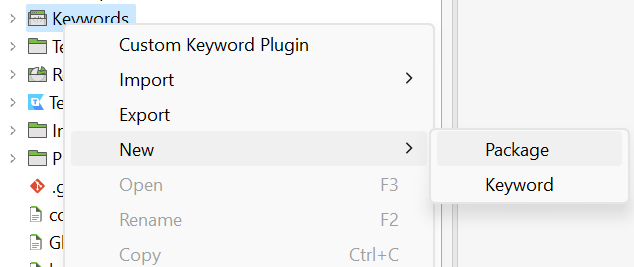
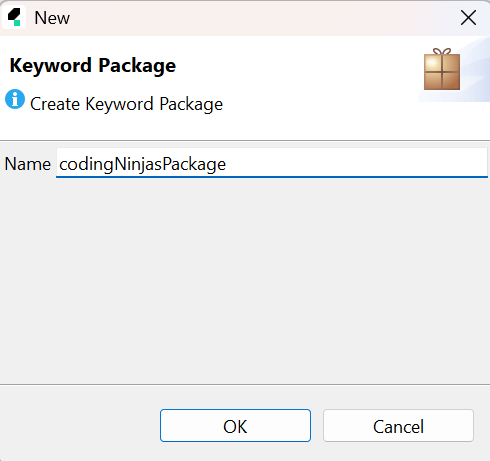
1. Follow this order File - > New - > Package. After this, a New keyword dialog box will appear to enter the name of your package and then click OK.
2. Now you can see that a new package has been created under the Keywords folder in Tests Explorer.
Create a custom keyword
Following are the steps to create a custom keyword:
1. Follow this order File - > New - > Keyword. After this, a new keyword dialog box will appear to enter the keyword's name and specify the package you want to use for the keyword.
2. A new keyword will be created under the specified package accordingly.
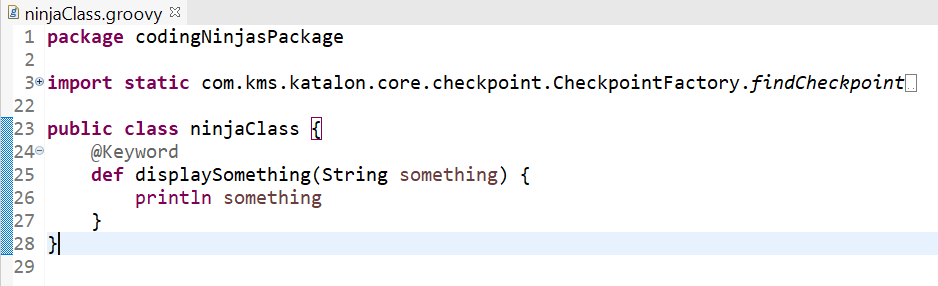
3. Enter this code snippet in your class to define a custom keyword.
This indicates that the code is the definition of a keyword.
Mandatory
keywordObject
Category of the keyword
Optional
name
The name of the keyword
Mandatory
params
List of parameters used in keyword
Mandatory
4. Now save the keyword file.
Use custom keywords
In manual view
Follow the below steps to use custom keywords in the manual view:
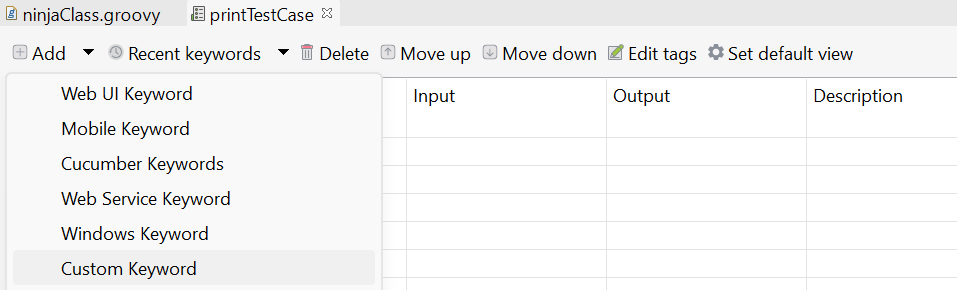
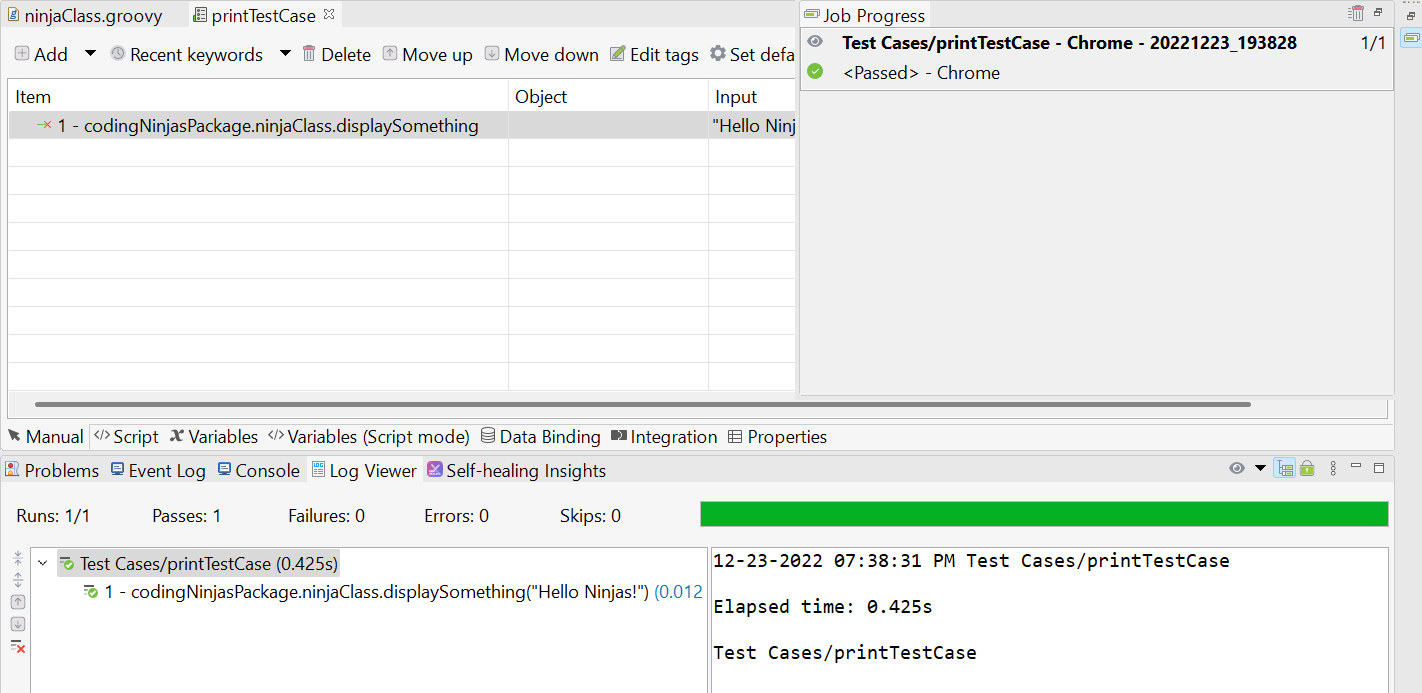
First, open a test case in the manual view, and after that select the custom keyword from the command toolbar.
2. Now you can select any of the custom keywords.
In script view
Follow the steps below to use custom keywords in the script view:
1. The class CustomKeywords of the Katalon Studio allows you to access all the custom keywords. Just enter this in the script editor:
CustomKeywords.
2. Now when you put a dot after CustomKeywords in the script editor then a series of custom keywords will appear on your screen. This is a feature of Katalon Studio which is called Content Assist it helps users by providing suggestions to users for code completion.
3. Select the keyword and provide the parameters.
Following is a list of classes that may prove to be helpful while working with custom keywords:
Find the value of a property using the property name
Keyword Util
logInfo(String str)
Logs message as info
markError(String str)
Marks a keyword to be error
markErrorAndStop(String str)
Markss a keyword to be error and stops its execution
markFailed(String str)
Marks a keyword to be failed and continue its execution
markFailedAndStop(String str)
Marks a keyword to be failed and stop its execution
markPassed(String str)
Marks a keyword to be passed
markWarning(String str)
Marks a keyword to be warning
Sample Custom Keywords
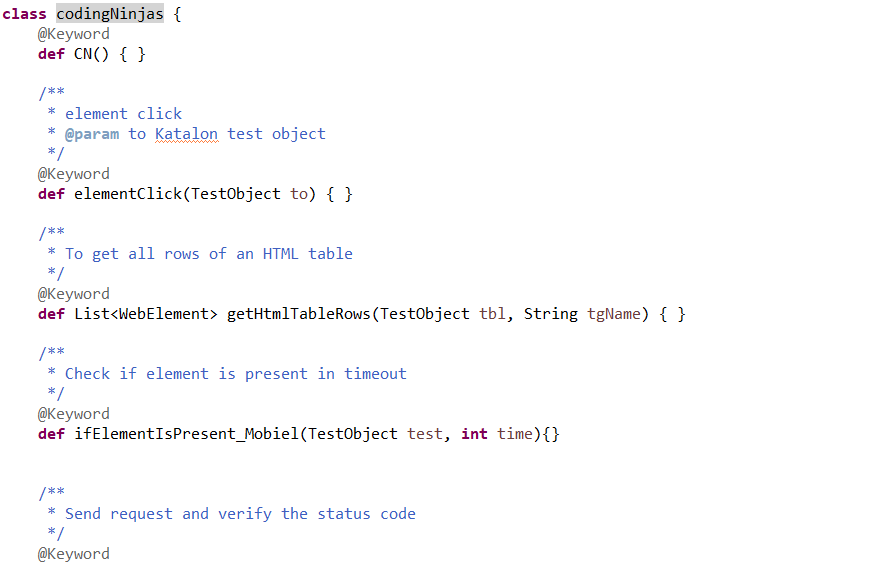
When we create a new Custom Keyword, we can generate sample custom keywords used for Web, Mobile, or API testing. All the options are displayed directly when a user creates a new custom keyword.
Option
Description
Sample keywords for Web
Generates some sample function used for Web Testing
Sample keywords for Mobile
Generates some sample functions used for Mobile Testing
Sample keywords for API
Generates some sample function used for API Testing
Users can either select one of the three options, or he/she can select all the options to generate sample keywords. For example, if a user selects all the options then the generated custom keyword would look like this:
class codingNinjas {
    @Keyword
    def CN() {
        KeywordUtil.logInfo("Katalon")
        WebDriver webDriver = DriverFactory.getWebDriver()
        webDriver.navigate().refresh()
        KeywordUtil.markPassed("Ninja in making")
    }


    /**
     * element click
     * @param to Katalon test object
     */
    @Keyword
    def elementClick(TestObject to) {
        try {
            WebElement element = WebUiBuiltInKeywords.findWebElement(to);
            KeywordUtil.logInfo("Clicking an element")
            element.click()
            KeywordUtil.markPassed("Element clicked once")
        } catch (WebElementNotFoundException e) {
            KeywordUtil.markFailed("Not found")
        } catch (Exception e) {
            KeywordUtil.markFailed("Failed to click an element")
        }
    }


    /**
     * To get all rows of an HTML table
     */
    @Keyword
    def List<WebElement> getHtmlTableRows(TestObject tbl, String tgName) {
        WebElement mails = WebUiBuiltInKeywords.findWebElement(tbl)
        List<WebElement> rows = mails.findElements(By.xpath("./" + tgName + "/tr"))
        return rows
    }


    /**
     * Check if element is present in timeout
     */
    @Keyword
    def ifElementIsPresent_Mobiel(TestObject test, int time){
        try {
            KeywordUtil.logInfo("Finding an eleement with id " + test.getObjectId())


            WebElement element = MobileElementCommonHelper.findElement(test, time)
            if (element != null) {
                KeywordUtil.markPassed("Obj " + test.getObjectId() + " is present")
            }
            return true
        } catch (Exception e) {
            KeywordUtil.markFailed("Obj " + test.getObjectId() + " is not present")
        }
        return false;
    }


    /**
     * Send request and verify the status code
     */
    @Keyword
    def verifyStatusCode(TestObject req, int status) {
        if (req instanceof RequestObject) {
            RequestObject requestObject = (RequestObject) req
            ResponseObject response = WSBuiltInKeywords.sendRequest(requestObject)
            if (response.getStatusCode() == status) {
                KeywordUtil.markPassed("Matched")
            } else {
                KeywordUtil.markFailed("Does not match. Expected: " +
                        status + " - Actual: " + response.getStatusCode() )
            }
        } else {
            KeywordUtil.markFailed(req.getObjectId() + " is not a reqObject")
        }
    }


    /**
     * Add Header authorization field
     */
    @Keyword
    def addBasicAuthorizationProperty(TestObject req, String name, String pass) {
        if (req instanceof RequestObject) {
            String authValue = name + ":" + pass
            authValue = "Basic " + authValue.bytes.encodeBase64().toString()


            List<TestObjectProperty> header = req.getHttpHeaderProperties()
            boolean exist = false
            for (int i = 0; i < header.size(); i++) {
                TestObjectProperty headField = header.get(i)
                if (headField.getName().equals('Authorization')) {
                    KeywordUtil.logInfo("Found existent basic authorization field and now replacing its value.")
                    headField.setValue(authValue)
                    exist = true
                    break
                }
            }


            if (!exist) {
                TestObjectProperty authProperty = new TestObjectProperty("Authorization",
                        ConditionType.EQUALS, authValue, true)
                header.add(authProperty)
            }
            KeywordUtil.markPassed("Basic authorization field added to request header")
        } else {
            KeywordUtil.markFailed(req.getObjectId() + "is not a RequestObject")
        }
        return req
    }

}
Frequently Asked Questions
What are keywords in Katalon?
Built-in keywords are intended to make it easier for users to automate with less coding experience. Katalon Studio has a custom keyword feature that makes it easier for users to expand automation capabilities.
Which framework does Katalon Studio use?
Katalon Studio uses the language Groovy, which is built using Java. Groovy is a scripting language with a syntax similar to Java. Groovy uses dot-separated notation makes it easier to write code while maintaining and allowing syntax to operate collections, Strings, and JavaBeans.
Is Katalon Studio free for use?
Yes, Katalon studio is free to use. Many users find its fully functional version free for use. The testing services which KMS Technology offers are used to pay for product development at Katalon.
What are the advantages of using Katalon studio?
Katalon Studio uses several types of testing.
It has a user-friendly GUI.
It is free to use.
Intuitive Analytics and Dashboard report.
Can we use Java in Katalon?
Yes, as Katalon Studio is based on Java, we can write code in Java in Katalon Studio. When we write scripts and custom keywords, we can either write them in Groovy or Java.
Conclusion
We have discussed the custom keyword and sample keywords in Katalon. We started with custom, then we looked into some sample custom keywords, and in the end, we discussed an example that had some custom keywords in it.
We hope this blog has helped you. We recommend you to visit our articles on different topics of Katalon Studio, such as









 7+ registered

