Scene Graph
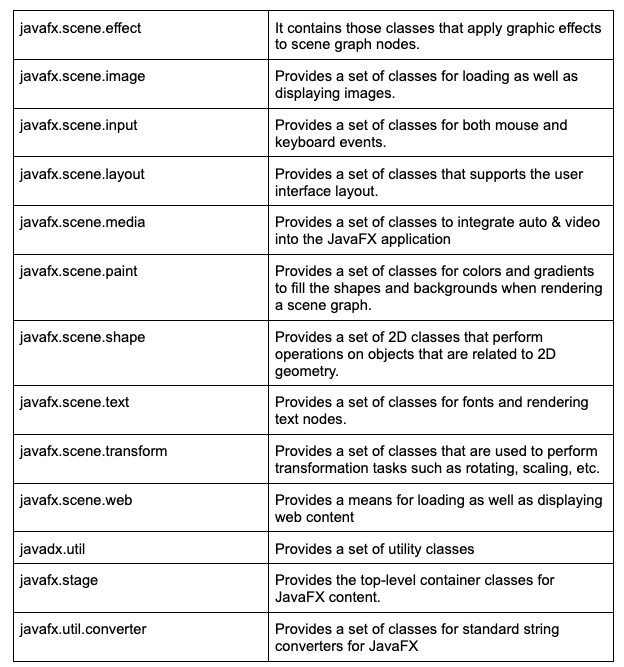
When we start constructing a JavaFX application, we always start with the Scene Graph API, which is the starting point of constructing a JavaFX application. It is a hierarchical tree in which all the graphical elements of the user interface are the nodes. Each node has its own id, volume, and style. Nodes in the scene graph can have only one parent tho they can have either zero or multiple children. The scene graph is also used in event handling. Whatever implementation that is performed by the user on the scene graph is applied to the nodes in it. There are various packages that allow the user to create and generate various transformations and animations in JavaFX applications, some of those packages are javafx.scene.input, javafx.scene.shape, javafax.scene.media, etc.
Each node in the Scene graph has the following:
- Geometrical Objects: Includes all the 2D as well as 3D shapes such as rectangles, circles, and polygons.
- UI Controls: Node contains various UI components like text area, etc.
- Containers: There are some layout panes available in the JavaFX containers, such as border, grid, and flow.
Graphics Engine
The graphics engine provides graphics support for 2D as well as 3D graphics to the scene graph. If the graphics hardware on the system cannot support the hardware-accelerated rendering, then the graphics engine also provides the software rendering. There are two graphics accelerated pipelines in the JavaFX, which are as follows:
Prism
It is a high-performance hardware-accelerated graphical pipeline that is used to render graphics in JavaFX. It is capable of rendering both 2D as well as 3D graphics. In order to render graphics, a prism uses different software depending on the operating system, which is:
- DirectX 9 is used on Windows XP & Vista
- DirectX 11 is used on Windows 7
-
OpenGL is used on Mac & Linux
Prism uses the software to render the path to process the graphics if the hardware support for graphics on the system is insufficient. It also smoothers the graphics when used along with a GPU, and if the system does not support a graphic card, then the Prism defaults to the software rendering stack.
Quantum Tool Kit
It is like an abstraction over the low-level components of Prism, Glass, Web Engine & Media Engine. It combines the prism and glass windowing toolkit and makes it available to the upper layer of the stack.
GWT
GWT stands for Glass Windowing Toolkit. It is the lowest or the last level of the JavaFX stack. It is platform dependent and acts as an interface between the JavaFX and the native operating system. Glass Windowing Toolkit is responsible for handling all the operating system's services, such as the windows, event queues, and timers. It also provides a connection between the JavaFX application and the operating system for further communication.
WebView
JavaFX allows the user to embed the HTML content into a scene graph and webview is the JavaFX component used to process this content. WebView uses a technology called Web Kit, which is basically an internal open-source web browser engine. WebView supports various web technologies such as HTML5, CSS, JavaScript, DOM, etc.
Using WebView, a user can do the following:
- Render HTML content from either a local or remote URL.
- Provides back and forth navigation along with history support.
- Allows the user to apply effects to the web component as well as edit the HTML content
- Allows the user to execute javascript commands and also handle various events.
Media Engine
It provides all the audio-video playback and media files in the JavaFX application. It is dependent upon the G streamer. The javafx.scene.media provides all the classes and interfaces which are required for media function in JavaFX. JavaFX media engine supports various audio formats such as MP3, WAV, AIFF, and video formats like FLC.
It provides the functionality with the help of three components:
- Media Object: Represents a media file.
- Media Player: Used to play media content.
- Media View: Used to display media.
Frequently Asked Questions
Which component provides graphics support to the scene graph?
The graphic engine provides support to the scene graph.
Which component or the level of the JavaFX stack acts as an interface between JavaFX and the native operating system?
The Glass windowing toolkit, which is the lowest layer of the JavaFX stack, acts as an interface between JavaFX and the native operating system.
Which software is used by Prism on MacOS?
The Prism uses the OpenGL software on macOS.
Conclusion
In this article, we have extensively discussed the Architecture of JavaFX.
After reading about the Architecture of JavaFX, are you not feeling excited to read/explore more articles on Java libraries? Don't worry; Coding Ninjas has you covered. To learn about the top 10 Java libraries, the top open-source libraries, and how to make UI that stands out using java libraries.
If you wish to enhance your skills in Data Structures and Algorithms, Competitive Programming, JavaScript, etc., you should check out our Guided path column at Coding Ninjas Studio. We at Coding Ninjas Studio organize many contests in which you can participate. You can also prepare for the contests and test your coding skills by giving the mock test series available. In case you have just started the learning process, and your dream is to crack major tech giants like Amazon, Microsoft, etc., then you should check out the most frequently asked problems and the interview experiences of your seniors that will surely help you in landing a job in your dream company.
Do upvote if you find the blogs helpful.
Happy Learning!








 7+ registered

