Do you think IIT Guwahati certified course can help you in your career?
Introduction
Hey Ninja!! You must have used pastel colours in your childhood to colour pictures of outlined drawings. Imagine colouring the outermost boundaries from the inner side. This is the exact effect the inner shadow class creates.
In this blog, you will learn about the inner shadow class, its constructors, and properties, and you will also go through a sample program to understand the implementation of the inner shadow class. Let's jump right into the details of this excellent class.
Inner Shadow Class
Inner Shadow class is a part of JavaFX and is present under the javafx.scene.effect package. On applying the inner shadow, a blur effect is created along the inside edges of the node. In the sample program given below, the inner shadow effect of the GAUSSIAN blur type is made with the HOTPINK colour.
Constructors
There are four constructors in the class:
InnerShadow (): It creates a new object with default parameters.
InnerShadow (radius, colour): It creates a new object with specified colour and radius.
InnerShadow (radius, offsetX,offsetY, colour): It creates a new object with the selected colour, radius and offset in x and y directions.
InnerShadow (blur type, colour, radius, choke, offsetX, offsetY): It creates a new object with the selected colour, radius and offset in x and y directions, blur type and choke
Properties
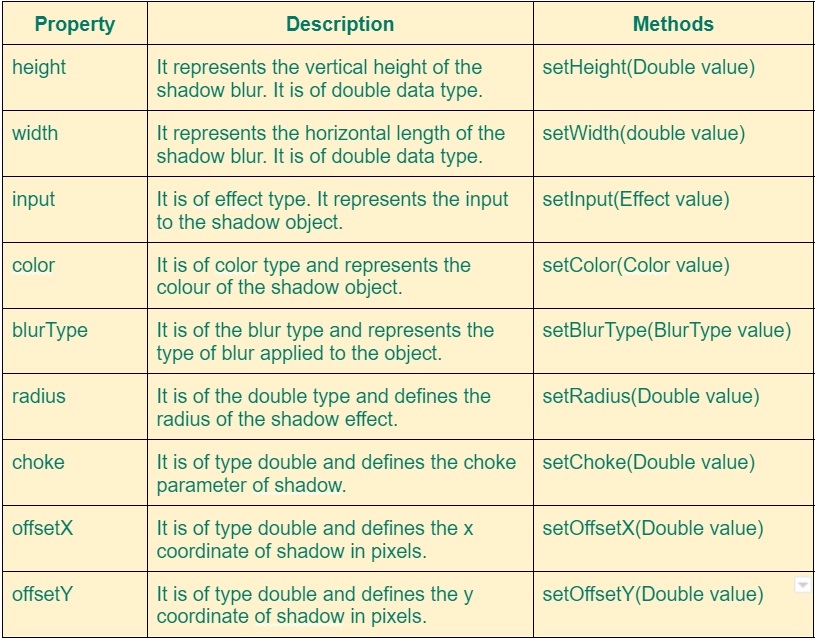
InnerShadow class offers various properties to manage the state of the object. They are listed below:
Sample Program
Let us go through a sample program to understand the implementation of the inner shadow class. Here we will take a picture of a ninja and apply an inner shadow effect to it:
//Code to show implementation of inner shadow effect in JavaFX
//Coding Ninjas
package com.example.javafx_inner_shadow_coding_ninjas;

//Import statements to fetch various pre written classes
import javafx.application.Application;
import javafx.scene.Group;
import javafx.scene.Scene;
import javafx.scene.effect.BlurType;
import javafx.scene.effect.InnerShadow;
import javafx.scene.image.Image;
import javafx.scene.image.ImageView;
import javafx.scene.paint.Color;
import javafx.stage.Stage;

//Main class to implement inner shadow
public class CodingNinjas extends Application {
   //start method custom definition
   @Override
   public void start(Stage view)
   {
       //Creating new image object
       Image pic = new Image("C:/Users/kvoxa/Downloads/ninja.png");

       //Creating new image view objects
       ImageView picView1 = new ImageView(pic);
       ImageView picView2 = new ImageView(pic);

       //Defining coordinates of image views
       picView1.setX(120);
       picView1.setY(70);
       picView2.setX(400);
       picView2.setY(70);
       picView1.setFitHeight(150);
       picView1.setFitWidth(300);
       picView2.setFitHeight(150);
       picView2.setFitWidth(300);
       picView1.setPreserveRatio(true);
       picView2.setPreserveRatio(true);

       //Creating inner shadow object
       InnerShadow shade = new InnerShadow();
       shade.setBlurType(BlurType.GAUSSIAN);
       shade.setColor(Color.HOTPINK);
       shade.setHeight(25);
       shade.setRadius(12);
       shade.setWidth(20);
       shade.setChoke(0.9);
       picView2.setEffect(shade);

       //Creating new group object
       Group root = new Group(picView1,picView2);

       //Setting up scene and configuring view
       Scene scene = new Scene(root,800,400);
       view.setScene(scene);
       view.setTitle(" JavaFx Inner shadow Effect : Coding Ninjas ");
       view.show();
   }
   // main launch method
   public static void main(String[] args) {
       launch(args);
   }
}
You can also try this code with Online Java Compiler
A class is a common template to specify common methods and properties of objects.
What is the ‘extends’ keyword?
The ‘extends’ keyword is used to inherit from another class.
What is the ‘scene’ class?
It is the container for all objects of the scene graph and requires the root object to work.
What is a package?
A package is a namespace similar to a folder where you can put your source files. It organises related classes and interfaces. You might keep java code in one folder, images in another, etc.
Conclusion
Finally, you have made it to the end of this article. Congratulations!! In this blog, you learned about InnerShadow class in JavaFX. You went through the class, its constructors, and a sample program.










 7+ registered

