




Introduction
Hello readers! We hope you are doing well.
In this article, we will look at how to add static content to a cherrypy website. Static material, such as javascript, CSS files, and images, is one of the essential components of a website which makes it look beautiful. CherryPy supports serving static content to end users.
In the next section, we will see go through a sample program to see how we can use static content in CherryPy.
Sample Program
In this example, we will create a webpage which generates a random natural number given the upper limit. We will also give it a background colour of "WhiteSmoke" to give the UI a rich feel. To do so, create a CSS file "style.css" inside the directory "public/css" and add the following piece of code:
body {
    background-color: whitesmoke;
}
Now, we will create a webpage where you can add a natural number as an upper limit, and upon pressing the Submit button, you get a random natural number less than or equal to that upper limit number. To do so, create a new file named main.py and add the following piece of code:
import os, os.path
import random
import cherrypy

class NumberGenerator(object):
    @cherrypy.expose
    def index(self):
        return """<html>
          <head>
            <link href="/static/css/style.css" rel="stylesheet">
          </head>
          <body>
            <form method="get" action="generate">
                <input type="text" value="10" name="upperlimit" />
                <button type="submit">Submit</button>
            </form>
          </body>
        </html>"""

    @cherrypy.expose
    def generate(self, upperlimit="10"):
        upperlimit = int(upperlimit)
        num = random.randint(1, upperlimit)
        cherrypy.session['myNum'] = str(num)
        return str(num)

    @cherrypy.expose
    def display(self):
        return cherrypy.session['myNum']

if __name__ == '__main__':
    conf = {
        '/': {
            'tools.sessions.on': True,
            'tools.staticdir.root': os.path.abspath(os.getcwd())
        },
        '/static': {
            'tools.staticdir.on': True,
            'tools.staticdir.dir': './public'
        }
    }
    cherrypy.quickstart(NumberGenerator(), '/', conf)
Now run the above program using the command python main.py and head over "http://localhost:8080/" to see the web page. Enter a valid integer and hit the submit button to see a random natural number that is less than or equal to the supplied value.
Output:
Before pressing the Submit button:
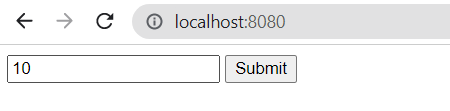
After Pressing the Submit button:

CherryPy allows you to serve a single file or an entire directory structure. This is what you'll wind up doing most of the time, therefore, the code above displays it. First, we specify the location of all of our static stuff. For security reasons, this must be an absolute path. CherryPy will complain if you only supply relative routes while seeking a match to your URLs.
Then we specify that all URLs with path segments beginning with /static will be served with static content. That URL is mapped to the public directory, which is a direct child of the root directory. The full public directory subtree will be supplied as static content. CherryPy will map URLs to the paths included within that directory. As a result, /static/css/style.css can be accessed in public/css/style.css.
You can compile with the help of Online Javascript Compiler for better understanding.



 7+ registered

