Do you think IIT Guwahati certified course can help you in your career?
Introduction
JAX-RS API allows us to download text, pdf, picture, and excel files in Java. We only need a few lines of code to accomplish this. For building JAX-RS file download examples, we are utilising the jersey implementation.
Specifying Content Type
To download several types of files, the user must pick the different content types. The annotation "@Produces" specifies the nature of file content.
@Produces("text/plain"): This gets used for downloading a text file.
@Produces("application/pdf"): This gets used for downloading PDF file.
@Produces("application/msword"): This gets used for downloading ms word files.
@Produces("application/vnd.ms-excel"): This gets used for downloading excel file.
@Produces("image/png"): This gets used for downloading a png image file.
JAX RS Text File Download
Below we will see an example of JAX RS Text File Download. We will look at the project structure and the files to see how the codes have been configured.
Project Structure
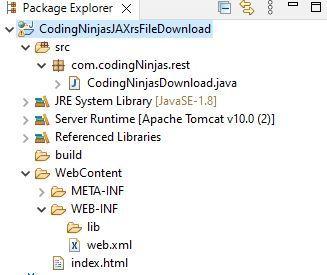
The project structure of our JAX RS File download project is an essential element. The one shown below is from Eclipse integrated development environment. There are three files: The Java File, The XML File and the HTML file. They all have the essential codes to run our example.
Code
We can see the codes below for the download example. Which has been divided into a three-part structure.
Java File Code
    package com.codingNinjas.rest;
    import javax.ws.rs.Produces;
    import javax.ws.rs.GET;
    import java.io.File;
    import javax.ws.rs.Path;

    import javax.ws.rs.core.Response;
    import javax.ws.rs.core.Response.ResponseBuilder;
    @Path("/files")
    public class CodingNinjasDownload {
     //here we add the file path where the target is located
        private static final String FILE_PATH = "here_you_add_your_file_directory";
        @GET
        @Path("/txt")
        @Produces("text/plain")
        public Response getFile() {
            File file = new File(FILE_PATH);

            ResponseBuilder response = Response.ok((Object) file);
            response.header("Content-Disposition","attachment; filename=\"CodingNinjas_JaxRS.txt\"");
            return response.build();

        }
     }
You can also try this code with Online Java Compiler
<a href="rest/files/txt">Download Coding Ninjas Text File</a>
Output
As we run the code, we will see the server is successfully running in the terminal. Following this, we will see the download prompt in our server/browser.
Below we can have a look at the download prompt, which can be seen in the browser view. The available option, when pressed, will download the intended text file present at the source.
Frequently Asked Questions
What makes API and REST API different?
API's main objective is to standardise data transmission across online services. The protocol used varies depending on the type of API. REST API, on the other hand, is an architectural style for developing online services that communicate via the HTTP protocol.
Are JAX-RS and Jersey the same?
Jersey is a JAX-RS implementation, while JAX-RS is a specification. Jersey is more than just a JAX-RS Reference Implementation. Jersey has its own API, which extends the JAX-RS toolkit with additional capabilities and utilities to make RESTful service and client creation even easier.
Which annotation specifies the type of file content in JAX RS?
The @Produces annotation in JAX RS gets used to define the type of file content
Conclusion
In the article, we found out about JAX-RS File download examples. We also saw the different types of content types that we have to have and the annotations. We also implemented a real-life code and saw its output to get a real-time example.










 7+ registered

