pretty-format
Any JavaScript value can be converted to a string.
Serialize JavaScript types that are built-in.
Using built-in or user-defined plugins, serialize application-specific data formats.
Installation:
yarn add pretty-format

You can also try this code with Online Javascript Compiler
Usage:
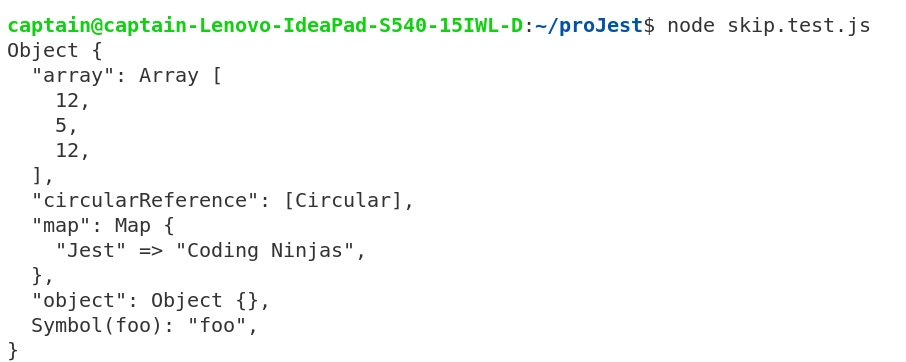
Program:
// Import pretty-format via require function
const { format: prettyFormat } = require('pretty-format');

// The object to beautify.
const toPresent = { object: {} };

// Adding attributes.
toPresent.map = new Map([['Jest', 'Coding Ninjas']]);
toPresent[Symbol('foo')] = 'foo';
toPresent.circularReference = toPresent;

toPresent.array = [12, 5, 12];

console.log(prettyFormat(toPresent));
You can also try this code with Online Javascript Compiler
Output:
jest-diff
Display differences clearly so people can review changes confidently.
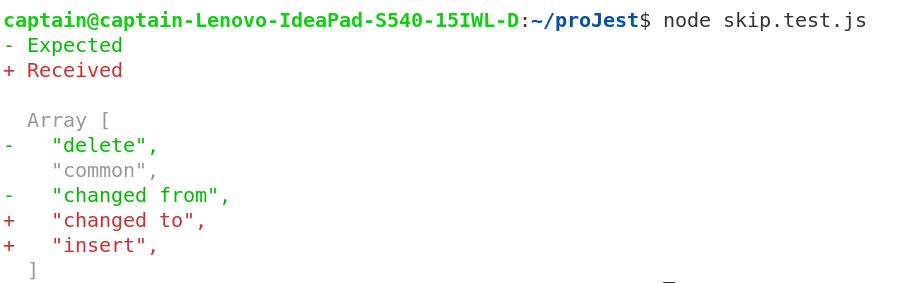
The diff named export serializes JavaScript values, compares them line-by-line, and returns a string that includes comparison lines.
Installation:
npm install jest-diff
Usage:
diff(a, b, options?) does the following using JavaScript values:
- Using the pretty-format package, serialize the values as strings.
- Using the diff-sequences package, compare the strings line by line.
- Using the chalk package, format the altered or common lines.
Program
const { diff } = require('jest-diff');

const arr1 = ['delete', 'common', 'changed from'];
const arr2 = ['common', 'changed to', 'insert'];

const difference = diff(arr1, arr2);
console.log(difference);
You can also try this code with Online Javascript Compiler
Output:
jest-docblock
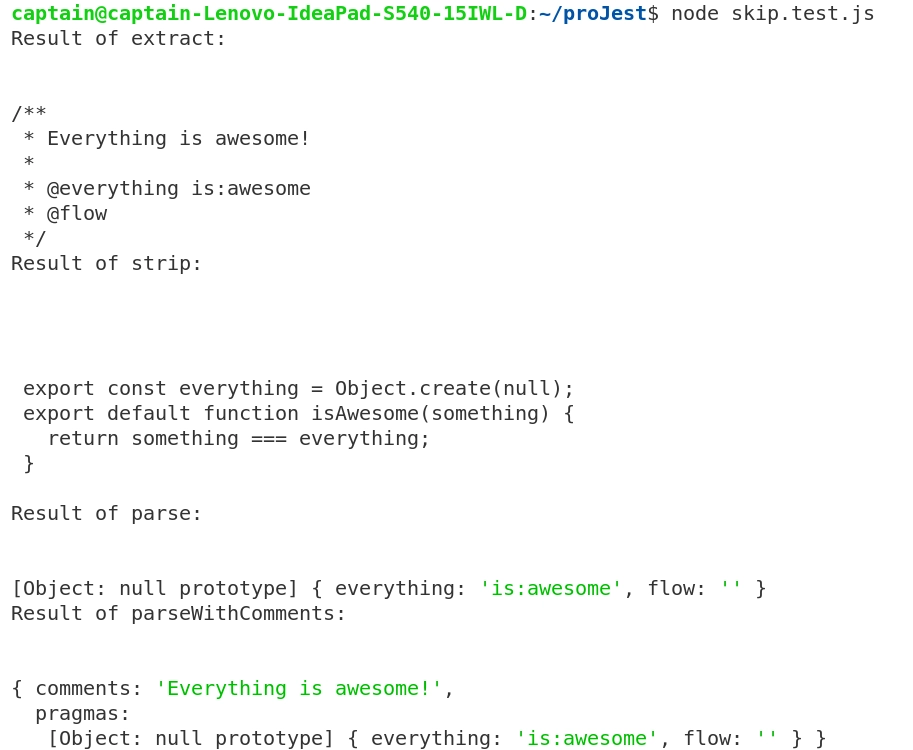
jest-docblock is a package that can extract and parse a specially-formatted comment called a "docblock" at the top of a file.
Installation:
# with yarn
$ yarn add jest-docblock
# with npm
$ npm install jest-docblock
You can also try this code with Online Javascript Compiler
Usage:
const code = `
/**
* Everything is awesome!
*
* @everything is:awesome
* @flow
*/

export const everything = Object.create(null);
export default function isAwesome(something) {
  return something === everything;
}
`;

const {
   extract,
   strip,
   parse,
   parseWithComments,
   print,
} = require('jest-docblock');

const docblock = extract(code);
console.log(docblock);

const stripped = strip(code);
console.log(stripped);

const pragmas = parse(docblock);
console.log(pragmas);

const parsed = parseWithComments(docblock);
console.log(parsed);

console.log(print({ pragmas, comments: 'hi!' }));
You can also try this code with Online Javascript Compiler
Output:
jest-validate
Validation tool for user-submitted setups. Exports a function with two parameters: the user's configuration and an object with an example configuration and other options. The return value is a two-attribute object:
Installation:
npm install --save jest-validate
You can also try this code with Online Javascript Compiler
Usage
isValid: a boolean showing whether the provided configuration is acceptable or not, and
hasDeprecationWarnings: a boolean indicating whether the submitted configuration has deprecation warnings.
Program:
const { validate } = require('jest-validate');

const userConfig = {
   transform: '<rootDir>/node_modules/custom-transform',
};

const result = validate(userConfig, {
   comment: '  Documentation: http://custom-docs.com',
   exampleConfig: { transform: '<rootDir>/node_modules/babel-jest' },
});

console.log(result);
You can also try this code with Online Javascript Compiler
Output:

jest-worker
By offering a Promise-based interface, minimal overhead, and bound workers, this module can execute massive tasks in parallel under forked processes.
The module operates by specifying an absolute path for all forked processes to load the module. All methods are exposed as promises on the parent process, allowing them to be awaited. Asynchronous or synchronous child (worker) methods are available.
Support for bound employees is also included in the module. Binding a worker means that the same task will always be performed by the same worker based on specified parameters. The computeWorkerKey method returns a string, which is used by bound workers.
Installation:
yarn add jest-worker
You can also try this code with Online Javascript Compiler
Usage:
Create two files parent.js and worker.js with the following content.
1.) parent.js
import { Worker as JestWorker } from 'jest-worker';

async function main() {
   // The returned JestWorker instance has all the exposed methods, plus some additional ones to interact with the workers itself.
   const myWorker = new JestWorker(require.resolve('./worker'), {
       exposedMethods: ['foo', 'bar', 'getWorkerId'],
       numWorkers: 4,
   });

   console.log(await myWorker.foo('Alice')); // "Hello from foo: Alice"
   console.log(await myWorker.bar('Bob')); // "Hello from bar: Bob"
   console.log(await myWorker.getWorkerId()); // "3" -> this message has sent from the 3rd worker

   const { forceExited } = await myWorker.end();
   if (forceExited) {
       console.error('Workers failed to exit gracefully');
   }
}

main();
You can also try this code with Online Javascript Compiler
2.) worker.js
export function foo(param) {
   return 'Hello from foo: ' + param;
}

export function bar(param) {
   return 'Hello from bar: ' + param;
}

export function getWorkerId() {
   return process.env.JEST_WORKER_ID;
}
You can also try this code with Online Javascript Compiler
jest-get-type
Any JavaScript value's primitive type is identified by this module. Returns a string with the type of the value supplied as argument when this function is called.
Installation:
npm install jest-get-type
You can also try this code with Online Javascript Compiler
Usage:
const { getType } = require('jest-get-type');

const valArr = [1, 2, 3];
const undefinedVar = undefined;
const nullVar = null;
const mapVar = {};

console.log(getType(valArr));
console.log(getType(nullVar));
console.log(getType(undefinedVar));
console.log(getType(mapVar));
You can also try this code with Online Javascript Compiler
Output:

Check out most important Git Interview Questions here.
FAQs
-
What is the usage of strip function in jest-docblock package?
Strips the top docblock from a file and returns the result. If a file does not have a docblock at the top, then return the file unchanged.
-
What is the usage of the parse function in the jest-docblock package?
Parses the pragmas in a docblock string into an object whose keys are the pragma tags and whose values are the arguments to those pragmas.
-
How to get the list of exposed methods in the jest-worker package?
The list of exposed methods can be explicitly provided via the exposedMethods option. If it is not provided, it will be obtained by requiring the child module into the main process and analysed via reflection. Check the "minimal example" section for a valid one.
-
Why is it not a good practice to await the end() Promise immediately after the workers are no longer needed?
awaiting the end() Promise immediately after the workers are no longer needed before proceeding to do other useful things in your program may not be a good idea. If workers have to be force exited, jest-worker may go through multiple stages of force exiting (e.g. SIGTERM, later SIGKILL) and give the worker overall around 1 second time to exit on its own.
Key Takeaways
In this blog, we discussed various standalone packages provided by Jest. These packages are helpful in performing various tasks that are exclusive in nature. We can beautify the presentation of an object in JavaScript using the pretty-format package, determine the type of variables using the jest-get-type module, and the jest-worker package helps in running tasks parallely and so on.
Learning never stops, and to feed your quest to learn and become more skilled, head over to our practice platform Coding Ninjas Studio to practice top problems, attempt mock tests, read interview experiences, and much more.!
Happy Learning!





 7+ registered

