Watch Plugins
Watch plugins allow us to inject behavior on the jest life cycle events and also to add some prompt options on the interactive mode.
We can hook into specific parts of Jest and define watch mode menu prompts that execute code on keypress—allowing you to develop interactive experiences custom for your workflow.
Run the following command to run the test in watch mode.
npm test -- -- watch
Configuration
Let's create our custom watch plugin to extend the behavior of the watcher, create a new file called custom-watch-plugin.js, and add the following template of the plugin. We will be modifying this template to apply some hooks, customize getUsageInfo, and implement the run method.
custom-watch-plugin.js
module.exports = class customWatchPlugin {

    // Add hooks to Jest.
    apply(jestHooks) {}

    // add or override functionality of any key of the watch usage menu.
    getUsageInfo(globalConfig) {}

    // provide the run method to a key press specified in getUsageInfo.
    run(globalConfig, updateConfigAndRun) {}
 }
jestConfig.json
We also have to add the following configuration to the jestConfig.json file to use the custom watch plugin. You can also add the configuration in the package.json file or jest.config.js file, basically wherever you are adding your Jest configuration.
{
    "watchPlugins": ["./custom-watch-plugin.js"]
}
The Folder structure will look like this.

Sample jestConfig.json will look like this.
{
    "watchPlugins": ["./custom-watch-plugin.js"],
    "collectCoverage": true,
    "coverageThreshold": {
        "global": {
            "branches": 50,
            "functions": 100,
            "lines": 85
        },
        "./function.js": {
            "branches": 50,
            "functions": 100,
            "lines": 85,
            "statements": -10
        }
    },
    "testTimeout": 300,
    "globals": {
        "globalVar": "a global variable"
    },
    "snapshotFormat": {
        "printBasicPrototype": false
    }
}
Hooking into Jest
Hooks in Jest are basically the functionalities we want to add to our test environment.
Applying Hooks
We can add new hooks by using apply(jestHooks) {} method, and put all your hooks into the parenthesis.
Let us now see some example hooks provided by Jest.
-
jestHooks.shouldRunTestSuite(testSuiteInfo)
This hook will allow testers to run a particular test suite. Test suites are basically some tests grouped into one single unit.
-
jestHooks.onTestRunComplete(results)
This hook allows testers to do a particular task at the end of every test run.
-
jestHooks.onFileChange({projects})
This watcher hook will allow testers to watch any changes made in the file, so this hook is called whenever there is a change in the file system.
Customizing getUsageInfo
Using this method, we can add or override the functionality of any key of the watch usage menu.
For example, if we want to add a new key, 'v', which will be shown in the watch menu, we want it to do something when pressed.
Example Key
getUsageInfo(globalConfig) {
    return {
        key: 'v',
        prompt: 'run function of above key',
    };
  }
Output
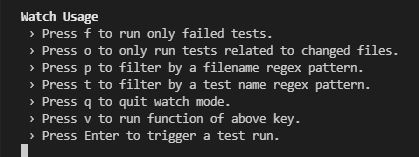
We can see that a new key 'v' is added to the watch usage. Let's press this key and see what happens.

And we got an error because, up to this point, we have defined a key, but we have not specified the functionality of this key. We have to implement key functionality in the run method, which we will see next.
Implementing Run Method
So as we have learned above, we have to implement the functionality of any key in the run method. Let's go ahead and implement the behavior of the 'v' key.
For simplicity, let's say that pressing the 'v' key will print into the console that this key is pressed.
Example
// provide the run method to a key press specified in getUsageInfo.
    run(globalConfig, updateConfigAndRun) {
        console.log('v key is pressed');
        return Promise.resolve(false);
    }
Jest provides a list of different run methods for stability and safety reasons, these are:
bail, changedSince, collectCoverage, collectCoverageFrom, collectCoverageOnlyFrom,
covergeDirectory, coverageReporters, notify, notifyMode, onlyFailures, reporters
testNamePattern, testPathPattern, updateSnapshot, verbose.
Output
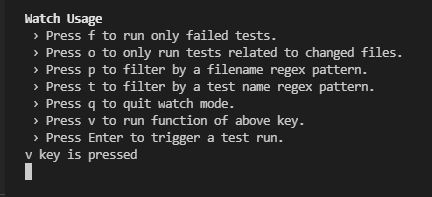
We can see that when we pressed the 'v' key, it prints in the console that the v key is pressed.
FAQs
-
How do you check if a function is called in Jest?
To check if a component's method is called, we can use the jest.spyOn method.
-
What is Jest framework used for?
Jest is a testing framework designed to ensure the correctness of any JavaScript codebase. It allows you to write tests with an approachable, familiar, and feature-rich API that gives you results quickly.
-
Is Jest faster than karma?
Jest is 2 to 3 times faster than karma testing.
The tests that took 4–5 minutes on KARMA only takes about 1–2 minutes on jest. This is particularly important when using CI-CD ( Continous Integration/Continous Delivery). Since the tests are faster, the execution time of CI-CD will also reduce.
-
What is the use of jest resolver?
Jest uses a custom resolver for imports in your tests, making it simple to mock any object outside of your test’s scope.
Key Takeaways
In conclusion, watch plugins provide a lot of functionalities. We can easily configure watch plugins and start applying our hooks in tests using the apply method. We can also modify any key of watch usage using the getUsageInfo method and implement its behavior using the run method.
Hence never stop your journey of learning. Learn more about mock functions from here, You can also practice top problems from the Coding Ninjas Studio platform, attempt mock tests, read interview experiences, and more.!
Happy Learning!







 7+ registered

