Configuring Jest
Create a new project named myapp using the command given below:
ng new my-app
Create the jest.config.js in the root directory
const { pathsToModuleNameMapper } = require("ts-jest/utils");
const { compilerOptions } = require("./tsconfig");

module.exports = {
	preset: "jest-preset-angular",
	roots: ["<rootDir>/src/"],
	testMatch: ["**/+(*.)+(spec).+(ts)"],
	setupFilesAfterEnv: ["<rootDir>/src/test.ts"],
	collectCoverage: true,
	coverageReporters: ["html"],
	coverageDirectory: "coverage/my-app",
	moduleNameMapper: pathsToModuleNameMapper(compilerOptions.paths || {}, {
  	prefix: "<rootDir>/",
	}),
};

You can also try this code with Online Javascript Compiler
Update src/test.ts file
import 'jest-preset-angular/setup-jest';

Object.defineProperty(window, 'CSS', { value: null });


Object.defineProperty(window, 'getComputedStyle', {
value: () => {
  return {
    display: 'none',
    appearance: ['-webkit-appearance'],
  };
},
});

Object.defineProperty(document, 'doctype', {
value: '<!DOCTYPE html>',
});

Object.defineProperty(document.body.style, 'transform', {
value: () => {
  return {
    enumerable: true,
    configurable: true,
  };
},
});
You can also try this code with Online Javascript Compiler
Update tsconfig.spec.json file
{
"extends": "./tsconfig.json",
"compilerOptions": {
  "outDir": "./out-tsc/spec",
  "types": [
    "jest", // 1
    "node"
  ],
  "esModuleInterop": true, // 2
  "emitDecoratorMetadata": true // 3
},
"files": ["src/test.ts", "src/polyfills.ts"],
"include": ["src/**/*.spec.ts", "src/**/*.d.ts"]
}
You can also try this code with Online Javascript Compiler
Remove comments in the ts config files
Open the tsconfig.json and tsconfig.spec.json and delete the comment in the first line.
Run the tests
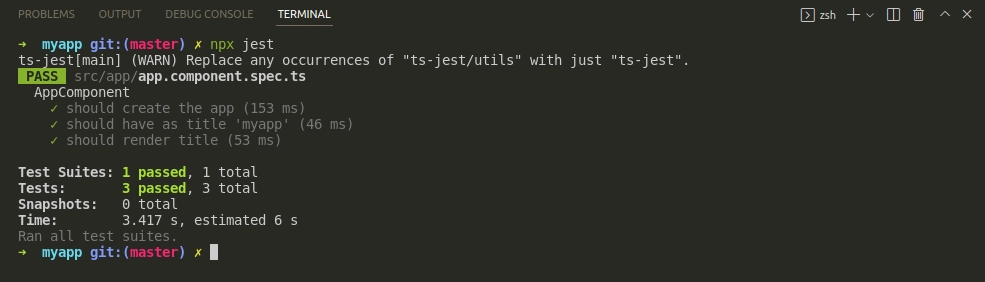
Go to the terminal and just run npx jest.
Remove Karma
Removing dependencies
For npm
npm uninstall karma karma-chrome-launcher karma-coverage-istanbul-reporter karma-jasmine
You can also try this code with Online Javascript Compiler
Or for yarn
yarn remove karma karma-chrome-launcher karma-coverage-istanbul-reporter karma-jasmine karma-jasmine-html-reporter
Removing karama.config.json
rm karma.conf.js
Removing the test target inside the angular.json file
"test": {
  "builder": "@angular-devkit/build-angular:karma",
  "options": {
    "main": "src/test.ts",
    "polyfills": "src/polyfills.ts",
    "tsConfig": "tsconfig.spec.json",
    "karmaConfig": "karma.conf.js",
    "assets": [
      "src/favicon.ico",
      "src/assets"
    ],
    "styles": [
      "src/styles.css"
    ],
    "scripts": []
  }
}
You can also try this code with Online Javascript Compiler
FAQs
-
Is Jest faster than Karma?
Jest is two to three times faster than Karma for testing purposes. We should take special notes while defining CI/CD pipeline since the test execution time will be faster.
-
Can Jest Run Jasmine test?
If you use Jasmine or Jasmine like APIs such as mocha. Jest should be mostly compatible, making it less complicated to migrate to js.
-
What is Karma in Angular?
Karma is the test feature of the Angular framework. They are the default test runner for the application created in Angular CLI.
-
What is code coverage in Angular?
Code coverage reports show you any areas of your codebase that your unit tests haven't thoroughly tested. Run it in your browser, run it in your browser, or download and run it locally, download and run it locally if you want to play around with the programme described in this guide.
Key Takeaways
This article covers essential details of setting up the testing environment in Jest. We have set up the configuration file in jest and edited files wherever necessary for setting up the environment by modifying a few other configuration files.
Hence never stop your journey of learning. Here are some of the links you might be interested in, such as Getting started with Jest, Mocking in Jest, Matchers in Jest.
Happy Learning!





 7+ registered

