Do you think IIT Guwahati certified course can help you in your career?
Introduction
In this article, we will learn about JPopupMenu in Java Programming Language with its implementation.
JPopupMenu
JPopupMenu is a class that belongs to the java swing component package. It is a PopupMenu implementation. JPopupMenu creates a small pop-up window that displays a list of options. JPopupMenu can be used to make a little window appear anywhere in the container.
Class Declaration
public class JPopupMenu
extends JComponent
implements Accessible, MenuElement
You can also try this code with Online Java Compiler
JPopupMenu(): creates a popup menu that has an empty name.
JPopupMenu(String name): creates a popup menu with a specified title.
Commonly used Methods of JPopupMenu Class:
add(JMenuItem menuItem): add menuItem to the popup menu.
add(String s): add String to the popup menu.
String getLabel(): get the popup menu’s label.
boolean is Visible(): Returns whether the JPopup menu is visible or not.
setLabel(String s): sets the popup menu’s label.
setLocation(int x, int y): sets the pop-up menu’s location to the given coordinates
setPopupSize(int width, int height): set the popup size to give height and width
setVisible(boolean b): It sets the visibility of the pop-up menu, visible if true is passed as an argument or vice versa.
show(Component c, int x, int y): displays the popup menu at the x, y position within the component c.
Let us see some examples of JPopMenu:
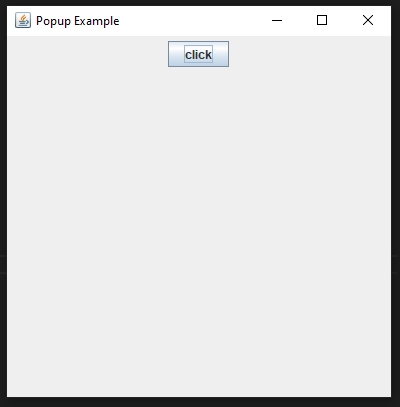
A simple popup menu
Program:
// Java program to show a simple popup menu
import java.awt.*;
import java.awt.event.*;
import javax.swing.*;
class Popup extends JFrame implements ActionListener {


    // java button
    static JButton testbutton;


    // java frame
    static JFrame testframe;


    // popup menu
    static JPopupMenu popm;


    // default constructor
    Popup()
    {
    }


    // main class
    public static void main(String[] args)
    {
        // create a frame
        testframe = new JFrame("Popup Example");


        // set the size of the frame
        testframe.setSize(400, 400);


        // close the frame when close button is pressed
        testframe.setDefaultCloseOperation(JFrame.EXIT_ON_CLOSE);


        // create a new panel
        JPanel testpanel = new JPanel();


        // create an object of mouse class
        Popup popm = new Popup();


        // create a button
        testbutton = new JButton("click");


        // addActionListener
        testbutton.addActionListener(popm);
        testpanel.add(testbutton);
        testframe.add(testpanel);
        testframe.show();
    }


    // when the button is clicked
    public void actionPerformed(ActionEvent e)
    {
        String str = e.getActionCommand();
        if (str.equals("click")) {
            // create a popup menu
            popm = new JPopupMenu("Message");


            // create a label
            JLabel testlabel = new JLabel("This is the popup menu...");


            // add the label to the popup
            popm.add(testlabel);


            // add the popup to the frame
            popm.show(testframe, 100, 100);
        }
    }
}
You can also try this code with Online Java Compiler
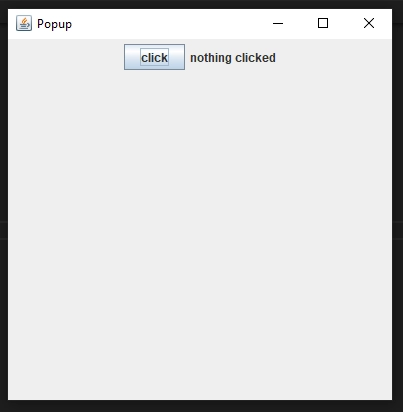
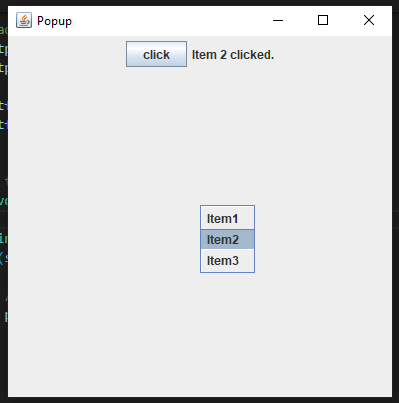
// Java program to show a popup menu
// and menu items to it
import java.awt.*;
import java.awt.event.*;
import javax.swing.*;
class Popup extends JFrame implements ActionListener {


    // java button
    static JButton testbutton;


    // java frame
    static JFrame testframe;


    // popup menu
    static JPopupMenu popm;


    // JLabel
    JLabel testlabel;


    // default constructor
    Popup()
    {
    }


    // main class
    public static void main(String[] args)
    {
        // create a frame
        testframe = new JFrame("Popup");


        // set the size of the frame
        testframe.setSize(400, 400);


        // close the frame when close button is pressed
        testframe.setDefaultCloseOperation(JFrame.EXIT_ON_CLOSE);


        // create anew panel
        JPanel testpanel = new JPanel();


        // create an object of mouse class
        Popup testpop = new Popup();


        // create a button
        testbutton = new JButton("click");


        // addActionListener
        testbutton.addActionListener(testpop);


        // create a popup menu
        popm = new JPopupMenu("Message");


        // create menuItems
        JMenuItem menu1 = new JMenuItem("Item1");
        JMenuItem menu2 = new JMenuItem("Item2");
        JMenuItem menu3 = new JMenuItem("Item3");


        // create a Jlabel
        JLabel testlabel = new JLabel("nothing clicked");


        // add menuitems to popup menu
        popm.add(menu1);
        popm.add(menu2);
        popm.add(menu3);


        // addActionListener
        menu1.addActionListener(new ActionListener() {
            public void actionPerformed(ActionEvent e)
            {
                testlabel.setText("Item 1 clicked.");
            }
        });


        menu2.addActionListener(new ActionListener() {
            public void actionPerformed(ActionEvent e)
            {
                testlabel.setText("Item 2 clicked.");
            }
        });


        menu3.addActionListener(new ActionListener() {
            public void actionPerformed(ActionEvent e)
            {
                testlabel.setText("Item 3 clicked.");
            }
        });


        // add button and label to frame
        testpanel.add(testbutton);
        testpanel.add(testlabel);


        testframe.add(testpanel);
        testframe.show();
    }


    // when the button is clicked
    public void actionPerformed(ActionEvent e)
    {
        String str = e.getActionCommand();
        if (str.equals("click")) {


            // add the popup to the frame
            popm.show(testframe, 200, 200);
        }
    }
}
You can also try this code with Online Java Compiler
Graphical User Interface (GUI) in Java is an easy-to-use visual experience builder that is used for applications that are developed in Java. It is mainly made of components such as buttons, labels, windows, etc., through which the user can interact with an application. GUI plays an essential role in building accessible interfaces for Java applications.
Is JOptionPane a GUI?
JOptionPane is a nice way to throw together a few dialog boxes and get a GUI, but it doesn't give us the flexibility we really want. But with power and flexibility comes complexity. The basic class we start with is a JFrame.
What are the menus and toolbars in Java?
Menus group commands that we generally use in an application. Toolbars provide quick access to the most frequently used commands. In Java Swing, the JToolBar class creates a toolbar in an application. The example creates a toolbar with one exit button.
What are menus in Java?
A menu is a way to arrange buttons. There are several types. Traditional dropdown menus are positioned across the top of a window in a menu bar and displayed below the menu name. Popup menus appear when the user clicks, e.g., with the right mouse button, on a component that can handle a popup request.
What is the JFrame class in Java?
JFrame class is a type of container inheriting the java.awt.Frame class. Whenever a Graphical User Interface (GUI) is created with Java Swing functionality, a container is required where components like labels, buttons, and text fields are added to create a Graphical User Interface(GUI) and are known as JFrame.
Conclusion
In this article, we have studied JPopupMenu in Java. We have also discussed the different constructors and methods of JPopupMenu in Java in detail.
We hope that this article has provided you with the help to enhance your knowledge regarding JPop in JavaupMenu with different constructors and methods provided in detail and if you would like to learn more, check out our articles on Generics in Java, Trim in Java and Java Regex.









 7+ registered

