Do you think IIT Guwahati certified course can help you in your career?
Introduction
In this blog, we will learn about the JSF h:convertDateTime. The JSF h:convertdatetime tag is a standard JSF converter that turns a string into a specified date format. It is also used to validate date formats. The convertDateTime tag is used to convert a string value to a specified date format. It also serves as a validator for the needed date format. This article describes the convertDateTime function in JSF, beginning with the most straightforward statements and progressing to the most significant modules.
JavaServer Faces (JSF)
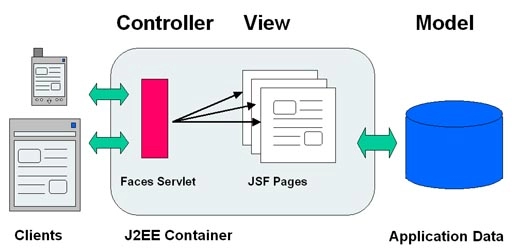
JSF (Java Server Faces) is a Java-based web application framework designed to build web-based user interfaces more accessible. The Java Community Process codified a definition for JavaServer Faces, a standardised display technology. The MVC design pattern separates model and display, allowing developers to concentrate on their primary competencies and communicate more effectively.
Instead of focusing on the model and controller layers, web designers must focus solely on the view layer. Developers can alter the model's code but usually do not need to change the view layer. Controllers access user actions. This procedure may alter the layer model and views.
A JSF application is comparable to any other Java-based web application in that it operates in a Java servlet container and incorporates JSF components.
Models comprising application-specific functionality and data are used in JavaBeans components.
Event handlers and validators are represented using a bespoke tag library.
A custom tag library for displaying a user interface components
On the server, UI components are defined as stateful objects.
Helper classes for the server
Validators, event handlers and navigation handlers are all valuable tools.
For configuring application resources, use the application configuration resource file.
h:convertDateTime Tag
<h:convertDateTime pattern = "dd-mm-yyyy" />
It converts user input into a specific date. By nesting the convertDateTime tag inside the component tag, you can convert the data of a component to a java.util.Date. The convertDateTime tag includes numerous properties that allow you to select the data format and type.
Tag Attributes
The DateTime Converter properties are listed in the tables below:
S.No.
Attributes
Description
type
It specifies whether the string value will include a date, a time, or both. Date, time, or both are acceptable options. The date is used if no value is supplied.
2.
binding
It connects a converter to a controlled bean property.
3.
dateStyle
It defines the format as described by java.text. DateFormat, the format of a date or the date portion of a date string. Only used if the type is date or both, and the pattern is not defined. Valid options include default, short, medium, long, and full. When no value is supplied, the default value is utilised.
4,
timeStyle
It defines the format as described by java.text. DateFormat, which represents a time or the time component of a date string. Only used if the type is time and the pattern is not defined. Valid options include default, short, medium, long, and full. When no value is supplied, the default value is utilised.
5.
pattern
It's a custom formatting pattern that governs how the date/time string is formatted and parsed. DateStyle, timeStyle, and type properties are disregarded if this attribute is provided.
6.
locale
It is a Locale instance that uses specified styles for dates and times when formatting or parsing. If no Locale is supplied, FacesContext.getLocale will be used.
7.
timeZone
It is used to interpret any time information in the date string based on the time zone.
Example Application
To test the above tag, let's create a test JSF application.
As described in the JSF - First Application chapter, create a project called HelloWorld in the package com.codingNinjas.test.
Make the following changes to the main.xhtml: Leave the remainder of the files alone.
Put output.xhtml in the webapps directory, as shown below.
As shown below, create UserInfo.java as a managed bean in the package com.codingNinjas.test.
Compile and run the application to ensure that the business logic works as expected.
Finally, create the application as a war file and deploy it to the Apache Tomcat Webserver.
In the final step, launch your web application using the right URL.
UserInfo.java
package com.codingNinjas.test;

import java.io.Serializable;
import java.util.Date;

import javax.faces.bean.ManagedBean;
import javax.faces.bean.SessionScoped;

@ManagedBean(name = "userInfo", eager = true)
@SessionScoped
public class UserInfo implements Serializable {
   private static final long serialVersionUID = 1L;
   public Date date;

   public Date getDate() {
      return date;
   }

   public void setDate(Date date) {
      this.date = date;
   }
}
Main.xhtml
<?xml version = "1.0" encoding = "UTF-8"?>
<!DOCTYPE html PUBLIC "-//W3C//DTD XHTML 1.0 Transitional//EN"
"http://www.w3.org/TR/xhtml1/DTD/xhtml1-transitional.dtd">

<html xmlns = "http://www.w3.org/1999/xhtml"
   xmlns:h = "http://java.sun.com/jsf/html">

   <h:head>
      <title>JSF h:convertDateTime</title>
   </h:head>

   <h:body>
      <h2>ConvertDateTime</h2>

      <h:form>
         <h:inputText id = "dateInput" value = "#{userData.date}"
            label = "Date" >
            <h:convertDateTime pattern = "dd-mm-yyyy" />
         </h:inputText>
         <h:commandButton value = "submit" action = "result"/>
      </h:form>
      <br/>
      <h:message for = "dateInput" style = "color:blue" />

      <h:outputText value = "19-06-2022" >
         <h:convertDateTime pattern = "dd-mm-yyyy" />
      </h:outputText>

   </h:body>
</html>
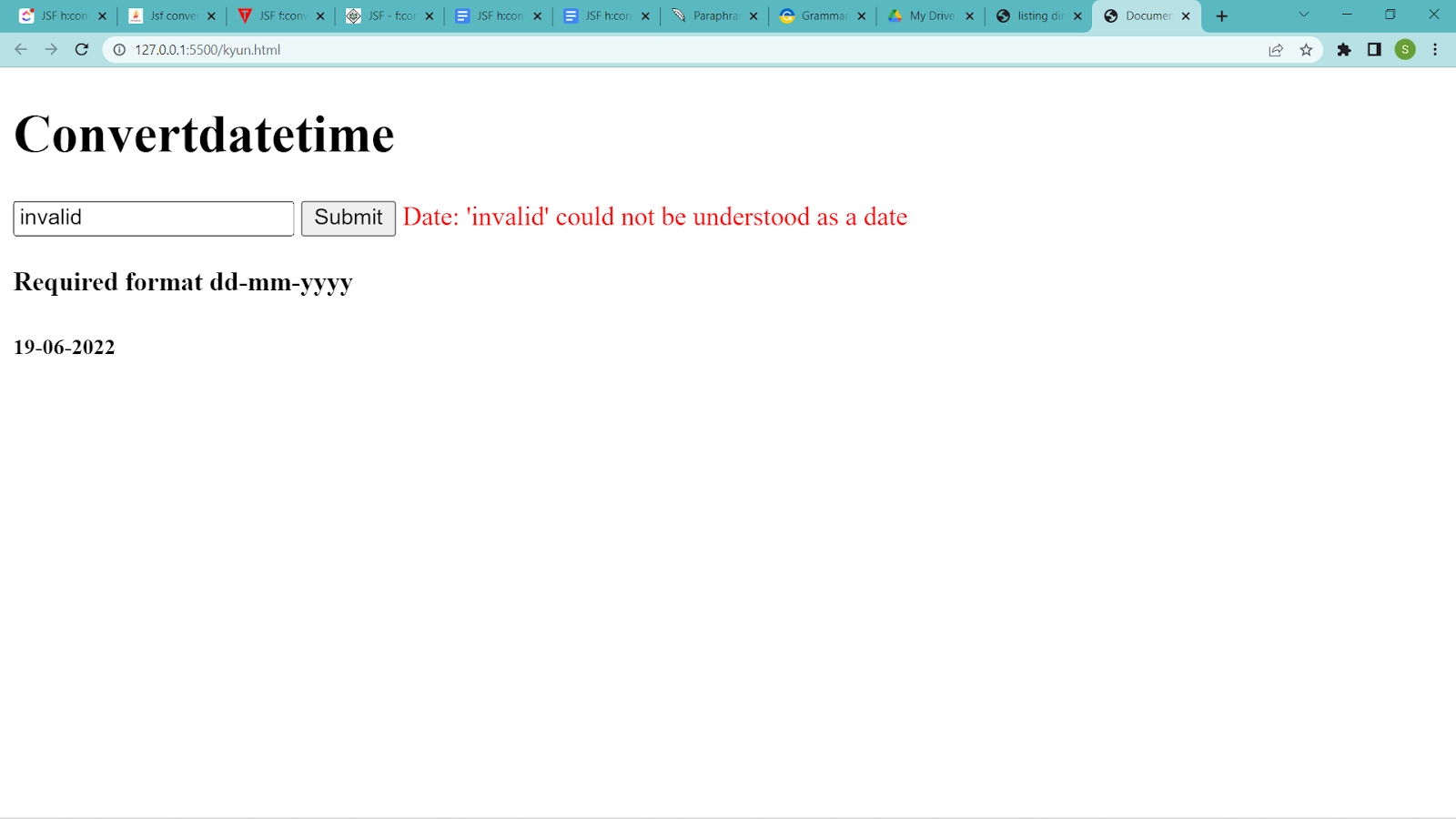
Once you have completed all of the changes, compile and run the application like we did in the JSF - First Application chapter. If everything is in order with your application, the following will happen.
Output:
Enter any invalid value and then click the Submit button. See the error message below.
Enter any valid value and then click the Submit button. Consider the following outcome.
Frequently Asked Questions
What is meant by JSF?
JSF (Java Server Faces) is a Java-based web application framework designed to make the building of web-based user interfaces easier. The Java Community Process codified a definition for JavaServer Faces, which is a standardized display technology.
What is the use of the h:DateTime Tag in JSF?
The h:convertDateTime tag is used to convert a string value to the appropriate date format. It also serves as a validator for the needed date format.
What is a value-binding expression?
A JavaServer Faces EL expression that refers to a backing bean property. This expression is used by a component tag to bind the associated component's value or the component instance to the bean property.
Conclusion
In this blog, we have extensively discussed the JSF h:convertDateTime. We hope that this article has helped all of you with additional information about Java Server Faces. For more information about Java Server Faces, you can visit Java Frameworks and Introduction to JSP blogs. For more information about JSF, you can visit JSF-Coding Ninjas and XML-encoding Coding Ninjas blogs.










 7+ registered

