Do you think IIT Guwahati certified course can help you in your career?
Introduction
In this blog, we will learn about the JSF h:convertNumber. The JSF h:convertNumber Tag is a standard JSF converter that can convert a string to various formats. It is also used to check if a number is genuine. By nesting the convertNumber Tag inside the component tag, you can convert a component's data to a java.lang.number. The convertNumber Tag contains several characteristics that let you determine the data's format and type. This article describes the convertNumber function, beginning with the most straightforward statements and progressing to the most significant modules.
JavaServer Faces (JSF)
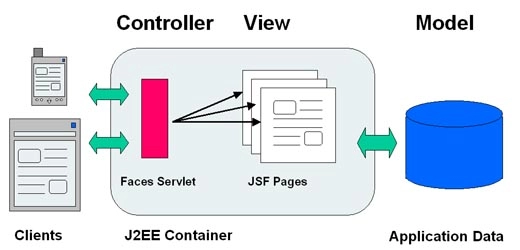
JSF (Java Server Faces) is a Java-based web application framework designed to build web-based user interfaces more accessible. The Java Community Process codified a definition for JavaServer Faces, a standardised display technology. The MVC design pattern separates model and display, allowing developers to concentrate on their primary competencies and communicate more effectively.
Instead of focusing on the model and controller layers, web designers must focus solely on the view layer. Developers can alter the model's code but usually do not need to change the view layer. Controllers access user actions. This procedure may alter the layer model and views.
A JSF application is comparable to any other Java-based web application in that it operates in a Java servlet container and incorporates JSF components.
Models comprising application-specific functionality and data are used in JavaBeans components.
Event handlers and validators are represented using a bespoke tag library.
A custom tag library for displaying a user interface components
On the server, UI components are defined as stateful objects.
Helper classes for the server
Validators, event handlers and navigation handlers are all valuable tools.
For configuring application resources, use the application configuration resource file.
h:ConvertNumber Tag
<h:convertNumber minFractionDigits = "4" />
It's used to transform data from a component (user input) to a Java Number type. By nesting the convertNumber tag inside the component tag, you can convert the data of a component to a java.lang.Number. The convertNumber tag contains a number of characteristics that let you determine the data's format and type.
Tag Attributes
The NumberConverter properties are listed in the tables below:
S.no.
Attributes
Description
type
It determines whether the string value should be parsed and formatted as a number, currency, or percentage. If no value is supplied, the default value is utilised.
2.
binding
It's used to connect a managed bean property to a converter.
3.
pattern
It specifies how the number string is formed and parsed using a particular formatting pattern.
4.
currencyCode
It stands for the ISO 4217 currency code, which is only used to format currencies.
5.
currencySymbol
It's a currency sign that's exclusively used for structuring currencies.
6.
locale
It uses number styles to format and parse data.
7.
maxFractionDigits
It is used to specify the maximum number of digits that can be formatted in the output's fractional component.
8.
minFractionDigits
It is used to specify the minimum number of digits that should be formatted in the output's fractional component.
9.
maxIntegerDigits
It is used to limit the number of digits that can be formatted in the integer portion of the output.
10.
minIntegerDigits
It is used to specify the minimum number of digits that should be formatted in the integer portion of the output.
11.
groupingUsed
It determines whether or not grouping separators are included in formatted output.
12.
integerOnly
It determines whether or not the integer portion of the value will be parsed.
Example Application
To test the above tag, let's create a test JSF application.
As described in the JSF, create a project named HelloWorld under the package com.codingninjas.test.
Make the changes to the main.xhtml as described below. The rest of the files should be left alone.
Compile and run the programme to ensure that the business logic meets the specifications.
Finally, create a war file for the application and deploy it to the Apache Tomcat Webserver.
Use the right URL to launch your web application, as stated in the last step.
Main.xhtml
<?xml version = "1.0" encoding = "UTF-8"?>
<!DOCTYPE html PUBLIC "-//W3C//DTD XHTML 1.0 Transitional//EN"
"http://www.w3.org/TR/xhtml1/DTD/xhtml1-transitional.dtd">

<html xmlns = "http://www.w3.org/1999/xhtml"
   xmlns:h = "http://java.sun.com/jsf/html">

   <h:head>
      <title>JSF h:convertNumber</title>
   </h:head>

   <h:body>
      <h2>ConvertNumber</h2>
    <!-- Making a table to distribute Parameter, Value Passed and their output-->
      <table border = "1" cellspacing = "2" cellpadding = "2">
         <tr>
            <th>Parameter</th>
            <th>Value Passed</th>
            <th>Output</th>
         </tr>

         <tr>
            <td>minFractionDigits = "4"</td>
            <td>24.54321</td>
            <td>
               <h:outputText value = "24.54321" >
                  <h:convertNumber minFractionDigits = "4" />
               </h:outputText>
            </td>
         </tr>
        <!-- Making Patterns. -->>
         <tr>
            <td>pattern = "#011.123"</td>
            <td>24.54321</td>
            <td>
               <h:outputText value = "24.54321" >
                  <h:convertNumber pattern = "#011.123" />
               </h:outputText>
            </td>
         </tr>
        <!-- row for currency symbols-->>
         <tr>
            <td>currencySymbol = "$"</td>
            <td>$1</td>
            <td>
               <h:outputText value = "$1">
                  <h:convertNumber currencySymbol = "$" type = "currency" />
               </h:outputText>
            </td>
         </tr>
        <!-- row for percentage distributions-->>
         <tr>
            <td>type = "percent"</td><td>50.54321%</td>
            <td>
               <h:outputText value = "50.54321%" >
                  <h:convertNumber type = "percent" />
               </h:outputText>
            </td>
         </tr>
      </table>

   </h:body>
</html>
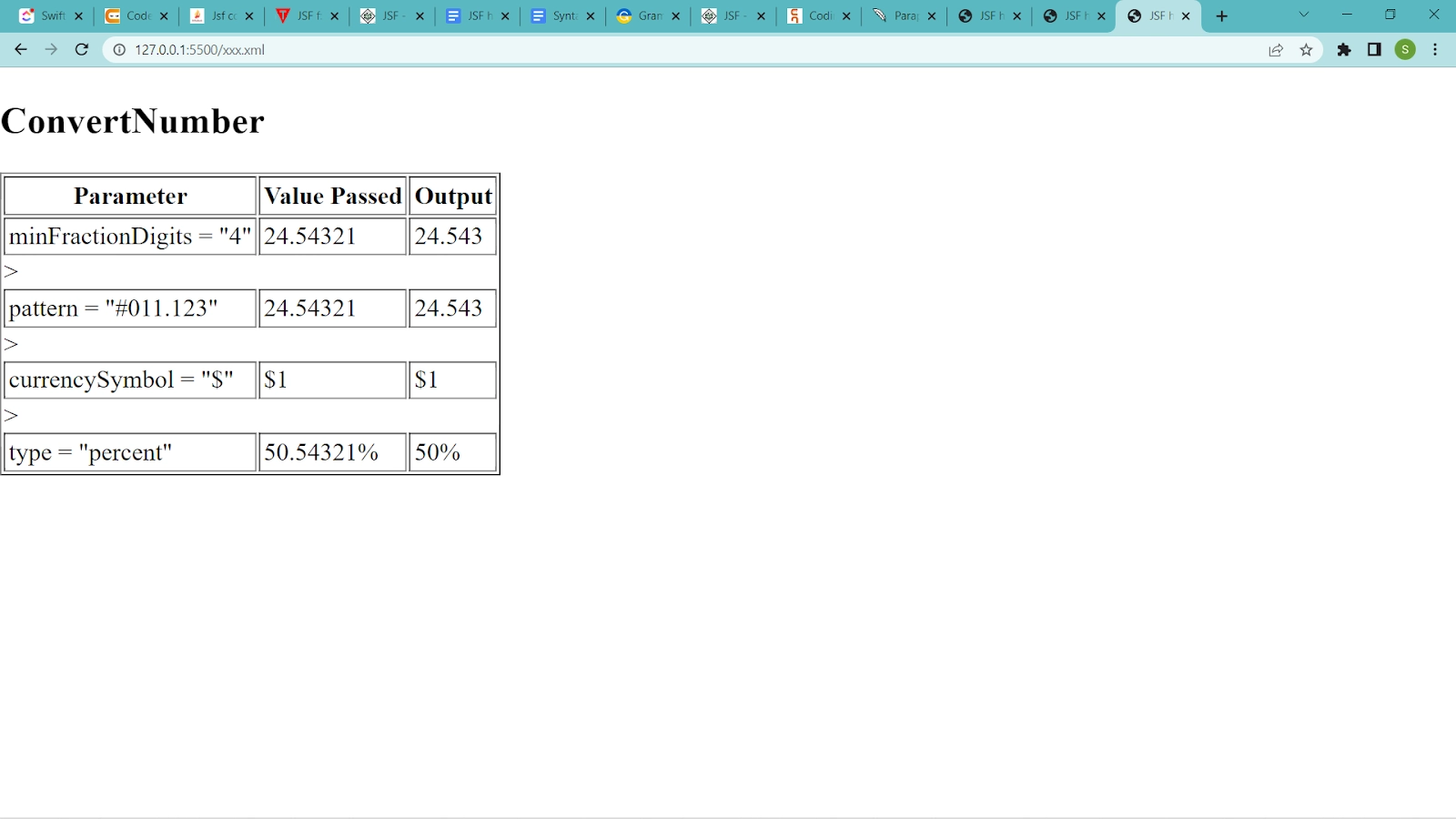
Let us compile and run the application as we did in the JSF - First Application chapter once you are through with all the changes. If everything is fine with your application, this will provide the following result.
Output:
Frequently Asked Questions
What is meant by JSF?
JSF (Java Server Faces) is a Java-based web application framework designed to make the building of web-based user interfaces easier. The Java Community Process codified a definition for JavaServer Faces, which is a standardised display technology.
What is the use of the Tag in JSF?
<h:convertNumber> in JSF On the UIComponent associated with the enclosing parent tag, Tag registers a NumberConverter instance.
What is a value-binding expression?
A JavaServer Faces EL expression that refers to a backing bean property. This expression is used by a component tag to bind the associated component's value or the component instance to the bean property.








 7+ registered

