Link Tag Attributes
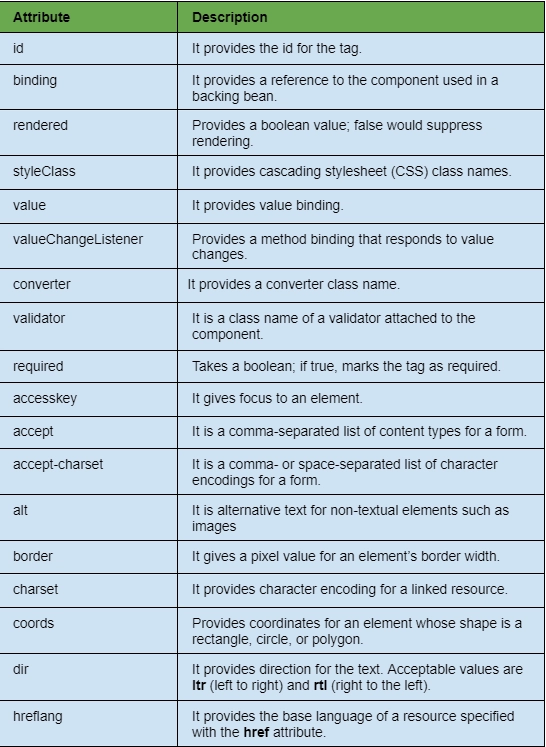
JSF provides several attributes in its link tag. All the attributes are given in the table below.


Example on JSF Link Tag
In this section, we will discuss a simple example to understand the theory we have studied so far. Here, we will create a JSF program with a file name firstPage.xhtml. This webpage contains a heading and a link, on clicking the link, you will be redirected to the other page whose name is the message.xhtml. This file contains a simple message.
firstPage.xhtml
<?xml version="1.0" encoding="UTF-8"?>
<!DOCTYPE html PUBLIC "-//W3C//DTD XHTML 1.0 Transitional//EN"
"http://www.w3.org/TR/xhtml1/DTD/xhtml1-transitional.dtd">

<html xmlns="http://www.w3.org/1999/xhtml"
xmlns:
f="http://java.sun.com/jsf/core"
xmlns:ui="http://java.sun.com/jsf/facelets"
xmlns:h="http://java.sun.com/jsf/html">
<h:head>
<title>JSF Link Demo</title>
</h:head>
    <h:body>
      <h3>JSF Link Demo</h3>
      <h:form>
         <h:link value="Click Here" outcome="message" />
      </h:form>
    </h:body>
</html>
message.xhtml
<?xml version="1.0" encoding="UTF-8"?>
<!DOCTYPE html PUBLIC "-//W3C//DTD XHTML 1.0 Transitional//EN"
"http://www.w3.org/TR/xhtml1/DTD/xhtml1-transitional.dtd">

<html xmlns="http://www.w3.org/1999/xhtml"
xmlns:h="http://java.sun.com/jsf/html"
xmlns:f="http://java.sun.com/jsf/core"
xmlns:ui="http://java.sun.com/jsf/facelets">
<h:head>
<title>JSF Link Demo</title>
</h:head>
    <h:body>
      <h3>Welcome To Coding Ninjas</h3>
    </h:body>
</html>
Output:
URL: http://localhost:7001/JSFExample16/faces/firstPage.xhtml

After clicking the link.

Frequently Asked Questions
Why should we use JSF?
It creates a distinct and evident division between the web application's behavior and its display. It is feasible to separate the design of business logic and user interfaces.
What is a link tag?
Definition and application The relationship between the current document and an outside resource is specified using the link> tag. Adding a favicon to your website or linking to external style sheets are two common uses for the link> tag.
Why is render in JSF used?
A JSF component's render attribute enables us to load one or more additional components when a specific action has been completed. Another boolean attribute of a JSF component called rendered defines whether the component is rendered or not.
What is the use of the title attribute in the JSF's link tag?
In JSF, the title attribute is used in the link tag because it provides a title for accessibility. The browsers typically create tooltips for the title's value.
What is the use of the hreflang attribute in the link tag?
In JSF, the hreflang attribute is used in the link tag to provide the base language of a resource specified with the help of the href attribute.
Conclusion
In this article, we have extensively discussed the JSF link tag. We discussed the functionality and attributes of the link tag and tried out an example.
We hope this blog has helped you enhance your knowledge of the JSF link tag. Check out the awesome content on the Coding Ninjas Website, JSF, JSF architecture, JSF Application Events, Coding Ninjas Studio Problems, Coding Ninjas Studio Interview Bundle, Coding Ninjas Studio Interview Experiences, Coding Ninjas Courses, Coding Ninjas Studio Contests, and Coding Ninjas Studio Test Series. Do upvote our blog to help other ninjas grow.
Happy Coding!





 7+ registered

