Example on JSF outputFormat Tag
In this section, we will discuss a simple example of outputFormat tag to understand the theory we have studied. Here, we will create a JSF program with a file name demo.xhtml. Here, we will use the outputFormat tag.
demo.xhtml
<?xml version="1.0" encoding="UTF-8"?>
<!DOCTYPE html PUBLIC "-//W3C//DTD XHTML 1.0 Transitional//EN"
"http://www.w3.org/TR/xhtml1/DTD/xhtml1-transitional.dtd">

<html xmlns="http://www.w3.org/1999/xhtml"
xmlns:f="http://java.sun.com/jsf/core"
xmlns:h="http://java.sun.com/jsf/html"
xmlns:ui="http://java.sun.com/jsf/facelets">
<h:head>
<title>JSF output format Demo</title>
</h:head>
    <h:body>
      <h:outputFormat value="This is: {0}, Powered By: {1}" >
         <f:param value="Coding Ninjas Studio" />
         <f:param value="Coding Ninjas" />
      </h:outputFormat>
    </h:body>

</html>
Output:

Frequently Asked Questions
What is the outputFormat tag?
Although it can accept parameterized inputs, the h:outputFormat tag generates an HTML text.
What are the standard converters in JSF?
The JavaServer Faces offer a collection of Converters. You can convert component data using that. Conversion transforms the Servlet API's String-based data into strongly typed Java objects.
What are the web resources in JSF?
The resources needed for successful rendering in the web application are JSF web resources. Images, scripts, and any user-made component libraries are all included.
What is the use of the title attribute in the outputFormat tag?
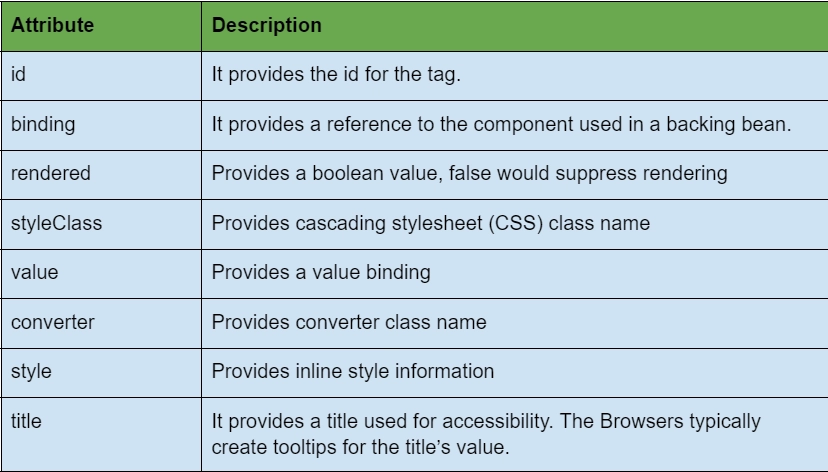
The title attribute provides an accessibility-related title. JSF uses the title attribute in link tags. For the value of the title, browsers often produce tooltips.
What is the use of rendered attribute in outputFormat tag?
The rendered attribute lets you know whether or not the component needs to be rendered. The use of rvalue expressions, which can only receive data and not write it back to the given source components, is restricted by rendered attributes. Arithmetic operators and literals that support rvalue can be used in expressions.
Conclusion
In this article, we have extensively discussed the JSF outputFormat tag. We discussed the functionality and attributes of the link tag and tried out an example.
We hope this blog has helped you enhance your knowledge of the JSF outputFormat tag. Check out the awesome content on the Coding Ninjas Website, JSF, JSF architecture, JSF Application Events, Coding Ninjas Studio Problems, Coding Ninjas Studio Interview Bundle, Coding Ninjas Studio Interview Experiences, Coding Ninjas Courses, Coding Ninjas Studio Contests, and Coding Ninjas Studio Test Series. Do upvote our blog to help other ninjas grow.
Happy Coding!







 7+ registered

