Do you think IIT Guwahati certified course can help you in your career?
Introduction
Hello and welcome, readers! We hope you are doing well.
Today, we will discuss the JSF <h:graphicImage> Tag. After completing this article, you will clearly understand the JSF <h:graphicImage> Tag. So follow the article till the end.
So, without further ado, let’s jump into the article.
JSF h:graphicImage
JSF renders the "img" tag for HTML elements. This tag is used to render an image on a web page.
Tag
<h:commandLink value = "File1" action = "file1" />
What are the three different categories of text field tags offered by JSF?
h:inputText>, h:inputSecret>, and h:inputTextarea> are the three different types of text field tags. A textbox will be added next to the caption box by using the h:inputText> tag. <h:inputSecret>—This type is used for password fields where the data entered is hidden. <h:inputTextarea>—This type of field is used when typing a large number of characters.
What is Resource bundling in JSF?
The phenomenon of storing UI labels, dates, status messages, and other UI text elements in a separate properties file rather than hard-coding them into a page is called a resource bundle. You can use the h:outputLabel element to select these values from the resource pack properties file on the JSF view page.
What are JSF life cycle phases?
There are six lifecycle phases: Restore view phase, Apply request values phase, Process validations phase, Update model values phase, Invoke application phase, and Render response phase.
What are the required configurations for the JSF framework?
There are two configuration files: web and xml. The deployment information is contained in the general web application configuration file. This includes the faces-config file responsible for handling the application.
Conclusion
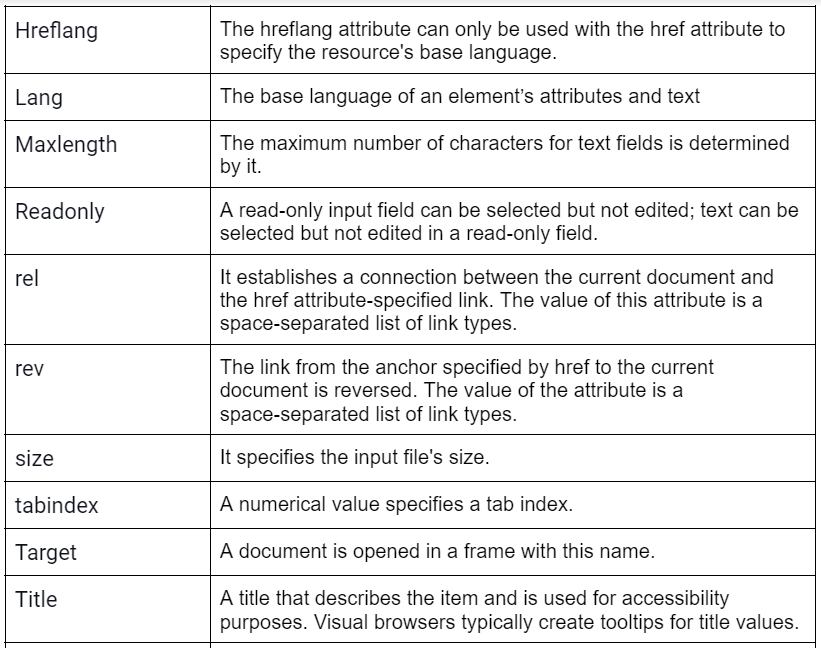
JavaServer Faces is a Java standard for creating web-based user interfaces. At the time of this writing, JSF 2.3 is the current version, and the reference implementation is Eclipse Mojarra. JSF is included in Jakarta EE and has been selected for further development. This is good news for Java developers looking for a standard way to develop a modern Java-based Web UI. This blog covers JSF h:graphicImage, its attributes, and description. This will give you an insight into the JSF and its implementation.










 7+ registered

