Do you think IIT Guwahati certified course can help you in your career?
Introduction
Java Server Faces (JSF) has many user interface components for common requirements. One of the most important components is the <h:selectBooleanCheckbox/> component. It is a component that has been used for checking single or multiple options from a given list. Simply put, they are square boxes that can be dynamically ticked in the front end. This comes in handy when we need multiple inputs from the user. Users who encounter a checkbox question use these boxes to select their preferred options from the entire list. The data from the checked checkboxes are collected when the question or form is submitted. Now, we will cover h:selectBooleanCheckbox in JSF in detail.
JSF h:selectBooleanCheckbox
An h:selectBooleanCheckbox in JSF can indicate whether a question or statement is on or off. for example, In terms and conditions form, If the user checks the check box, it means "yes," while leaving the box unchecked means "no." Users can also make multiple selections using check boxes from a list of predefined options. For example, if a student takes yoga classes on Monday, Tuesday, and Thursday. An instructor who teaches yoga can use checkboxes as the input object for this question on the form to check multiple days when the student is present.
Advantages
Here, we have listed down the advantages of using h:selectBooleanCheckbox in JSF.
Total control is given to the User: Users don't have to click on anything to see the options in it before making a decision. However, they may require users to scroll the list if there are too many items.
Multiple item selectivity: Checkboxes are designed to allow you to select multiple items from a list.
Higher accuracy: Checkboxes are more likely to collect accurate information than open-ended inputs like text boxes.
Flexibility of choice: The choice and selection Checkboxes can be ticked by the user to any combination permitted.
Disadvantages
The following are the disadvantages of using h:selectBooleanCheckbox in JSF.
Screen space: Multiple check boxes for a single question can eat up a lot of room on a form. Checkboxes should only be used when the number of options is limited, which may be less than 10.
Selection bias: The way check box options are presented to form users may influence their decision. For example, they may select the first option solely based on its position in the list. It assists in determining the order of options using a well-known method (e.g., alphabetic, frequency of use, etc.).
Possibilities of overlooking: It's possible that users won't be able to see all of the CheckBox options at once. As this is usually used in areas with many more items, the checkboxes go to an unfocused area.
Uses of h:selectBooleanCheckbox
The h:selectBooleanCheckbox in JSF is probably the most commonly used selection component. We have listed down its uses for better understanding.
It renders complex forms in which multiple selections may be required to simple ones. Where the user would face fewer troubles in making the choices wanted.
In native applications and websites, h:selectBooleanCheckbox is used for selecting and making agreement choices.
selectBooleanCheckboxis commonly used on software or subscription prompts of websites where the user may be asked to agree to terms and conditions or select which software components to install.
This is useful in the cases of creating forms where the user may pick their selection of choice when provided with multiple options.
selectBooleanCheckbox makes a form more accepting, especially when there are many options to choose from and multiple combinations of choices are possible.
Using the selectBooleanCheckbox can make information collection more accurate.
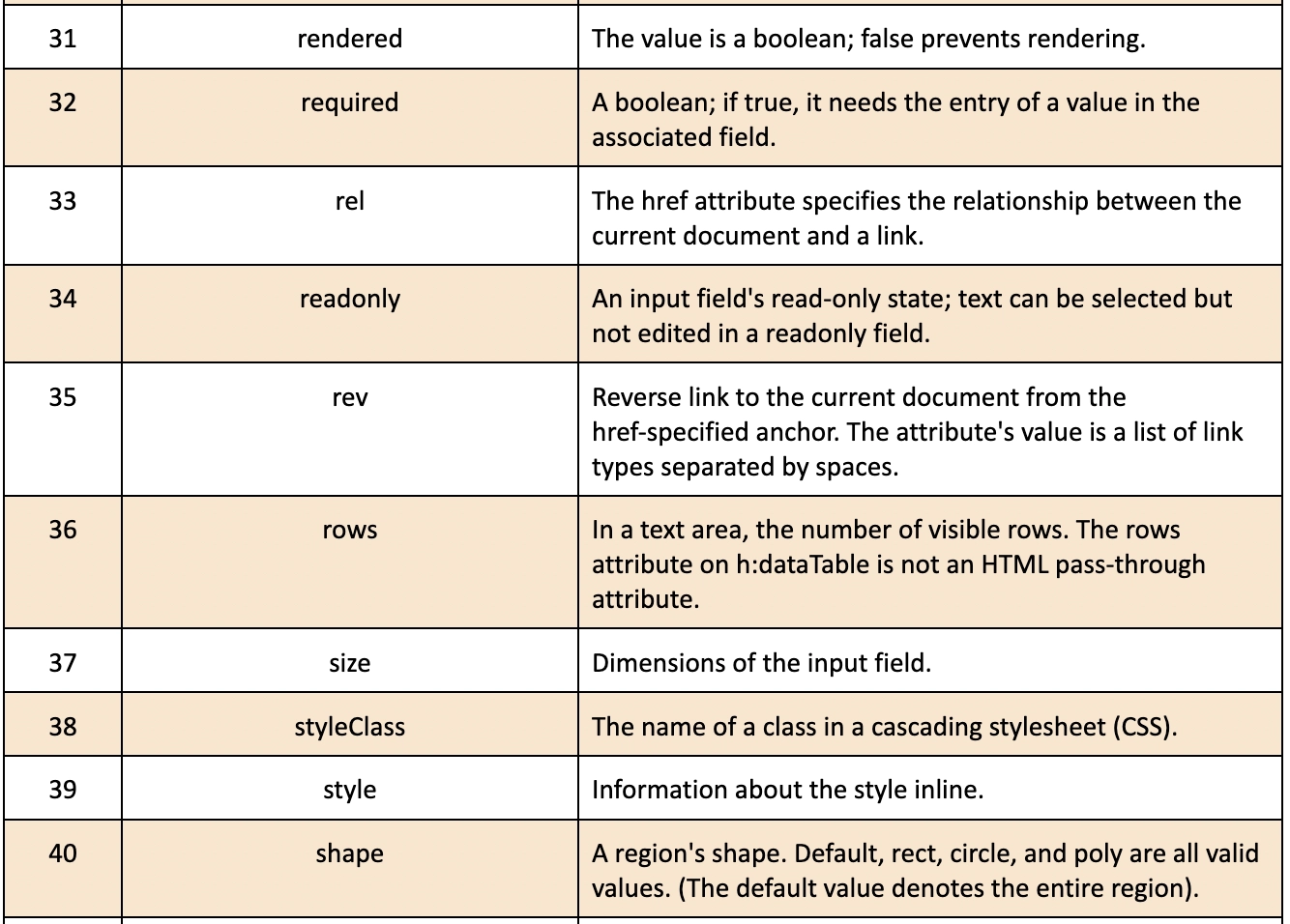
Attributes of Tags
We will cover some of the attributes of the tag h:selectBooleanCheckbox in JSF. These have been discussed below:
Example
We will look into an example of 'h:selectBooleanCheckbox in JSF' in which the output will come as 'true' or 'false' depending on the checkbox selected. If we select the checkbox for a particular question, the value will come as 'true'; if we don't, the value will come as 'false' in the output.
Home.java:
import javax.faces.bean.ManagedBean;
import javax.faces.bean.SessionScoped;

@ManagedBean(name="home")
@SessionScoped

/**********************
Managed Bean
@author codingninjas
**********************/
public class Home {
   private boolean checkedBoxValue;
   public boolean isCheckedBoxValue() {
       return checkedBoxValue;
   }
   public void setCheckedBoxValue(boolean checkedBoxValue) {
       this.checkedBoxValue = checkedBoxValue;
   }
   public String checkedCheckBoxValue() {
       return "Success";
   }
}
You can also try this code with Online Java Compiler
Let us compile and run the application once you are done with all the changes. This will generate the following result if everything with your application is in order.
Output
We will be getting this output when we run the JSF project. The output will be generated on 'http://localhost:8000/booleancheckbox/faces/home.xhtml'.
If we do not mark the checkbox, then the output will be like the following:
Now, let us check if the checkbox is marked.
After marking the checkbox, the output will be like this:
Frequently Asked Questions
What is a stand-alone checkbox?
A stand-alone checkbox is used when there is only one option that can either be turned on or off.
Explain the selectOne menu tag's function in JSF.
The h:selectOneMenu component lets you choose from a list of options. A list box, radio buttons, or a menu are examples of components.
How's h:selectBooleanCheckbox differ from h:selectOneListbox?
A user can tick single or multiple values from a list of data using the selectBooleanCheckbox. The user can choose many choices among the ones available on the screen. On the other hand, Only one value from a list of data can be selected using the selectOneListbox. The user can see a few of the entries in the list within a box on the screen. Then they choose one of the options from the list box.
Conclusion
In this article, the handling of h:selectBooleanCheckbox in JSF has been discussed. We've also seen how h:selectBooleanCheckbox allows users to choose multiple options and select multiple options at once. We looked at making and using h:selectBooleanCheckbox elements in JSF.
Explore our courses on HTML and CSS here for free. You can check out various Java topics and blog on JSF Architecture to follow.







 7+ registered

