Do you think IIT Guwahati certified course can help you in your career?
Introduction
JTabbedPane is one of the many classes the 'javax.swing' Java package offers for the Java swing APIs, along with JButton, JTextArea, JMenu, JTextField, etc. The Java Foundation Classes (JFCs) include the Java Swing package. These core classes are used to design graphical user interfaces, window-based applications, and desktop programs using readily available GUI components. On top of AWT, the Abstract Windows Toolkit is entirely written in Java.
Java Swing packages, however, offer platform-independent components, in contrast to AWT. These parts are also relatively light in weight. You will be able to add Swing JComponents like JTabbedPane onto an AWT Container after reading this tutorial. Additionally, you can decide where to put your panel and frame. Additionally, you will discover how to build a scrollable tab panel.
What is JTabbedPane?
One of the Java classes included in the swing package is JTabbedPane. It is beneficial since it gives the user the freedom to quickly switch between several groupings of components he wants to see by selecting one of the tabs. Different titles and icons can be used for the tabs.
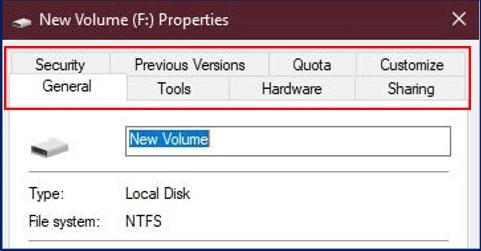
Here is an example of a typical window with multiple tabs that may be selected by clicking.
An excellent example of tabbed panes is the simple "properties" window of a local drive on your computer system, which includes several tabs with names like General, Tools, Hardware, etc., that you can access by clicking on one of them.
In other words, the JTabbedPane enables you to share a workspace with many components. By selecting or clicking on the desired tab, the user can quickly decide which part he wishes to view.
Tab Indexing and Placement in JTabbedPane
An index is determined by the location or position in which the tab was added to represent the tabs.
Let's assume you added your first tab to comprehend this better. Then, according to fashion, your last tab added will have an index equal to "tab count minus 1" and your next tab will have an index equal to "0."
The Tabbed Pane classes employ a single selection model that represents both the "now selected index" (i.e., the selected tab's index) and "a group of tab indexes."
As you can see in the property tabbed pane of the window above, the tabs are default positioned at the TOP position. By using the setTabPlacement method, you can move this tab in any of the directions, such as LEFT, RIGHT, or BOTTOM.
Java JTabbedPane Constructors
Constructor
Description
JTabbedPane()
creates a new TabbedPane that is empty and has JTabbedPane's default placement for tabs. Top.
JTabbedPane(int tab placement)
creates a blank TabbedPane with the provided placement for the tabs.
JTabbedPane(int tabPlacement, int tabLayoutPolicy)
creates a blank TabbedPane with the tab placement and layout policies supplied.
Here, we go into further depth about an example of a JTabbedPane in Java:
We will attempt to add the tabbed window to our JFrame at this point. Javax.swing will be used. We will have the ability to add tabs to our frame thanks to the JTabbedPane package.
The example code below uses JTabbedPane to add tabs to our frame.
JTabbedPane Exampletab placement
import java.awt.BorderLayout;
import javax.swing.JFrame;
import javax.swing.JPanel;
import javax.swing.JRadioButton;
import javax.swing.JTabbedPane;
public class JTP_Layout
{
JFrame frame;
JTP_Layout()
{
//Creating our JFrame
frame= newJFrame("Tabbed Pane Sample");
//Terminating process after exiting
frame.setDefaultCloseOperation(JFrame.EXIT_ON_CLOSE);
//Adding TabbedPane Object
JTabbedPanetabbedPane = new JTabbedPane();
//Adding TabbedPane LayoutPolicy
tabbedPane.setTabLayoutPolicy(JTabbedPane.SCROLL_TAB_LAYOUT);
//TabPlacement
//tabbedPane.setTabPlacement(JTabbedPane.BOTTOM);
//Setting our componentobject
//JRadioButton r1=new JRadioButton("A) Tab Component A");
//r1.setBounds(30,30,100,90);
//Adding our First Panel Object
JPanel p1=new JPanel();
//Adding our component to the Panel
//p1.add(r1);
JPanel p2=new JPanel();
JPanel p3=new JPanel();
//Setting boundary values for the tabs
tabbedPane.setBounds(50,50,200,200);
//Naming 'One' asour First Pane
tabbedPane.add("One",p1);
tabbedPane.add("Two",p2);
tabbedPane.add("Three",p3);
//Setting Frame'sposition to the center
frame.add(tabbedPane, BorderLayout.CENTER);
//Setting FRame'sSize
frame.setSize(400, 150);
//Setting visibility asTrue
frame.setVisible(true);
}
public static void main(String args[])
{
new JTP_Layout();
}
}
The output of the aforementioned application is displayed in the window below.
In the example above, we added tabs to our JFrame and gave them various names, such as "One," "Two," etc. Using a straightforward code line like the one below, we can add multiple components under our various tabs.
To add radio buttons to panel One, also known as p1, we first constructed an object for the radio button, designated as r1.
And underneath our initial panel, where we added it, the "Radio Button" component will show up.
Frequently Asked Questions
What purpose does Java's JTabbedPane component serve?
JTabbedPane class. a feature that enables the user to transition between a series of features by selecting a tab with a certain title and/or icon.
What does JTabbedPane display?
A JTabbedPane has a tab that may display both text and an image and include a tool tip and mnemonic. Look and Feel alters a tab's appearance as well as how the selected tab is presented.
How is JTabbedPane used?
In order to construct a tabbed pane, first create the components you want it to display, then instantiate JTabbedPane, and finally add the components to the tabbed pane using the addTab method.
To JTabbedPane, how do You add a tab?
Create a new JFrame .
Call frame. getContentPane(). setLayout(new GridLayout(1, 1) to set up grid layout for the frame.
Use JTabbedPane(JTabbedPane. TOP) to get a JTabbedPane .
Use tabbedPane. addTab to add a tab.
Conclusion
In this article, we have extensively discussed JTabbedPane in Java.We hope this blog has helped you enhance your knowledge regarding the same. We hope this blog has helped you enhance your knowledge regarding the same.












 1+ registered

