Table of contents
1.
Introduction
2.
Alphanumeric Order
2.1.
Test:
2.2.
Output:
3.
Order using OrderAnnotation
3.1.
Test:
3.2.
Output:
4.
Random Order
4.1.
Test:
4.2.
Output:
5.
FAQs
6.
Key Takeaways
Last Updated: Mar 27, 2024

JUnit Order of Tests

Author Aditya Anand
1 upvote
Career growth poll
Do you think IIT Guwahati certified course can help you in your career?

Introduction

Welcome readers! This blog will learn how to run JUnit tests in a determined order. You know, when running a whole test class, the execution order of test methods matters if the input of a test depends on the output of others. For example, when testing CRUD operations, testList() method would depend on testCreate() method – so when running the test class, the testCreate() must run before testList().

By default, JUnit executes tests in a specific order but is not predictable. JUnit 5 allows programmers to override that default to run tests in a determined order like alphanumeric order or numeric order, etc.

Let's get started, and I hope you learn a lot from this tutorial.

Alphanumeric Order

The Alphanumeric order sorts test methods alphanumerically.

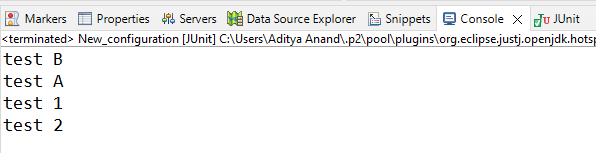
Just specify the @TestMethodOrder(Alphanumeric.class) annotation for the test class to run tests in the order of test method names by alphanumeric order. We will create four tests named testB, testA, test2, test1. According to Alphanumeric order, we expect tests to run in the order of test1, test2, testA, testB.

Test:

package com.aditya04848.junit.helper;

import  org.junit.jupiter.api.Test;
import static org.junit.jupiter.api.Assertions.assertTrue;
import org.junit.jupiter.api.MethodOrderer;
import org.junit.jupiter.api.TestMethodOrder;

@TestMethodOrder(MethodOrderer.Alphanumeric.class)
public class alphaNumericOrderTests {
     
    @Test
    public void testB() {
        System.out.println("test B");
        assertTrue(true);
    }
     
    @Test
    public void testA() {
        System.out.println("test A");
        assertTrue(true);
    }
     
    @Test
    public void test2() {
        System.out.println("test 2");
        assertTrue(true);
    }
     
    @Test
    public void test1() {
        System.out.println("test 1");
        assertTrue(true);
    }  
     
}
You can also try this code with Online Java Compiler
Run Code

Output:

JUnit Output:

Console Output:

In the console, we can see the order of the executed tests.

Order using OrderAnnotation

Using @Order annotation, we can sort test methods in a specific order based on the value provided in @Order.

Before the test class, we have to write @TestMethodOrder(OrderAnnotation.class) annotation. We can run tests in numeric order. All the tests will run in the order specified in the @Order annotation.

Test:

package com.aditya04848.junit.helper;

import  org.junit.jupiter.api.Test;
import static org.junit.jupiter.api.Assertions.assertTrue;
import org.junit.jupiter.api.MethodOrderer;
import org.junit.jupiter.api.TestMethodOrder;
import org.junit.jupiter.api.Order;

@TestMethodOrder(MethodOrderer.OrderAnnotation.class)
public class OrderTests {
     
    @Test
    @Order(3)
    public void testA() {
        System.out.println("test A");
        assertTrue(true);
    }
     
    @Test
    @Order(1)
    public void testB() {
        System.out.println("test B");
        assertTrue(true);
    }
     
    @Test
    @Order(4)
    public void test1() {
        System.out.println("test 1");
        assertTrue(true);
    }
     
    @Test
    @Order(2)
    public void test2() {
        System.out.println("test 2");
        assertTrue(true);
    }      
}
You can also try this code with Online Java Compiler
Run Code

Output:

JUnit Output:

Console Output:

In the console, we can see the order of the executed tests.

Random Order

To run tests in random order, we use MethodOrderer.Random.class in @TestMethodOrder annotation. It will simply sort test methods pseudo-randomly. In every run, tests will run in a different order. It also supports the configuration of a custom seed, which means we can control the random order using a custom seed.

Test:

package com.aditya04848.junit.helper;

import  org.junit.jupiter.api.Test;
import static org.junit.jupiter.api.Assertions.assertTrue;
import org.junit.jupiter.api.MethodOrderer;
import org.junit.jupiter.api.TestMethodOrder;

@TestMethodOrder(MethodOrderer.Random.class))
public class randomOrderTests {
     
    @Test
    public void testA() {
        System.out.println("test A");
        assertTrue(true);
    }
     
    @Test
    public void testB() {
        System.out.println("test B");
        assertTrue(true);
    }
     
    @Test
    public void test1() {
        System.out.println("test 1");
        assertTrue(true);
    }
     
    @Test
    public void test2() {
        System.out.println("test 2");
        assertTrue(true);
    }      
}
You can also try this code with Online Java Compiler
Run Code

Output:

JUnit Output:

Console Output:

In the console, we can see the order of the executed tests.

FAQs

  1. How to specify the order of execution of JUnit tests?
    From version 4.11, you can specify execution order using annotations and ordering by method name
     
  2. Why doesn't order matter in JUnit 5?
    Besides the built-in Order classes, JUnit 5 supports custom orders by implementing the interface MethodOrderer. 
     
  3. What is the purpose of extensions in JUnit 5?
    As the name suggests, the purpose of Junit 5 extensions is to extend the behaviour of test classes or methods, and these can be reused for multiple tests. 
     
  4. Does execution order matter in JUnit tests?
    Order Test Execution in JUnit5 Jupiter. By default, JUnit tests are not executed in the written order. Typically, this doesn’t matter because Unit tests shouldn’t have interdependencies.

Key Takeaways

In this article, we have extensively discussed the JUnit Order of tests. We have discussed how to order tests in Alphanumeric order using @TestMethodOrder(MethodOrderer.Alphanumeric.class) in a specific order using @TestMethodOrder(MethodOrderer.OrderAnnotation.class) and @Order annotation. We have also learned to run tests in random order using @TestMethodOrder(MethodOrderer.Random.class).

Check out JUnit Interview Questions here.

We hope that this blog has helped you enhance your knowledge of running JUnit tests in a specific order and if you would like to learn more, check out our articles on Time Test in JUnitJUnit Error Collector. Do upvote our blog to help other ninjas grow.

Head over to our practice platform Coding Ninjas Studio to practice top problems, attempt mock tests, read interview experiences, and much more.!

Happy Reading!

Live masterclass