Do you think IIT Guwahati certified course can help you in your career?
Introduction
In recent years, web applications have gotten away from the straightforward "HTML pages + refresh the whole page" approach. This time-tested method is still quite effective, but consumers are accustomed to web programmes that do not refresh the entire page. Client-side code in web apps allows them to communicate with the backend without refreshing the page. The same is made possible via Ajax.
Ajax Web Application
In an Ajax in cherrypy web application, the entire page must be loaded after a client performs a request and receives a response. Only a portion of the page is refreshed when the client makes another request after the server answers. The server may respond to the client's request with a partial page refresh. User interaction with a web application with Ajax in cherrypy initiates communication behind the scenes. The server requests the information required to update the page and does not return the entire HTML code for the web page. This action takes place asynchronously. The browser only updates the pertinent area of the webpage.
Traditional web Application
Let us See how a conventional web application functions. On a server, we have a client. The server returns the entire page in response to the client's request. The server will reply with the full HTML if the client sends the request again. It is necessary to refresh the page completely. The client then waits for the server to respond after sending a request. The entire webpage needs to be reloaded after receiving the response. This is an example of a typical classic web application without Ajax in cherrypy. Traditional web applications are easy to develop and do not require extensive programming. Traditional web apps, however, take longer. Typical web applications repeatedly communicate data as a request and response to display an entire web page. Reloading the entire web page is necessary, depending on the response.
Implementation of Ajax in cherrypy
We will create a straightforward client-side application to calculate a number's cube. Four HTTP requests will be made by the application to calculate the cube. Let us see how Ajax in cherrypy gets used in real-world settings.
Ajax Program CSS
First, we must ensure that we save the CSS code below in a file called "style.css" located in the "public/css" directory.
We will utilise the jQuery framework for the application's home page to keep things simple. However, the users can switch it out with their programme. Simple HTML elements are used on the page to collect user input and display the resulting string. Additionally, it has client-side code to communicate with the backend API that does the labour-intensive job.
Now we have to save the above code in the index.html file.
Ajax Program Python
We have written the HTML code for our AJAX in cherrypy web application. Now we have to write the Python code that drives the page. The application's code that delivers the HTML page and responds to requests to compute the cube of a number will then be written.
We should save the above code in the name "ajax app.py".
Output
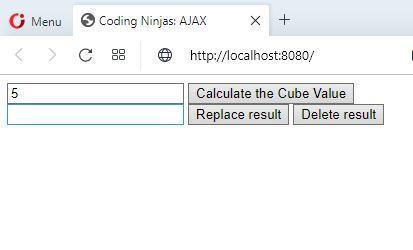
Run the following command in the Terminal or Command Line: "python3 ajax app.py" If we type "http://localhost:8080/" into a browser's address bar, the result will look like this. The default input is given as "5". This can be changed according to the user's wishes.
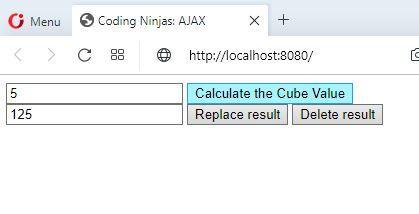
Below, we can see that the cube of the number requested has been shown in this instance. By selecting the "Replace result" and "Delete result" buttons, we may carry out the other HTTP requests, PUT and DELETE.
We can also quickly figure out how the whole page has not been refreshed. Instead, the position of the page required got refreshed. We have illustrated how Ajax in cherrypy implementation is carried out using a straightforward example.
Frequently Asked Questions
What are the features of AJAX?
The most attractive aspect of AJAX is its "asynchronous" nature. This allows AJAX to exchange data with the server and update the page without requiring a whole page refresh. The following are some things that AJAX's two main features enable: Without refreshing the page, send requests to the server.
What differentiates AJAX from other technologies?
With XML, HTML, CSS, and JavaScript, a new method called AJAX enables the development of more effective, quick, and interactive web applications. In addition to Document Object Model and JavaScript for dynamic content display, Ajax leverages XHTML for content, CSS for presentation, and other technologies.
How many languages does AJAX combine?
AJAX (Asynchronous JavaScript and XML) is a method for building interactive web programmes that are better and faster. It is done by integrating JavaScript, dynamic HTML (DHTML), and extensible markup language (XML).
Conclusion
Ajax is used to convert static web applications into responsive ones, which offers several advantages. Ajax in cherrypy has drawbacks in addition to its advantages. Programming complexity is the first difficulty. In some cases, JavaScript must be integrated. An ajax object must be created. Along with this, sometimes function expressions must be written. Then the data must be handled to develop an exact programme. Along with user experience, we also have network-related issues. However, keeping in mind its swift use, Ajax in cherrypy is a handy tool. In this article, we read and discovered how it is better than traditional web applications. We also implemented a simple application in Ajax in cherrypy to show its real-world use. You can read how to build applications with Python and find the basics of python here. Do not forget to check out more blogs on Cherrypy and Python to follow.








 7+ registered

