Do you think IIT Guwahati certified course can help you in your career?
Introduction
Puppet is a configuration management tool. It is used for managing the infrastructure on physical or virtual devices. It is a Ruby-based open-source software. It facilitates real-time control of complicated infrastructure. Puppet
has a declarative language for describing system configuration. It is a model-driven approach that requires a basic understanding of programming. The Puppet was created by Puppet, Inc., which Luke Kanies established in 2005.
Let's dive into the article to learn about Managing code with r10k in Puppet.
Managing code with r10k
The code management tool r10k allows controlling the settings for various environments. It includes development, testing, and production. The r10k command line tool must be installed on your principal server. It is used with all compilers to release code changes from your control repository. It is unlike Code Manager's automated deployments.
R10k builds environments on your primary server. It installs and updates the modules you specify for each environment. It is based on the code in your control repository branches.
Set up r10k: To use r10k as your code management tool, you must configure it.
Configure r10k: Set r10k parameters in the PE console. It will set up r10k in an existing Puppet Enterprise (PE) installation. The console can be used to change r10k parameters as well.
Customizing r10k configuration: Your r10k configuration can be customized by setting parameters in Hiera.
Deploying environments with r10k: The r10k deploy command can deploy environments from the command line.
r10k command reference: Actions, options, and subcommands are all supported by the r10k command.
Set up r10k
Your Puppet code and data are maintained and distributed by r10k using the control repo. You may also build distinct deployment environments in your Puppet infrastructure. It can be making branches in your control repository. Such as a development branch for a development environment. Your environments are updated by r10k following the modifications you make to your control repository.
The Puppetfile details which modules and data should be installed in your environment. It also contains the versions and where to get the modules or other materials. To use r10k as your code management tool, you must configure it. Setting up r10k involves:
Get ready to manage environments using a control repository. A Git control repository with a Puppetfile must be created to do this.
Configure r10k.
Customize your Hiera r10k setup if desired.
r10k is a command-line environment deployment tool.
Configure r10k
Set r10k parameters in the PE console. It will set up r10k in an existing Puppet Enterprise (PE) installation. The console can be used to change r10k parameters as well.
Locate the puppet enterprise::profile::master class in the PE console. You can do it by going to Node groups > PE Master > Classes.
Enter the string git@YOUR.GIT.SERVER.COM>: puppet/control.git as the value for the r10k remote option. It allows you to access your Git control repository over SSH.
Enter a string like "/etc/puppetlabs/puppetserver/ssh/id-control repo.ed25519". It is for the r10k private key parameter. It provides the location of the SSH private key you established when you set up your control repo.
Run Puppet on the compilers and main server.
Customizing r10k configuration
Your r10k configuration can be customized by setting parameters in Hiera. Customize your configuration as follows:
Open the data/common.yaml file in your control repository.
The pe r10k class needs extra parameters. Use the format:
pe_r10k::<PARAMETER>: <SETTING>
Examples of arguments that define a Git repository cache directory and the location to get the source repository are as follows:
Use r10k to deploy environments. After you configure PE, r10k does not execute.
Configuring the r10k base directory
Environments are built for your control repo. This is done at the location specified by the r10k base directory. Any materials not added by r10k are removed from this directory, which is under his control. If r10k_basedir is not specified, your puppet.conf file's default environmentpath is used.
r10k_basedir accepts a path with a string format, such as:
/etc/puppetlabs/code/environments
Configuring post-deployment commands
Use the postrun argument to schedule commands to run after deployments are finished.
The entire command is accepted as an array of strings in this parameter. It can be used as an argument vector. This option can only be changed once. For example:
The r10k purges some unmanaged content after deployment. The purge_levels option determines this content. It is in the deploy parameter.
The purge_levels parameter accepts an array of strings. This describes the content that r10k removes before deploying new code. Deployment, environment, puppetfile, and purge allowlist are among the options you have.
[‘deployment’, ‘puppetfile’] is the default setting. The options for purging levels are described below.
deployment
R10k deletes content in the configured basedir. This is not maintained by any sources listed in the remote or source parameters after each deployment.
environment
R10k deletes content after a specific environment has been deployed, that is:
It is not added to the branch of the control repository corresponding to that environment.
It is not stated in a puppet file added to that branch.
With the environment purging level, r10k loads and analyses the Puppetfile for the environment. It is done even if the —modules parameter is not used. So that r10k can determine whether the content is declared in the Puppetfile. But, until the environment is fresh or the —modules switch is enabled, r10k does not deploy Puppetfile content.
puppetfile
When Puppetfile content for a specific environment is deployed. The r10k deletes any content not specified in the Puppetfile. It can be from any directory that the Puppetfile manages.
The defined moduledir, which defaults to modules. Any other alternative directories supplied as an install_path option to Puppetfile content declarations. These are among the directories handled by a Puppetfile.
purge_allowlist
The purge_allowlist parameter prevents the purging of the specified filename patterns. This parameter only has an impact on environment purging. This setting's value needs to be a string-formatted list of filename patterns. It must be in the shell manner. When r10k evaluates the allowlist, the FNM_PATHNAME and FNM_DOTMATCH flags are both active.
Patterns, by default, do not match and are relative to the root of the environment being purged. For instance, an allowlist value of *myfile* preserves only the environment's root files that match. Using a recursive pattern, such as **/*myfile*would be best. It does is to preserve matched files across the deployed context.
Files in a folder otherwise liable for purging could still be deleted even though they meet an allowlist pattern. Use an extra allowlist rule in this situation to protect the contained folder, such as:
You can adjust r10k's module download behavior by setting the forge settings parameters in Hiera.
This option establishes a proxy for all Forge interactions. It defines the location from which Forge modules are installed. The following keys may be used in a hash that is accepted by the forge settings parameter:
baseurl: Specify the directory from which Forge modules are installed. It starts with https://forgeapi.puppetlabs.com by default.
authorization_token: Provide the authorization_token, which will be used to sign in to a unique Forge server.
proxy: Choose a proxy for all communications with Forge.
In this configuration, for example, a unique Forge server without authentication is specified:
You can use the git_settings parameter to instruct r10k to use a particular Git provider. It will also use a private key, a proxy, or several Git source repositories.
A hash that uses the private key, provider, username, proxy, and repositories keys is acceptable for the r10k git settings option. For example:
Enables r10k to communicate with Git repositories using several Git providers. Shellgit and Rugged are acceptable values.
proxy
The proxy key sets the HTTP(S) transport used by Git operations. Only for Git operations does this configuration supersede the global proxy setting. An unauthenticated proxy can be established. An authenticated proxy using Basic or Digest authentication. For example:
proxy: 'http://proxy.example.com:3128'
username
If the Git remote URL lacks a username, enter the appropriate username as a string.
repositories
The repositories key specifies a list of repositories and their corresponding private keys or proxies. Use repositories if:
Instead of configuring the same proxy settings for all Git operations, you must do so for specific repositories.
Several control repos are available to you.
The remote, private-key, proxy, and username keys can be used to create a hash that the repositories setting will accept. The remote key specifies the repository to which the ensuing private-key, username, or proxy settings apply. The prerequisites and functions for the private-key, username, and proxy settings are the same as those listed above. Except when used inside repositories, each repository receives its own set of settings.
This repository's hash, for example, designates a distinct private key for one repository. And also a different proxy for another:
The r10k deploy command can deploy environments from the command line. Deploy all environments and modules the first time you run r10k by running the following:
r10k deploy environment
This command:
Verify which branches are present by looking through your control repository.
combines those branches into environments for the Puppet directory.
You should make clones of your Git repository. Whether it's your first or after the run, it creates or changes your directory environments. It does that with the information from your repo branches.
r10k command
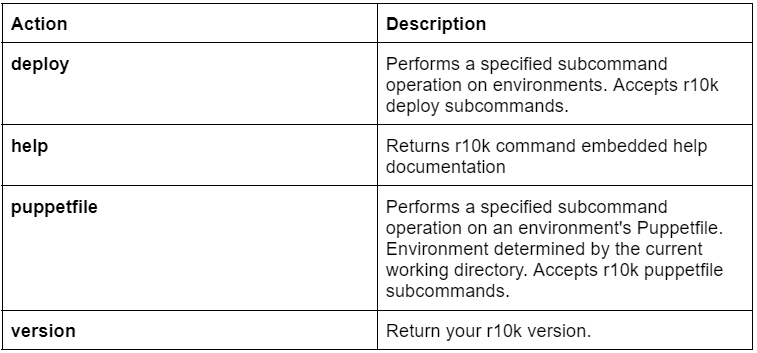
Actions, options, and subcommands are accepted by the r10k command. This is the format used for the r10k command:-
r10k <ACTION> <ACTION_OPTIONS> <SUBCOMMANDS>
r10k command actions
These actions and action options are supported by the r10k command.
r10k action options
r10k <ACTION> commands can be modified with these options:
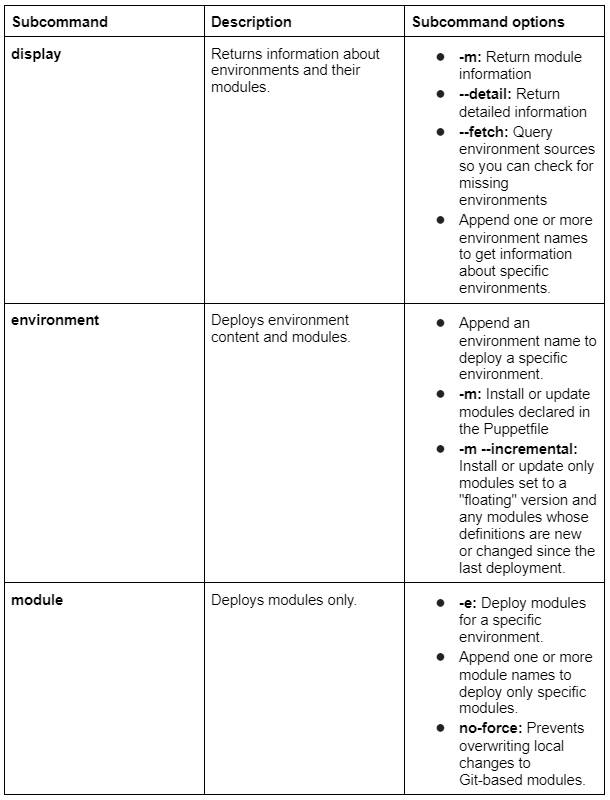
r10k deploy subcommands
The subcommands and subcommand options that can be used with the r10k deploy command are given below:-
r10k puppetfile subcommands
The below commands are accepted by the r10k puppetfile command. The modules directory of an environment must be accessible to the puppetfile command. Run these commands with elevated privileges or switch to a user who has been granted access.
After the puppetfile action, add subcommands like:
R10K's name means "Killer robot powered Puppet environment deployment."
What command should I use to deploy puppet code?
Use the puppet-code deploy command, providing the environments to deploy environments. Run puppet-code deploy with the environment specified on the command line. It helps to deploy environments. Name the setting. Use the —all flag to deploy across all environments.
What do puppet environments mean?
A primary server can serve an isolated group of agent nodes in an environment. It is done using its main manifest and modules. Environments can be used to separate a site by hardware. You can spin up scratch nodes for testing before implementing changes in production.
Where on a Puppet agent are environments specified?
The puppet.conf file is used for all environment setup configurations. In the client's puppet.conf file, you can enter a value for the environment configuration variable. It tells Puppet which environment it should use.
What is Puppet configuration management?
The configuration management tool handles Puppet Server deployment, configuration, and management.
Conclusion
In this article, we have extensively discussed Managing code with r10k in puppet. We have also explained the setup of r10k, configure r10k, customize r10k configuration, deploy an environment with r10k, and more in detail.
We hope this blog has helped you enhance your SSL and Certificate Puppet knowledge. If you would like to learn more, check out our articles on Ansible vs. Puppet, DevOp's best things, DevOps tools, and reasons to build a career in DevOps.












 1+ registered

