Do you think IIT Guwahati certified course can help you in your career?
Introduction
Puppet is a configuration management tool. It is used for managing the infrastructure on physical or virtual devices. It is a Ruby-based open-source software. It facilitates real-time control of complicated infrastructure. Puppet has a declarative language for describing system configuration. It is a model-driven approach that requires a basic understanding of programming. The Puppet was created by Puppet, Inc., which Luke Kanies established in 2005.
Let's dive into the article to learn about SSL and Certificates in Puppet.
SSL and certificates
Puppet Enterprise is network security, and communications are based on HTTPS. It encrypts traffic using X.509 certificates. You can use PE's own CA tools to regenerate certificates as necessary.
● Regenerate the console certificate:
Every 824 days, the console certificate expires. If the console certificate is about to expire, has already expired, or is corrupted. You should regenerate if you didn't access the console because of it.
● Regenerate infrastructure certificates:
In some cases, you can increase the security of your installation. You can do it by regenerating the certificates and security credentials. It has both private and public keys. The integrated PE certificate authority creates it.
● Use an independent intermediate certificate authority:
A root and intermediate certificate are generated by the built-in Puppet certificate authority. But you can create a separate intermediate certificate authority if you need more intermediate certificates. Instead you can also use a public authority CA. This setup must be finished during installation.
● Make your Diffie-Hellman parameter file:
The Diffie-Hellman (DH) key exchange was found to have some flaws by the "Logjam Attack" (CVE-2015-4000). PE comes pre-loaded with a 2048-bit Diffie-Hellman param file. It helps counteract the "Logjam Attack." You can create your own if you decide against using the default DH param file.
● Use a console-specific SSL certificate:
The certificate used by the Puppet Enterprise (PE) console was signed by the certificate authority integrated into PE (CA). Web browsers do not recognize or trust this CA because it is special to PE. So you must add a security exception to access the console. If you decide this situation is unacceptable, you can create the console's certificate using a custom CA.
● Enable TLSv1:
TLSv1 and TLSv1.1 will be deactivated by default in 2021.7.z versions (PE) to abide by the security rules of Puppet Enterprise.
Regenerate the console certificate
Every 824 days, the console certificate expires. When the console certificate is about to expire or has already expired, or the certificate is corrupted. If you are unable to access the console, you should regenerate it.
The next time Puppet runs, a new certificate is generated after you erase the old console certificate and its artifacts.
Start Puppet, use puppet agent -t, or hold off till Puppet runs again.
Regenerate infrastructure certificates
In some circumstances, it is regenerating security credentials, both private and public keys. It is created by the integrated PE certificate authority and can assist in ensuring the security of your installation.
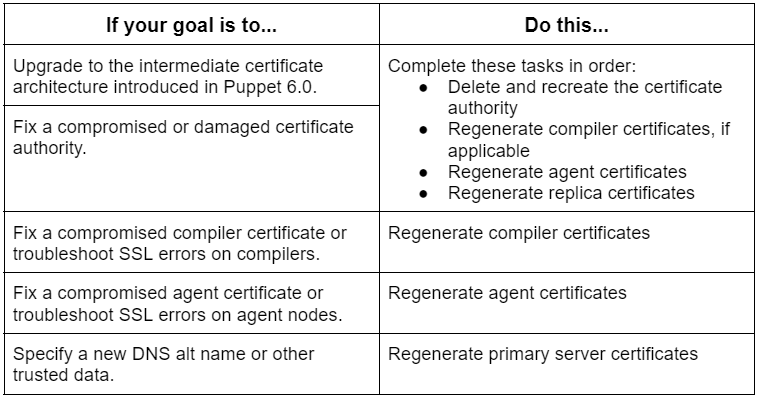
Depending on your aim, the procedure for regenerating certificates differs.
Delete and recreate the certificate authority
You can recreate the certificate authority only if you're upgrading to Puppet 6.0's new certificate architecture. You can also do this if your existing certificate authority has been compromised or damaged.
Run the following commands while logged in as root on your main server:
puppet infrastructure run rebuild_certificate_authority
Results:-
Your CA server's SSL and cert directories are backed up with the suffix "_bak." The CA files are deleted, and certificates are recreated after a successful Puppet run.
Regenerate compiler certificates
Recreate your certificate authority if you want to fix a compromised certificate, fix SSL compiler issues, or all the above. Run the following command while logged in as root on your main server. Give any more instructions necessary for your environment and use case.
puppet infrastructure run regenerate_compiler_certificate target=<COMPILER_HOSTNAME>
Results:-
When a Puppet run is finished, the agents resume their function in your deployment. It happens after the agent SSL directories are backed up to C:/ProgramData/PuppetLabs/puppet/etc/ssl bak (Windows) or /etc/puppetlabs/puppet/ssl bak (*nix). And their respective certificates are regenerated and signed.
Regenerate replica certificates
It would be best if you regenerated the replica certificates for your disaster recovery installation
if you change your certificate authority or
needed to supply a new DNS alt name or
other trustworthy data.
Run the following command while logged in as root on your main server. Include any other parameters that are necessary for your environment and use case.
puppet infrastructure run regenerate_replica_certificate target=<REPLICA_HOSTNAME>
Results:-
After completing a Puppet run, the replica resumes its function in your deployment. It happens when the replica's SSL directory is backed up to /etc/puppetlabs/puppet/ssl bak, and its certificate is renewed and signed.
Regenerate primary server certificates
Renew primary server certificates to show a new DNS alt name or other reliable information. All primary infrastructure nodes, including stand-alone PE-PostgreSQL nodes, get their certifications renewed throughout this process.
Use the --help flag to view all available parameters. /var/log/puppetlabs/installer/bolt_info.log is where the logs for all puppet infrastructure run Bolt plans. Run the following commands while logged in as root on your main server:
puppet infrastructure run regenerate_primary_certificate
You can enter the following optional parameters:
To add a list of alternative DNS names to the certificates created for your main server, use the dns_alt_names function.
To select a directory for uploading and running temporary files, use the tmpdir command-line option.
You can use --force to compel certificate regeneration. In case your infrastructure is compromised because of a damaged certificate.
Use an independent intermediate certificate authority
You can create a separate intermediate certificate authority if you need more. You can prefer to use a public authority CA rather than the built-in Puppet certificate authority. It provides a root and intermediate certificate. During installation, you must finish this configuration.
Gather the PEM-encoded certificates and CRLs for the root certificate. Also, try to gather intermediate certificates and the signing certificate. These certificates are for your organization's chain of trust. (The intermediate or root certificate could be the signing certificate.)
For the Puppet CA, create a private RSA key with no passphrase.
Make a Puppet CA certificate that is PEM-encoded.
The Puppet CA CSR should be created.
Utilizing your external CA to sign the CSR will enable you to create the Puppet CA certificate.
Make sure that the CA constraint is set to true. The keyIdentifier contains the 160-bit SHA-1 hash of the subjectPublicKeyfield's bit string value. Details are provided in RFC 5280 section 4.2.1.2.
Concatenate each certificate into a PEM-encoded certificate bundle. It is done by beginning with the Puppet CA cert and finishing with your root certificate,
-----BEGIN CERTIFICATE-----
<PUPPET CA CERTIFICATE>
-----END CERTIFICATE-----
-----BEGIN CERTIFICATE-----
<OPTIONAL INTERMEDIATE CA CERTIFICATES>
-----END CERTIFICATE-----
-----BEGIN CERTIFICATE-----
<ROOT CA CERTIFICATE>
-----END CERTIFICATE-----
Concatenate each CRL into a PEM-encoded chain, beginning with any optional intermediate CA CRLs. And concluding with the CRL for your root certificate.
-----BEGIN X509 CRL-----
<OPTIONAL INTERMEDIATE CA CRLs>
-----END X509 CRL-----
-----BEGIN X509 CRL-----
<ROOT CA CRL>
-----END X509 CRL-----
Your private key (from step 2), CRL chain (from step 5), and CA bundle (from step 4) should all be copied to the node where the primary server is being installed.
Using a modified pe.conf file with the signing_ca options, install PE: PATH TO PE.conf:./puppet-enterprise-installer -c. You must include the three keys bundle, crl_chain, and private_key for the signing ca argument in your modified pe.conf file.
Where is the puppet master's certificate storage facility?
The agent receives this certificate, which is used for SSL and TLS connections. The CA is kept in the /etc/puppetlabs/puppet/ssl/ca/signed directory on the master. And the /etc/puppetlabs/puppet/ssl/certs directory on the agent. This happens during the master and agent exchange.
How does a puppet agent accept certificates?
Within the CA server: Puppet cert sign —allow-dns-alt-names <NAME> allows you to sign the certificate request. It does it while permitting other names. Run puppet agent -t —ca server <CA HOSTNAME> on the server to get the cert.
Does Puppet use SSL?
Puppet can help either leverage an existing external CA or its internal PKI and certificate authority (CA) tools. It is for all its secure socket layer (SSL) communications.
What's the operation of a puppet agent?
Puppet operates in a pull mode, where agents poll the master to get the site- and node-specific configurations. The Puppet agent application is run by controlled nodes in this system, often in the background.
Conclusion
In this article, we have extensively discussed the SSL and Certificates in Puppet. We have also explained how to regenerate the console certificate, and regenerate infrastructure certificates. We also used independent intermediate certificate authority, and more in detail.
We hope this blog has helped you enhance your SSL and Certificate Puppet knowledge. If you would like to learn more, check out our articles on Ansible vs. Puppet, DevOp's best things, DevOps tools, and reasons to build a career in DevOps.










 1+ registered

