Node Modules Mocking
When the module that we are mocking is a Node module, we should place the mock __mocks__ directory adjacent to node_modules(unless we configure roots to point to a folder other than the project root), and it will mock automatically. We will not need to call jest.mock('module_name') explicitly.
We can also mock the Scoped Modules or the Scoped Packages by creating a file in the directory structure that matches the name of that scoped module. For example, if we want to mock a scoped module called @scope/project-name, we will need to create a file at __mocks__/@scope/project-name.js and create the @scope/ directory accordingly.
Keep in mind that if you want to mock Node's core modules (for example, fs or path), then an explicit call is required (for example, jest.mock('path')). That is because jest does not mock core Node modules by default.
You can also learn more about Node.js and Node Modules by following our Node.js and Node.js Modules articles.
Example
We will define a structure for our examples where we place our User Module Mock and Node Module Mock. The structure of our test case will look something like this:
├── config
├── __mocks__
│   └── fs.js
├── models
│   ├── __mocks__
│   │   └── user.js
│   └── user.js
├── node_modules
└── views

You can also try this code with Online Javascript Compiler
If a manual mock exists for any given module, jest's module system uses that module only if you explicitly call jest.mock('module name'). Whereas, if we set automock to be true, the manual mock implementation is used instead of the automatically created mock, even if we do not call jest.mock('moduleName'). In tests that use the actual module implementation, you can opt-out of this behavior by explicitly calling jest.unmock('moduleName').
File Summarizer
In the code below, a module provides a summary of all the files in a given directory. Here we will use the built-in fs module.
Program
// jest.js (module file).
"use strict";

const fs = require("fs");

function DirFileSummarizer(directory) {
  return fs.readdirSync(directory).map((fileName) => ({
     directory,
     fileName,
  }));
}

exports.DirFileSummarizer = DirFileSummarizer;
You can also try this code with Online Javascript Compiler
Now, the program below is the code for the manual mock. Since we are trying to avoid hitting the disk as it will be prolonged and fragile, you can create a manual mock for the fs module by extending an automatic mock to make a manual mock for the fs module. This manual mock will implement custom versions of the fs APIs that we can build on.
Program
// __mocks__/fs.js  (manual mock)
"use strict";

const path = require("path");

const fs = jest.createMockFromModule("fs");

// This is a custom function our tests might use during setup to specify
// what the "mock" filesystem files should look like when any
// `fs` APIs are in use.
let mockFiles = Object.create(null);
function __setMockFiles(newMockFiles) {
  mockFiles = Object.create(null);
  for (const file in newMockFiles) {
     const dir = path.dirname(file);

     if (!mockFiles[dir]) {
        mockFiles[dir] = [];
     }
     mockFiles[dir].push(path.basename(file));
  }
}

// A custom version of `readdirSync` which reads from the special mocked out
// file list set via __setMockFiles
function readdirSync(directoryPath) {
  return mockFiles[directoryPath] || [];
}

fs.__setMockFiles = __setMockFiles;
fs.readdirSync = readdirSync;

module.exports = fs;
You can also try this code with Online Javascript Compiler
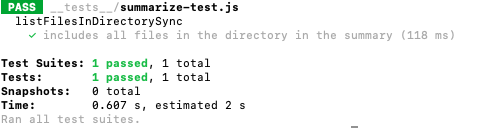
Finally, we need to write the code for our test file. As explained above in the Node Modules Mocking section, we need to explicitly call to mock the fs module as it's a core Node module.
Program
// __tests__/summarize-test.js (test file)
"use strict";

jest.mock("fs");

describe("listFilesInDirectorySync", () => {
  const MOCK_FILE_INFO = {
     "/path/to/file1.js": 'console.log("file1 contents");',
     "/path/to/file2.txt": "file2 contents",
  };

  beforeEach(() => {
     // Set up some mocked out file information before each test
     require("fs").__setMockFiles(MOCK_FILE_INFO);
  });

  test("include all files in the directory in the summary", () => {
     const FileSummarizer = require("../jest");
     const fileSummary = FileSummarizer.DirFileSummarizer("/path/to");

     expect(fileSummary.length).toBe(2);
  });
});
You can also try this code with Online Javascript Compiler
Output
FAQs
-
How can you make a mock object in jest?
The jest object is automatically in scope in every test. The methods within the jest object help create mocks and let us control the jest's overall behaviour. The jest object can also be imported explicitly via import {jest} from '@jest/globals.'
-
What is the __ mocks __ folder?
We define Manual Mocks by writing a module in a __mocks__/ subdirectory immediately adjacent to the module.
-
What is jest.fn?
The jest.fn method allows you to directly create a new mock function. When you mock an object method, you can use jest.fn method, it is the simplest way to create a mock function.
-
How do you reset mock jest?
If you want to completely reset a mock back to its initial state, you can use mockClear(). mockClear() removes any mocked return values or implementations.
Key Takeaways
Throughout this article, we can see that manual mock is not challenging to implement. It provides a much more flexible mocking, more potent than auto mock, especially in cases where we are accessing a remote resource such as a website, a database, or another instance/service.
In our File Summarizer example, we mocked a core module that allows us to use fake data without breaking the module dependency, making our test fast and not flaky.
A better understanding of Modules can help understand this article, so be sure to check the Modules article on Coding Ninjas and head over to our practice platform Coding Ninjas Studio to practice top problems, attempt mock tests, read interview experiences, and much more. Till then, Happy Learning!





 7+ registered

