




Introduction
Welcome readers! In this blog, we will learn about Timer mocks. We will understand what a timer mock is and why it is an important feature of Jest. We will see some examples of timer mocks and learn about different methods like jest.useFakeTimers(), runAllTimers(), jest.runOnlyPendingTimers(), etc.
If you are new to Jest, you can check out Getting started with Jest blog. You can head over to Mocking in Jest, Manual Mock blog, to learn more about mocking. Let's get started, and I hope you learn a lot from this tutorial.
What is a Timer Mock?
One of the biggest hurdles to testing global timer functions or timeouts is waiting for them to time out. Jest provides a way around this. Using Timer Mock, we can mock the global timer functions like setTimeout, setInterval, clearTimeout, clearTimeout, clearInterval, etc. These native timers are not ideal in a testing environment because they depend on real-time to elapse. Jest can swap/mock out timers with functions that allow you to control the passage of time.
Main Function:
Let’s create a function timerGame in timerGame.js file. This function is using setTimeout() which we will be mocking using jest.useFakeTimers().
'use strict';

function timerGame(callback) {
  console.log('Ready....go!');
  setTimeout(() => {
    console.log("Time's up -- stop!");
    callback && callback();
  }, 1000);
}

module.exports = timerGame;
Fake Timers:
'use strict';

jest.useFakeTimers();
jest.spyOn(global, 'setTimeout');

test('waits 1 second before ending the game', () => {
  const timerGame = require('./timerGame');
  timerGame();

  expect(setTimeout).toHaveBeenCalledTimes(1);
  expect(setTimeout).toHaveBeenLastCalledWith(expect.any(Function), 1000);
});Here we try to mock setTimeout function. We create a fake timers by calling jest.useFakeTimers() which will mock setTimeout and other such timer functions. at the end of the test if we want to restore the normal behaviour of the Timers we can do it using jest.useRealTimers() function.
jest.useFakeTimers() and jest.useRealTimers() are global operations so it willl affect the other tests within the same file. so you need to call jest.useFakeTimers() before each test to reset the internal counters and then after executing tests, call jest.useRealTimers() to then use real timers, so that the faked timers do not leak across the tests.
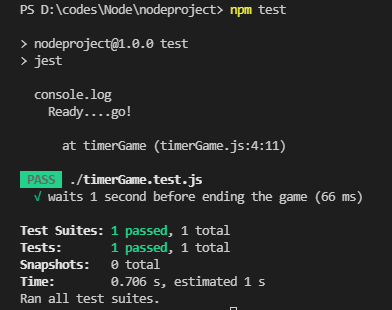
Now let’s run this test using the command npm test.
Output:
Run All Timers
Jest provides another Feature that enables testers to run to control the passage of time truly. So if a test program is taking some time to call its callback and, of course, in the test environment, we don't want to wait for the event to be emitted. so using jest.runAllTimers function, we can instantly run callback set with setTimeout.
So basically, we can use Jest's timer control APIs to fast-forward the time right in the middle of the test.
jest.useFakeTimers();
test('calls the callback after 1 second', () => {
  const timerGame = require('./timerGame');
  const callback = jest.fn();

  timerGame(callback);

  // At this point in time, the callback should not have been called yet
  expect(callback).not.toBeCalled();

  // Fast-forward until all timers have been executed
  jest.runAllTimers();

  // Now our callback should have been called!
  expect(callback).toBeCalled();
  expect(callback).toHaveBeenCalledTimes(1);
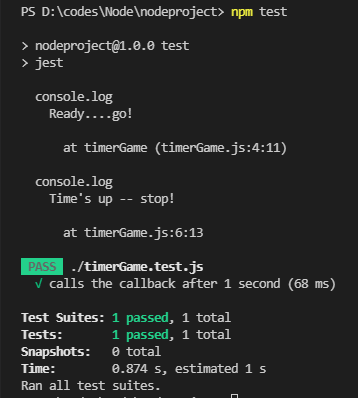
});Output:
Run Pending Timers
Sometimes we have functions that set a new timer in its own callback. So when we use jest.runAllTimers() for these functions, our test will go in an endless loop because it is setting a new timer inside a timer and so on, and jest.runAllTimers() will try to execute all the timers without waiting.
So to not catch up in an endless cycle of timers and test these functions, Jest provides jest.runOnlyPendingTimers(), which will run only pending timers and not all the new timers created inside timers.
Main Function:
'use strict';

function infiniteTimerGame(callback) {
  console.log('Ready....go!');

  setTimeout(() => {
    console.log("Time's up! 10 seconds before the next game starts...");
    callback && callback();

    // Schedule the next game in 10 seconds
    setTimeout(() => {
      infiniteTimerGame(callback);
    }, 10000);
  }, 1000);
}

module.exports = infiniteTimerGame;Test:
'use strict';

jest.useFakeTimers();
jest.spyOn(global, 'setTimeout');

test('schedules a 10-second timer after 1 second', () => {
    const infiniteTimerGame = require('./infiniteTimerGame');
    const callback = jest.fn();

    infiniteTimerGame(callback);

    // At this point in time, there should have been a single call to
    // setTimeout to schedule the end of the game in 1 second.
    expect(setTimeout).toHaveBeenCalledTimes(1);
    expect(setTimeout).toHaveBeenLastCalledWith(expect.any(Function), 1000);

    // Fast forward and exhaust only currently pending timers
    // (but not any new timers that get created during that process)
    jest.runOnlyPendingTimers();

    // At this point, our 1-second timer should have fired its callback
    expect(callback).toBeCalled();

    // And it should have created a new timer to start the game over in
    // 10 seconds
    expect(setTimeout).toHaveBeenCalledTimes(2);
    expect(setTimeout).toHaveBeenLastCalledWith(expect.any(Function), 10000);
});Output:

Advance Timers by Time
Testers can also use jest.advanceTimersByTime(msToRun). using this API, we can advance the time of all the timers by a specific time denoted by msToRun, which is provided inside the parenthesis. All the pending macro-tasks which are queued or if those macro-tasks schedules a new macro-task, will be executed during this time frame.
jest.useFakeTimers();
it('calls the callback after 1 second via advanceTimersByTime', () => {
  const timerGame = require('./timerGame');
  const callback = jest.fn();

  timerGame(callback);

  // At this point in time, the callback should not have been called yet
  expect(callback).not.toBeCalled();

  // Fast-forward until all timers have been executed
  jest.advanceTimersByTime(1000);

  // Now our callback should have been called!
  expect(callback).toBeCalled();
  expect(callback).toHaveBeenCalledTimes(1);
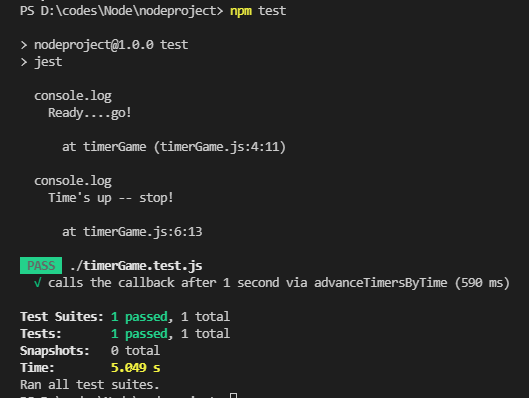
});Output:


 7+ registered

