Table of contents
1.
Introduction
2.
Creating the Persistent Class in May to Many XML
3.
Creating the Mapping file in Many to Many XML
4.
Configuration File in Many to Many XML
5.
Classes to Store the Data in Many to Many XML
6.
Frequently Asked Questions
6.1.
What is hibernate?
6.2.
What is a ClassLoader?
6.3.
What is ORM?
7.
Conclusion
Last Updated: Mar 27, 2024

Many to Many XML

Career growth poll
Do you think IIT Guwahati certified course can help you in your career?

Introduction

In this relation mapping, a single object of class X is linked to various objects of class Y, while a single object of class Y is linked to numerous objects of class X.

In other words, one record from table "A" is linked to multiple records from table "B" and one record from table "B" is linked to numerous records from table "A".

To hold the primary keys of both tables as foreign keys in this mapping, a separate table called the "Join table" is needed.

For Example, consider Bank and Customer relationship - One Bank can have multiple customers, and One customer can have multiple bank accounts

In this article we will discuss Many to Many XML.

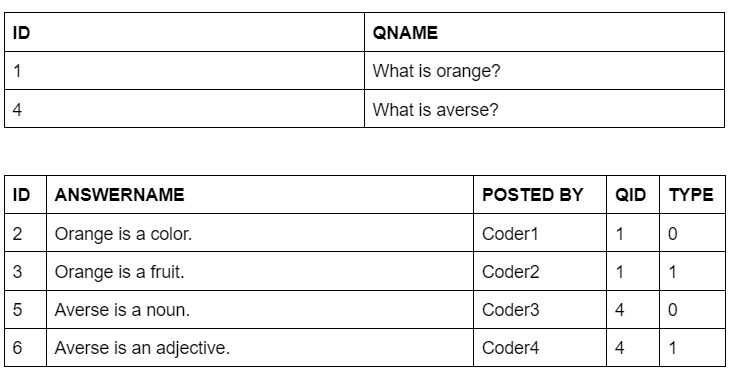
Let's start with an example in which we use a list to create a many-to-many relationship between the questions and the answers.

Creating the Persistent Class in May to Many XML

In Hibernate, persistent classes are Java classes whose instances or objects will be stored in database tables. These classes work best with Hibernate when they follow a few straightforward rules, also known as the Plain Old Java Object programming paradigm.

Answer.java and Question.java are two persistent classes. Answer class references can be found in Question class, and vice versa.

Question.java

package com.codingninjas;    
    
import java.util.List;    
    
public class Question 
{    
    private int id;    
    private String qname;    
    private List<Answer> answers;  
  
    public int getId() 
    {  
        return id;  
    }  
    public void setId(int id) 
    {  
        this.id = id;  
    }  
    public String getQname() 
    {  
        return qname;  
    }  
    public void setQname(String qname) 
    {  
        this.qname = qname;  
    }  
    public List<Answer> getAnswers() 
    {  
        return answers;  
    }  
    public void setAnswers(List<Answer> answers) 
    {  
        this.answers = answers;  
    }      
}
You can also try this code with Online Java Compiler
Run Code


Answer.java

package com.codingninjas;  
  
import java.util.*;  
  
public class Answer 
{    
    private int id;    
    private String answername;    
    private String postedBy;    
    private List<Question> questions;  
    public int getId()
 	{  
        return id;  
	}  
	public void setId(int id) 
	{  
   		this.id = id;  
	}  
	public String getAnswername() 
	{  
    	return answername;  
	}  
	public void setAnswername(String answername)
 	{  
    	this.answername = answername;  
	}  
	public String getPostedBy() 
	{  
    	return postedBy;  
	}  
	public void setPostedBy(String postedBy) 
	{  
    	this.postedBy = postedBy;  
	}  
	public List<Question> getQuestions() 
	{  
    	return questions;  
	}  
	public void setQuestions(List<Question> questions) 
	{  
    	this.questions = questions;  
	}	    
}
You can also try this code with Online Java Compiler
Run Code

Creating the Mapping file in Many to Many XML

In the below implementation, we will be creating files named questions.hbm.xml and answers.hbm.xml for defining the list.

questions.hbm.xml

<?xml version='1.0' encoding='UTF-8'?>    
<!DOCTYPE hibernate-mapping PUBLIC    
          "-//Hibernate/Hibernate Mapping DTD 5.3//EN"    
          "http://hibernate.sourceforge.net/hibernate-mapping-5.3.dtd">    
              
<hibernate-mapping>    
  
  <class name="com.codingninjas.Question" table="questions_1">  
        <id name="id" type="int">  
            <column name="qid" />  
            <generator class="increment" />  
        </id>  
        <property name="qname" />  
  
        <list name="answers" table="ques_ans_1" fetch="select" cascade="all">  
            <key column="qid" />  
               <index column="type"></index>   
            <many-to-many class="com.codingninjas.Answer" column="ans_id" />  
        </list>  
    </class>   
</hibernate-mapping>     


answers.hbm.xml

<?xml version='1.0' encoding='UTF-8'?>    
<!DOCTYPE hibernate-mapping PUBLIC    
          "-//Hibernate/Hibernate Mapping DTD 5.3//EN"    
          "http://hibernate.sourceforge.net/hibernate-mapping-5.3.dtd">    
              
<hibernate-mapping>    
<class name="com.codingninjas.Answer" table="answers_1">  
        <id name="id" type="int">  
            <column name="ans_id" />  
            <generator class="increment" />  
        </id>  
        <property name="answername"  />  
        <property name="postedBy" />  
    </class>  
</hibernate-mapping>

Configuration File in Many to Many XML

This file provides database and mapping file information.

hibernate.cfg.xml

<?xml version='1.0' encoding='UTF-8'?>    
<!DOCTYPE hibernate-configuration PUBLIC    
          "-//Hibernate/Hibernate Configuration DTD 5.3//EN"    
          "http://hibernate.sourceforge.net/hibernate-configuration-5.3.dtd">    
    
<hibernate-configuration>    
    
    <session-factory>    
        <property name="hbm2ddl.auto">create</property>    
        <property name="dialect">org.hibernate.dialect.Oracle9Dialect</property>    
        <property name="connection.url">jdbc:oracle:thin:@localhost:1521:xe</property>    
        <property name="connection.username">system</property>    
        <property name="connection.password">jtp</property>    
        <property name="connection.driver_class">oracle.jdbc.driver.OracleDriver</property>    
    <mapping resource="question.hbm.xml"/>    
    <mapping resource="answer.hbm.xml"/>  
    </session-factory>    
    
</hibernate-configuration>

Classes to Store the Data in Many to Many XML

We define a user class named store.java to store the data in many-to-many mapping using XML respectively.

StoreData.java

The data from the question class is stored in this class.

package com.codingninjas;    
  
import java.util.ArrayList;    
    
import org.hibernate.SessionFactory;  
import org.hibernate.Session;
import org.hibernate.Transaction;  
import org.hibernate.boot.MetadataSources;  
import org.hibernate.boot.Metadata;  
import org.hibernate.boot.registry.StandardServiceRegistryBuilder;  
import org.hibernate.boot.registry.StandardServiceRegistry;  


public class StoreData 
{    
	public static void main(String[] args) 
	{    
     
    	StandardServiceRegistry ssr=new StandardServiceRegistryBuilder().configure("hibernate.cfg.xml").build();  
    	Metadata meta=new MetadataSources(ssr).getMetadataBuilder().build();  
      
    	SessionFactory factory=meta.getSessionFactoryBuilder().build();  
    	Session session=factory.openSession();  
      
    	Transaction t=session.beginTransaction();    
        
    	Answer ans1=new Answer();    
    	ans1.setAnswername("Orange is a color");    
    	ans1.setPostedBy("Coder1");    
        
    	Answer ans2=new Answer();    
    	ans2.setAnswername("Orange is a fruit");    
   		ans2.setPostedBy("Coder2");    
        
    	Answer ans3=new Answer();    
    	ans3.setAnswername("Averse is a noun");    
    	ans3.setPostedBy("Coder3");    
        
    	Answer ans4=new Answer();    
    	ans4.setAnswername("Averse is an adjective");    
    	ans4.setPostedBy("Coder4");    
        
    	ArrayList<Answer> list1=new ArrayList<Answer>();    
    	list1.add(ans1);    
    	list1.add(ans2);    
        
    	ArrayList<Answer> list2=new ArrayList<Answer>();    
    	list2.add(ans3);    
    	list2.add(ans4);    
        
    	Question question1=new Question();    
    	question1.setQname("What is Orange?");    
    	question1.setAnswers(list1);    
        
    	Question question2=new Question();    
    	question2.setQname("What is averse?");    
    	question2.setAnswers(list2);    
        
    	session.persist(question1);    
    	session.persist(question2);    
        
    	t.commit();    
    	session.close();    
    	System.out.println("Done");    
    }    
}   
You can also try this code with Online Java Compiler
Run Code


Output

Output

Frequently Asked Questions

What is hibernate?

A lightweight, open-source ORM tool called Hibernate is used to store, alter, and retrieve data from databases.

What is a ClassLoader?

A classloader is a part of Java Virtual Machine that loads class files when a program is run in Java. The first executable file to load is ClassLoader.

What is ORM?

The term "ORM" stands for "Object/Relational Mapping." The mapping of objects to the data kept in the database is a programming technique. It makes data access, data manipulation, and data generation easier.

Conclusion

In this article, we have extensively discussed the Many to Many XML in hibernate using, its example, and file mapping in hibernate project structure.


If you find this blog has improved your understanding of Many to Many XML and if you would like to learn more, check out our articles Hibernate Interview QuestionsOOPS in JavaJava Framework, and JDBC Connection.

Refer to our Guided Path on Coding Ninjas Studio to upskill yourself in Data Structures and AlgorithmsCompetitive ProgrammingJavaScriptSystem Design, and many more! If you want to test your competency in coding, you may check out the mock test series and participate in the contests hosted on Coding Ninjas Studio! But suppose you have just started your learning process and are looking for questions asked by tech giants like Amazon, Microsoft, Uber, etc. In that case, you must look at the problemsinterview experiences, and interview bundle for placement preparations.

Do upvote our blogs if you find them helpful and engaging!

Happy Learning!

Live masterclass