BDD
BDD stands for behaviour-driven development. BDD styles provide an expressive language & readable style.The BDD interface of Mocha provides describe(), context(), it(), specify(), before(), after(), beforeEach(), and afterEach().
context() and describe() behaves the same way. They both provide a way to keep tests easier to read and organised. Similarly, specify() is an alias for it().
Example Test
var assert = require("assert");

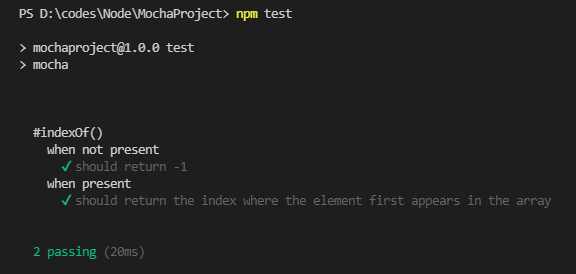
describe('#indexOf()', function () {
    context('when not present', function () {
      it('should return -1', function () {
        assert.equal(["a", "b", "c"].indexOf("d"), -1);
      });
    });
    context('when present', function () {
      it('should return the index where the element first appears in the array', function () {
        assert.equal(["a", "b", "c"].indexOf("b"), 1);
      });
    });
  });

You can also try this code with Online Javascript Compiler
Output
TDD
In the TDD approach to software development, the developer first writes tests that define the desired behaviour and then writes code that passes the tests.
The TDD interface of Mocha provides suite(), test(), suiteSetup(), suiteTeardown(), setup(), and teardown().
To use Mocha in TDD mode, you must specify mocha to use TDD in the package.json file.
"scripts": {
    "test": "mocha -u tdd"
  },
You can also try this code with Online Javascript Compiler
Example Test
var assert = require("assert");

suite('#indexOf()', function () {
    test('should return -1 when not present', function () {
        assert.equal(["a", "b", "c"].indexOf("d"), -1);
    });
  });
You can also try this code with Online Javascript Compiler
Output

Require
Using the Require interface, we can avoid the global variable in our tests by requiring the desired module and calling them whatever we want.
The require interface must be run via mocha and not via the node executable.
Example Test
var testCase = require('mocha').describe;
var assertions = require('mocha').it;
var assert = require('assert');

testCase('#indexOf()', function () {
    assertions('should return -1 when not present', function () {
        assert.equal(["a", "b", "c"].indexOf("d"), -1);
    });
  });
You can also try this code with Online Javascript Compiler
Output

FAQs
1. How does Mocha know it should wait for a function?
Ans: Add done argument to it () to a test callback. this allows mocha to know that it should wait for this function to be called to complete the test.
2. What is the default test interface in Mocha?
Ans: BDD is the default interface in Mocha. Behaviour-driven development (BDD) aims to help developers build software that is predictable, resilient to changes, and not error-prone.
3. How to tell if Mocha is waiting for a callback?
Ans: mocha will wait until the done callback is called. If neither the error nor finish events above are emitted, then mocha will timeout, which by default will happen after 2 seconds. Mocha can tell if you wrote your test with the done callback or not and mark those with the callback as async.
4. What happens if you don't tell Mocha that a function is asynchronous?
Ans: After some time if our promise is rejected and an error is thrown. But it’s too late now. Mocha has already reported that our test is passed.
Key Takeaways
In this article, we have extensively discussed interfaces in Mocha.
Key points we learned from this article are:
- Interfaces help in specifying the style of DSL.
- describe(), context(), it(), specify(), before(), after(), etc are provided by BDD interface.
- TDD interface of provides suite(), test(), etc.
-
Require allows us to require and name them as per our liking.
We hope that this blog has helped you enhance your knowledge regarding Mocha interfaces and if you would like to learn more, check out our articles on Mocha Installation and Example test, Introduction to Mocha. Do upvote our blog to help other ninjas grow.
Head over to our practice platform Coding Ninjas Studio to practice top problems, attempt mock tests, read interview experiences, and much more.!
Happy Reading!





 7+ registered

