The first question we need to address is - What are modules? Modules are those directories that contain the puppet code.
Modules are a very useful tool. They solve use cases and manage applications. Modules include helpful plans and tasks. They also allow to share of custom bolt tasks or utilize the bolt content programmatically.
The Task of Dependency Management
Usually, modules depend on other modules to function correctly. Install the module using the Bolt command line interface. Bolt handles these dependencies itself.
The puppet file for the project mentioned above will be-
moduledir '.modules'
mod 'puppetlabs/apache', '5.6.0'
mod 'puppetlabs/puppetserver_gem', '1.1.1'
mod 'puppetlabs/resource_api', '1.1.0'
mod 'puppetlabs/translate', '2.2.0'
mod 'puppetlabs/stdlib', '6.5.0'
mod 'puppetlabs/mysql', '10.8.0'
mod 'puppetlabs/concat', '6.2.0'
Module Path
There is a list of directories where Bolt search for content. It is called the modulepath. Bolt obtains content from
The current Bolt project.
Any modules in the configurable modules directory. By default, this is modules/.
The Bolt-managed moduledir (.modules).
Any modules that come with Bolt.
Installing Modules
We can use the command line to implement the following tasks.
Create a project
Add a Puppet Forge module
Update project modules.
Create a Project
You can manage to create a project using the following code. It is done using pre-installed modules.
For instance, if we want to turn the current directory into a project named exampleCodingNinjas_project which has puppetlabs/apache and puppetlabs/mysql modules installed, we can use the following command:
*nix shell command
bolt project init examplecodingninjas_project
PowerShell cmdlet
New-BoltProject -Name examplecodingninjas_project
The project's Puppetfileis mentioned below, which lists the puppetlabs/apache and puppetlabs/mysql modules and all of their dependencies:
mod 'puppetlabs-apache', '5.5.0'
mod 'puppetlabs-mysql', '10.6.0'
mod 'puppetlabs-stdlib', '6.3.0'
mod 'puppetlabs-concat', '6.2.0'
mod 'puppetlabs-translate', '2.2.0'
mod 'puppetlabs-resource_api', '1.1.0'
mod 'puppetlabs-puppetserver_gem', '1.1.1'
Install A Module To An Existing Project
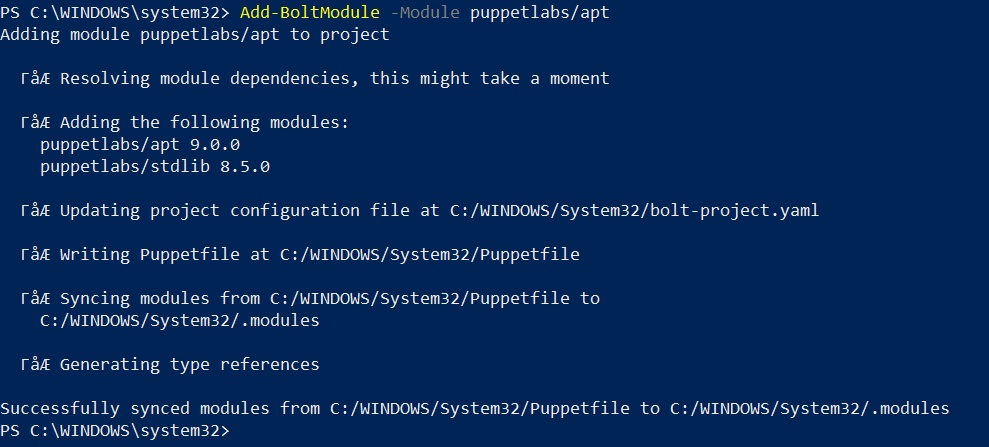
The first step is to add a forge module and dependencies to a current object.
*nix shell command
bolt module add puppetlabs/apt
Powershell cmdlet
Add-BoltModule -Module puppetlabs/apt
Install the Modules Associated with Your Bolt Project
The following code comes in handy while installing.
*nix shell command
bolt module add puppetlabs/apt
Powershell cmdlet
Add-BoltModule -Module puppetlabs/apt
Install Modules Using Proxy
For declaring a global proxy that can be used to install Forge and git modules set the proxy key under module-install to the following:
It is also possible to set a proxy that is only used when installing Forge modules. To do the same, set the proxy key under the forge section of the module-install option:
If you intend to set an authorization token that can be used when installing Forge modules, set the authorization_token key under the forge section of the module-install option. When you set the authorization_token key, you must also take care of the baseurl key.
For information on how to carry out the installation of modules, you can refer to the official documentation.
Module Structure
The content should be inside a puppet module on the current Bolt project’s modulepath before the bolt tries to load the content like tasks, plans, functions, classes, and types. Bolt modulepath includes the modules and, modules directories by default.
Directory Structure
data
The data that can be used when we apply a manifest block.
files
Static files that are loaded by a plan
functions
Puppet language functions that are usually used from a plan.
hiera.yaml
Hiera configuration
lib
Ruby code, like custom Puppet functions, types, or providers.
manifests
Classes and other Puppet codes are usable when we apply a manifest block.
metadata.json
Metadata for a module describing information like version, and operating system compatibility.
plans
Plans must end in the .pp or .yaml extensions.
tasks
Metadata of tasks.
Packaged Modules
Forge Modules
The following table represents some of the modules that are provided with Bolt.
puppetlabs/host_core
It installs and manages host entries
puppetlabs/http_request
Making HTTP requests.
puppetlabs/mount_core
It manages mounted filesystems and mount tables.
puppetlabs/package
These are the tasks that manipulate a package.
puppetlabs/pkcs7
This is a bolt plugin to encrypt and decrypt sensitive data
puppetlabs/powershell_task_helper
It serves as a helper for writing tasks in PowerShell
puppetlabs/puppet_agent
It manages to upgrade All-In-One Puppet Agents
puppetlabs/puppet_conf
It takes into account the tasks that manipulate a puppet configuration file
puppetlabs/python_task_helper
It is a Python helper library for use by Puppet Tasks
puppetlabs/reboot
It helps to add a type and provider for managing system reboots.
puppetlabs/ruby_plugin_helper
It serves as a helper for writing Bolt plugins in Ruby
puppetlabs/ruby_task_helper
It serves as a helper for writing tasks in ruby
puppetlabs/scheduled_task
It manages scheduled tasks for Windows Server 2008 and newer operating systems.
puppetlabs/secure_env_vars
It runs commands or scripts with sensitive environment variables.
puppetlabs/selinux_core
It manages the SELinux context of files
puppetlabs/service
Tasks that manipulate a service
puppetlabs/sshkeys_core
Manage SSH authorized keys and known hosts.
puppetlabs/stdlib
Standard library of resources for Puppet modules.
puppetlabs/terraform
A task to generate Bolt inventory from Terraform statefiles
puppetlabs/vault
A task to access Bolt configuration from secrets stored in a Hashicorp Vault server
puppetlabs/yaml
YAML plugin for bolt
Local Modules
Aggregate, Canary, puppet_connect, and puppetdb_facts are some of the modules provided with bolt packages, They are not present in Puppet forge.
Aggregate- This module provides the aggregate::count and aggregate::targets plans. This plan allows you to run another task, script, or command and aggregate the results.
Canary- This module provides the canary plan. This plan allows you to run another task, script, or command in canary mode.
Puppet_connect- This module provides the puppet_connect::test_input_data plan, which is used to test that the provided Puppet Connect input data is complete.
Puppetdb_facts- This module provides the puppetdb_fact plan, which collects facts for the specified targets.
Frequently Asked Questions
What do you mean by modulepath?
There is a list of directories where Bolt search for content. It is called the modulepath.
What is the use of Modules in Bolt?
Modules solve use cases and manage applications. Modules include helpful plans and tasks. They also allow to share of custom bolt tasks or utilize the bolt content programmatically.
What does puppetlabs/ruby_task_helper do?
The puppetlabs/ruby_task_helper serves as a helper for writing tasks in ruby.
What is the extension for plans in Bolt?
Plans must end in the .pp or .yaml extensions.
Name some local modules in packaged modules.
Aggregate, Canary, puppert_connect, and puppetdb are some local modules.
Conclusion
This blog discussed the concept of modules in the bolt. It also discussed the task of dependency management.
For more information on Bolt, you can refer to the following articles-





 408+ registered