

Table of contents
1.
Introduction
2.
Numpy Library
2.1.
Importing Numpy Library
2.2.
Implementation of Numpy Library
2.2.1.
Numpy Array Creation
2.3.
Python
2.3.1.
Numpy Array Arithmetic Operation
2.4.
Python
2.4.1.
Numpy Array Comparison Operation
2.5.
Python
3.
Polyfit() Method in Numpy
3.1.
Working of polyfit() function
3.2.
Syntax of Polyfit()
3.3.
Parameters of Polyfit() Method
3.4.
Return Type of polyfit() function
4.
Implementation of Polyfit() Method
4.1.
Fitting Polynomial Function with Polyfit()
4.2.
Python
4.3.
Linear Regression Plot using polyfit()
4.4.
Python
5.
Frequently Asked Questions
5.1.
Why to use Numpy arrays over Python lists?
5.2.
How the random numbers can be generated using Numpy?
5.3.
What is broadcasting in Numpy?
5.4.
What is Polynomial Function?
6.
Conclusion
Last Updated: Aug 13, 2025
Easy

Numpy polyfit() Method in NumPy

Career growth poll
Do you think IIT Guwahati certified course can help you in your career?

Introduction

Python provides a function called “polyfit()”, which can be imported from the module “Numpy”, which is used to fit the data within a polynomial function. There are different parameters, such as representing x-coordinate, y-coordinate values, polynomial degrees, etc.

Numpy polyfit() Method in NumPy

In the article “Numpy polyfit() Method in NumPy”, we will discuss what is Numpy library, the polyfit() method in Numpy, and the implementation of the polyfit() method in Numpy.

Numpy Library

In the article “Numpy polyfit() Method in NumPy”, we will discuss the Numpy Library. Numpy stands for “Numerical Python” and is a library provided by Python which is basically used for working with arrays that functions which is be useful in the domain of linear algebra, matrices, and fourier transform. 

Two of the major reasons for using the Numpy library are faster execution time, and it can also be used with various libraries such as Pandas, Scipy, and Scikit-learn. There can be different applications where the Numpy library can be used in Machine Learning, Data Science, Scientific Computing, and Quantum Computing.

Importing Numpy Library

Here is the syntax below by which the Numpy library can be imported:

import numpy as np
You can also try this code with Online Python Compiler
Run Code

Implementation of Numpy Library

In this subsection of article “Numpy polyfit() Method in NumPy”, we will discuss some examples by which we can learn how to implement Numpy arrays and its operations.

Numpy Array Creation

In this example, we will create Numpy array using Numpy library:

  • Python

Python

import numpy as np

# create numpy array
arr = np.array([2, 9, 10, 30])

# Output: [2 9 10 30]
print(arr)
You can also try this code with Online Python Compiler
Run Code


Output

Array Creation - Output

Explanation

In the above code, the First numpy library is imported as np. Now array() function is used from the library Numpy where the list is passed of 4 elements. Lastly, this created Numpy array is printed.

Numpy Array Arithmetic Operation

In this example, we will subtract one Numpy array from the Numpy array using subtract() method of the library Numpy:

  • Python

Python

# importing library numpy
import numpy as np

# creating two Numpy arrays for arithmetic operation
arr1 = np.array([2, 4, 6, 8])
arr2 = np.array([1, 3, 5, 7])

# using "-" operator for subtracting arr1 with arr2
res1 = arr1 - arr2
print("Using the - operator:", res1)

# using "subtract()" function for subtracting arr1 with arr2
res2 = np.subtract(arr1, arr2)
print("Using the subtract() function in Numpy:", res2)
You can also try this code with Online Python Compiler
Run Code


Output

Arithmetic Operation - Output

Explanation

In the above code, the First numpy library is imported as np. Now array() function is used from the library Numpy where 2 lists are created. Now “-” operator is used, and subtract() method of Numpy is used to subtract these lists. Lastly, this created Numpy array is printed.

Numpy Array Comparison Operation

In this example, we will compare every element of 2 Numpy arrays where the greater_equal() method of the library Numpy:

  • Python

Python

# importing library numpy
import numpy as np

# creating two Numpy arrays for comparison operation
arr1 = np.array([9, 12, 21])
arr2 = np.array([21, 12, 9])

# use of greater_equal() for comparing two Numpy arrays
res = np.greater_equal(arr1, arr2)
print("Using greater_equal():", res)
You can also try this code with Online Python Compiler
Run Code


Output

Comparison Operation - Output

Explanation

In the above code, the First numpy library is imported as np. Now array() function is used from the library Numpy where 2 lists are created. Now the “greater_equal()” method of Numpy is used to compare the elements of these lists. Lastly, this created Numpy array is printed.
Polyfit() Method in Numpy

In this section of the article “Numpy polyfit() Method in NumPy”, we will discuss the Polyfit() method. A polynomial function is a function in Python that can be used for positive integer exponents of a variable in an equation. Fitting the data is nothing but finding the least number of squares in the function that fits in the polynomial equation.

In Python, Polyfit() is a method in the Numpy library that is used to fit the data within a polynomial function. In simpler words, The polyfit() method helps us to fit the data inside a polynomial function.

Working of polyfit() function

In this subsection of the article “Numpy polyfit() Method in NumPy”, we will discuss how the polynomial data can fit with the help of the polyfit() function.

A polynomial with a degree of 1 is the simplest known polynomial. The equation “y = m * x + c” is basically used for the simplest known polynomial.

The polyfit() function is used to solve these equations that can be of degrees 2, 3, 4, and so on. One of the key points of using the polyfit() method is to fit the data in the quadratic equation: “y = ax 2 + bx + c”.

Syntax of Polyfit()

Here is the syntax below of the Polyfit() method in the Numpy Library:

numpy.polyfit( x , y , deg , rcond = None , full = False, w = None, cov = False)
You can also try this code with Online Python Compiler
Run Code

Parameters of Polyfit() Method

In the above syntax of the polyfit() method, the first three parameters are mandatory and are supposed to be passed in the function, and the rest of the parameters are optional. Here is the explanation of each parameter passed to the polyfit() method:

  • x: x is the mandatory parameter that is used to represent the x-coordinate value of the input array.
     
  • y: y is the mandatory parameter that is used to represent the y-coordinate value of the input array.
     
  • deg: deg stands for a degree, which is also a mandatory parameter which is an integer value that fits in the polynomial degree.
     
  • rcond: rcond is the optional parameter that is used for the relative condition value of the fit.
     
  • full: full is also an optional parameter that is a boolean value that is responsible for the nature of the value returned.
     
  • w: w is an optional parameter which is an array that weights to put to the sample point’s y-coordinates.
     
  • cov: cov is a boolean value which is an optional parameter that returns the estimate as well as the estimate covariance matrix.

Return Type of polyfit() function

The polyfit() method returns an array, and its dimension is equal to the degrees + 1.

Implementation of Polyfit() Method

In this section of the article “Numpy polyfit() Method in NumPy”, we will discuss the implementation of the Polyfit() method with examples.

Fitting Polynomial Function with Polyfit()

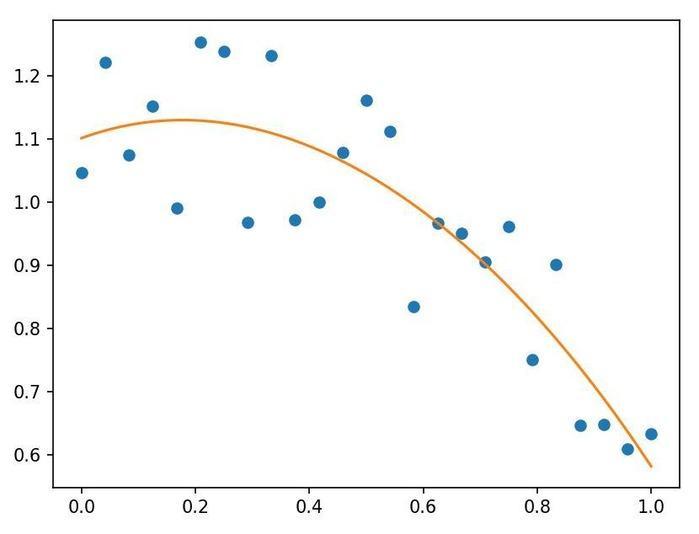
In this example, we will use the matplotlib library provided by Python, which will be used for plotting the values into the map. Also, we will do computation with the coefficients of the 4th degree.

  • Python

Python

# Importing some necessary libraries
import numpy as np
import matplotlib.pyplot as mp

# Setting our seed as 12
np.random.seed(12)

# X-Coordinates
x = np.linspace( 0, 1, 25 )

# Polynomial equation
y = np.cos(x) + 0.3*np.random.rand(25)

# Using polyfit func with 4 degrees
p = np.poly1d( np.polyfit(x, y, 4) )

t = np.linspace(0, 1, 250)

# Plotting our polynomial function
mp.plot(x, y, 'o', t, p(t), '-')

mp.show()
You can also try this code with Online Python Compiler
Run Code


Output

Fitting Polynomial Function - Output

Explanation

In the above code, the first numpy and matplotlib libraries are imported. The seed() function is used to seed the numpy as 12. Then X-Coordinates are set with the function linspace() with the arguments 0, 1, and 25. The polyfit() method is used with degree 4. Lastly, the plot() and show() methods are used for the plotting purposes.

Linear Regression Plot using polyfit()

In this example, we will use the matplotlib library provided by Python, which will be used for plotting the linear regression. Also, we will do computation with the coefficients of the 1st degree.

  • Python

Python

# Importing neccessary libraries

import numpy as np

import matplotlib.pyplot as plt


# Sample data

x = np.array([1, 2, 3, 4, 5, 6])

y = np.array([2, 3.5, 6, 7.5, 9, 11])


# Linear regression using polyfit with the degree 1

coefficients = np.polyfit(x, y, 1)

slope = coefficients[0]

intercept = coefficients[1]


# Create the regression line

reg_line = slope * x + intercept


# Plot the data and the regression line

plt.scatter(x, y, label='Data points')

plt.plot(x, reg_line, color='red', label='Regression line')

plt.title('Linear Regression Plot')

plt.legend()

plt.grid(True)

plt.show()
You can also try this code with Online Python Compiler
Run Code


Output

regression line - output

Explanation

In the above code, the first numpy and matplotlib libraries are imported. The sample data for x and y are created using Numpy arrays. The polyfit() function is used with the degree of 1 and the regression line is create. Lastly, the plot() and show() methods are used for the plotting purposes.

Frequently Asked Questions

Why to use Numpy arrays over Python lists?

Numpy arrays offer faster execution time and contiguous memory allocation, and they can also be used with various libraries such as Pandas, Scipy, and Scikit-learn.

How the random numbers can be generated using Numpy?

In Numpy, the numpy.random module can be used to generate the random numbers. Specifically rand() method is used where the parameter can be passed for the limits.

What is broadcasting in Numpy?

Broadcasting in Numpy is nothing but a feature that is used to perform element-wise operations on arrays with different shapes as long as they are compatible.

What is Polynomial Function?

A polynomial function is a function that only uses positive integer exponents of a variable in an equation. Polyfit() method is one of the polynomial functions in Python.

Conclusion

Polyfit() function is the function provided in the Numpy library by Python that is basically used to fit the data in the polynomial function. Polyfit() method can be used for plotting on the map after computing the polynomial equation. 

In the article “Numpy polyfit() Method in NumPy”, we have discussed the Numpy Library, the Polyfit() method in Numpy, and the implementation of the Polyfit() method. Here are more articles that are recommended to read:

You can refer to our guided paths on the Coding Ninjas. You can check our course to learn more about DSADBMSCompetitive ProgrammingPythonJavaJavaScript, etc. 

Also, check out some of the Guided Paths on topics such as Data Structure and AlgorithmsCompetitive ProgrammingOperating SystemsComputer Networks, DBMS, and System Design, etc. as well as some Contests, Test Series, and some Interview Experiences curated by top Industry Experts.

Happy Learning!

Live masterclass



