Do you think IIT Guwahati certified course can help you in your career?
Introduction to Katalon
Katalon is an automating testing software that lets the users test web, mobile or desktop applications and APIs without coding, to deliver efficient and robust software to the consumers. The software is built over the Selenium and Appium automation frameworks, and makes testing convenient and code-free.
Parameterizing Objects and Their Properties
With parameterization, we can dynamically update the object’s locators by using local or global variables. This is done when:
Similar actions need to be performed without wanting to define multiple test objects, like checking multiple checkboxes
When the object locator can only be found during runtime because there are multiple such objects, and one cannot be specified beforehand.
Given below is an example demonstrating the application of this. Refer to the Health Care sample project on Github. Go to Object Repository/Page_Login.
We select the object whose properties are to be parameterized. For example, we select the test object called txt_Username.
Identify its locator and create a variable with the syntax ${variable_name} as a placeholder for its dynamic properties. This can be done with different methods, as shown below:
Attributes
XPath
CSS
Now use the parameterised test object.
Manual View
Open your test case in the Manual View and double-click on the project whose properties you want to parameterise.
In the displayed Test Object Input dialogue, declare the expected dynamic property as a variable in the Variables panel.
Here:
Param Type: variable type (here ‘String’)
Param: variable name (here “id”)
Value Type: variable value type (here ‘String’)
Value: specific value of the variable (here ‘4TH4T934253&#^%(‘ )
Script View
After the declaration of the property, you can modify the value of the property by switching to the Script View. Usually property values are passed as variables. Given below is an example:
To find a test object using a dynamic property:
findTestObject('{your test object}', [('{property}') : '{value of property}'])
Example
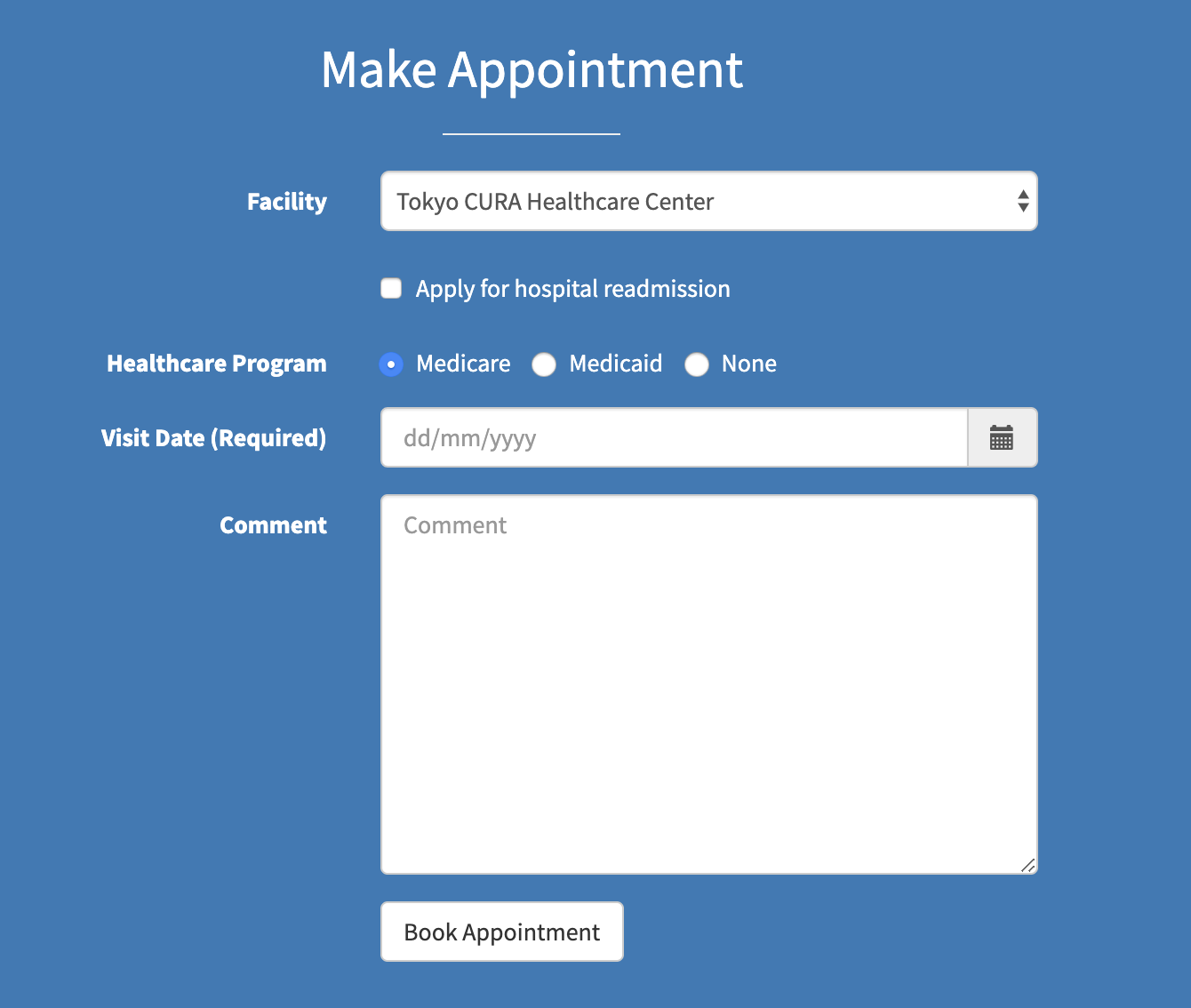
Here we look at an example of the Cura Healthcare Center appointment web page, which has three options for the program, and only the selected one is known when it is passed during execution.
When you parameterise a locator, only one test object needs to be created; hence you can determine the exact object with the data that is passed during execution. This way, we can specify an option in a test script.
Knowing the grouping pattern of similar objects is necessary to determine which attributes need to be adjusted to parameterise the object’s XPath. Here, the index values of the label attribute are the value we parameterise for options on the current web screen.
The captured object will have a corresponding selected locator depending on the preferred selection method.
Given below are steps to parameterise test objects in each case:
For capturing and saving the XPath locator of the three options to the Object Repository in Katalon Studio:
${index} = [1] => the XPath locator: //*[@id=\"appointment\"]/div/div/form/div[3]/div/label[${index}]
Escaping Special Characters
You may need to use the special characters $ or \ apart from their use in the syntax. To prevent confusion or error during execution, precede the special characters with a backlash: ‘\’.
Frequently Asked Questions
What is Katalon Studio?
Katalon is an automating testing software that lets the users test web, mobile or desktop applications and APIs without coding to deliver efficient and robust softwares to the consumers.
Why do we need parameterisation?
We parameterise test objects to either perform bulk actions on a group of similar elements without defining multiple test objects or when we can only identify an object’s locator during runtime as there are similar such objects, and the chosen one cant be specified before runtime.
How can we use special characters in our script?
Special characters can be used in the script by preceding it with a backslash, also called the escape character.
Conclusion
In this blog, we learnt the need for parameterisation of test objects and how to parameterise them using a step-by-step approach on some examples. Share this article with your fellow ninjas if you found it helpful. Additionally, visit our platform Coding Ninjas Studio to read informational articles on important computer fundamentals like DBMS, DSA, Competitive Programming, Python, Java, etc. Happy Coding!!









 1+ registered

