Do you think IIT Guwahati certified course can help you in your career?
Introduction 🤓
Hello Ninja🥷! In this article, we discuss the policies in Chef Infra. But before we dive into details, let's take a quick overview of Chef Infra🙌. A powerful automation platform Chef Infra turns infrastructure into code. Whatever the size of your network,
Chef Infra automates the configuration, deployment, and management of infrastructure across it, whether you're operating in the cloud, on-premises, or a hybrid environment.
About Cookbooks
In Chef Infra, a cookbook is a basic configuration and policy delivery unit.
A scenario is defined, and every component needed to implement it is included in a cookbook:
Custom Resources are used to supplement Chef Infra's built-in resources.
Information distribution to systems through files and templates
Cookbook Versions
A cookbook version denotes a set of features distinct from the cookbook it is based on. A version may be present for various purposes, including adding an improvement, updating a bug patch, or ensuring the proper use of a third-party component. A cookbook version can relate to environments, cookbook information, run-lists, and/or syntax and operators. It can also be frozen (to prevent unwanted updates from being made).
About Policy📢
Policy links settings and objects stored on the Chef Infra Server to business and operational needs, processes, and workflow:
Server kinds, such as "web server" or "database server," are defined by roles.
Processes are defined by environments, such as "dev," "staging," or "production."
Data bags, which are stored in a secure section of the Chef Infra Server and can only be accessed by nodes that authenticate to the Chef Infra Server with the proper SSL certificates, can be used to store certain types of data, including passwords, user account information, and other sensitive information.
The cookbooks (and versions of the cookbook) that maintain organization-specific configuration policies
About Policyfiles
When a document is uploaded to the Chef Infra Server, it can contain immutable collections of cookbooks, cookbook dependencies, and attributes. The Policy file is then linked to a collection of nodes. These nodes use the recipes listed in the Policy file when they run a Chef Infra Client.
Why Policy files?
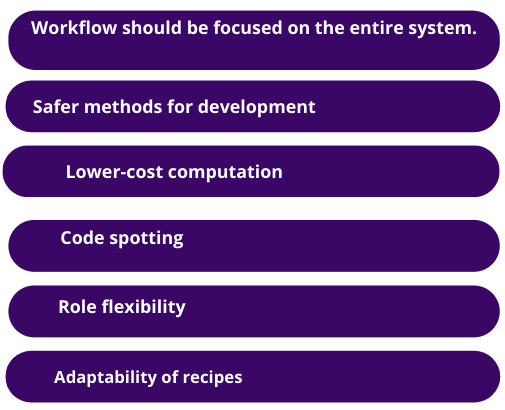
With a more user-friendly interface, policy files facilitate the safe testing and promotion of code. Using a Policy file can enhance the user experience and solve practical issues that various procedures based on Chef Infra must address. Some of the benefits of using the Policy file are covered in more detail in the sections that follow, including:
Policyfile.rb📝
When a document is uploaded to the Chef Infra Server, it can contain immutable collections of cookbooks, cookbook dependencies, and attributes. The Policy file is then linked to a collection of nodes. These nodes use the recipes listed in the Policy file when they run a Chef Infra Client.
You can specify the cookbook updates and recipes that Chef Infra Client will use in a single file called a policy file. A Policy file is posted to the Chef Infra Server and connected to a collection of nodes. Chef Infra Client will make judgments based on your Policy file settings and will construct a run-list based on that information when these nodes are configured during a Chef Infra Client run. To safely and effectively deliver a new configuration, a Policy file may be versioned and then advanced through deployment steps.
Syntax
Ruby files are called Policy file.rb specify run-list and cookbook locations. The following is the syntax:
Global variables are kept in data bags as JSON data. Data bags are loaded by a cookbook or accessible during a search and are indexable for searching.
Create a Data Bag
A data bag can be made manually or using a knife in two different methods. In general, using knives to generate data bags is advised, but either technique is secure and efficient as long as the data bag folders and data bag item JSON files are created correctly.
About Run-lists
A run list defines all the information needed for Chef to configure a node in the proper state. Describe the run-list.
A list of recipes or roles executed in the exact order listed in the run-list; Chef Infra Client, won't execute a recipe more than once if it appears more than once in the run-list.
It is always unique to the node on which it runs, albeit some nodes may have run lists similar to those used by other nodes.
Stored on the Chef server as a component of the node object.
Knife-maintained and then uploaded from the workstation to the Chef Infra Server, or Chef Automated-maintained
Run-list Format
One of the following formats—fully qualified, cookbook, or default—must be used for a run-list. Roles and recipes must both be enclosed in quotation marks, as in:
"role[NAME]"
or
"recipe[COOKBOOK::RECIPE]"
When adding more than one item to the run-list, separate roles and recipes with commas as follows:
Use an empty run list to determine whether the recipes defined in a failed Chef Infra Client run have anything to do with it. This is a quick approach to determine whether a configuration issue is the root cause of a Chef Infra Client run failure. Check the following if a failure continues even if the run-list is empty:
Config..rb file settings for configuration
Permission for the user to run a Chef Infra Client on both the Chef Infra Server and the node in question.
About Environments🧑💻
An environment is a way to translate a company's actual process into what Chef Infra can configure and manage. Setting characteristics and pinning cookbooks at the environment level allows for this mapping. Depending on the system's designation, you can modify recipe setups using environments. For instance, you can provide the appropriate URL of a database server for each environment by defining various staging and production environments. By moving releases through testing environments before entering production, environments also enable enterprises to confidently transition new cookbook releases from staging to production.
The _default Environment
There must be at least one environment for every Chef Infra Server organization. Every company has a single default environment when it first begins. There is no method to change the _default environment. Only a custom environment can be connected to nodes, roles, run lists, recipes (and cookbook versions), and attributes unique to an organization. More environments can be built to mirror the patterns and operations of each business. Creating environments for production, staging, testing, and development, for instance.
Environment Attribute Types
Attribute Type
Description
override
An override attribute has higher attribute precedence than the default, force default, and standard attributes and is automatically reset at the start of each Chef Infra Client run. Although it can be specified in an attribute file, for a role, or an environment, an override attribute is most frequently specified in a recipe. It is best to only use override attributes when necessary while creating a cookbook.
default
Every Chef Infra Client run begins with a default attribute, with the lowest priority of all attributes. In cookbooks, utilize default attributes as frequently as possible.
The above table describes the two types of attributes that can be used with environments.
About Roles💯
A role is a way to categorize specific behaviors and procedures that occur across organizational nodes as being part of a single job function. A run-list and zero (or more) qualities make up each role. Zero or more responsibilities may be assigned to each node. When a role is applied to a node, the node's configuration information is compared to the attributes of the role, after which the run-contents lists are applied to the node's configuration information. A Chef Infra Client blends its attributes and runs lists with those in each allocated role as it executes.
Role Attributes
A node's default settings may be overridden by an attribute defined in a role. These properties are compared to the attributes already existing on the node when a role is applied during a Chef Infra Client run. During a Chef Infra Client run, the updated settings and values are applied when the role attributes take precedence over the default attributes.
Only the default or override attributes can be chosen for a role attribute. It is not possible to make a role attribute a common attribute. Use the JSON data file's default attributes and override attributes hashes or the default attributes and override attributes methods in the.rb attributes file.
Frequently Asked Questions❓
What is Chef in DevOps?
A guide for people new to DevOps With Chef, a DevOps program in your kitchen, becoming an expert in the cloud is much simpler. Chef is an open-source cloud deployment and configuration management tool. Anyone can use it to organize servers in a departmental data center or the cloud.
What are the policies in Chef?
A brand-new, first-class element of the Chef Server API is Chef Policies. Policies do not integrate with other components of Chef, such as environments or roles. If necessary, end users can develop that kind of integration independently.
What is Chef infra used for?
A powerful automation platform called Chef Infra turns infrastructure into code. Whatever the size of your network, Chef Infra automates the configuration, deployment, and management of infrastructure across it, whether you're operating in the cloud, on-premises, or a hybrid environment.
Is the chef infra server accessible?
Chef is open source, available without charge, and has a helpful wiki and online documentation. Chef has a variety of "flavours." Using Chef-Server, you can run the entire thing for nothing (which requires you to set up the server software in addition to the client software on your system)
What is a policy file in Chef?
Cookbook dependency management is provided via policy files, which take the place of environments and roles. You can achieve precise, reproducible outcomes by doing this! Because cookbooks mentioned in a Policy are identifiable by a specific hash depending on their contents, Policies make your chef-client runs repeatable.
Conclusion
Congratulations, you made it here; in this article, we have covered a quick overview of Chef Infra, policies in it, policy files, the reason behind using policy files, data bag along with Run-lists, and Environments.







 7+ registered

